

Expensia – Expense Tracker
Expensia – Expense Tracker is made and published by Ulas Sancak. AppBrain is an independent app data site and isn't affiliated with Ulas Sancak. The app name, icon, screenshots and description belong to Ulas Sancak and are shown as published on the App Store.
AppBrain's verdict
- Last updated
- September 17, 2026
Rankings
App Store top chartsApp Store Rankings for Expensia – Expense Tracker
Competitors
Similar apps and more from Ulas SancakAlternatives to Expensia – Expense Tracker


More from Ulas Sancak


Releases
Updates seen on the App Store- Version
- 1.0.0
- Launched
- September 2026
No changelog data
User feedback
Ratings and reviews on the App StoreComments on Expensia – Expense Tracker for iOS
We don't have enough comments to show example comments. Please check back later.
Technology
Found in the app by AppBrain- Price
- Free
- App size
- 22.2 MB
- Content rating
- Everyone
Technologies used by Expensia – Expense Tracker
About the app and developer
About Expensia – Expense Tracker
Expensia – Expense Tracker is a finance app developed by Ulas Sancak.
What is the rating of Expensia – Expense Tracker?
Expensia – Expense Tracker has no ratings yet.
Is Expensia – Expense Tracker free?
Expensia – Expense Tracker is free. The app size is 22.21 MB. The latest version available is 1.0.0. The last update was on September 17, 2026.
What are the requirements for Expensia – Expense Tracker?
The app has a content rating of Everyone. The app has been available on the App Store since September 2026.
Developer information for Ulas Sancak
Address:
Frequently asked questions about Expensia – Expense Tracker
Is Expensia – Expense Tracker free?
Yes. Expensia – Expense Tracker is free on the App Store.
Is Expensia – Expense Tracker still available?
Yes. Expensia – Expense Tracker is on the App Store, and the last update we saw was on September 17, 2026.
How large is Expensia – Expense Tracker?
Expensia – Expense Tracker is 22.21 MB.
Is Expensia – Expense Tracker suitable for children?
App Store rates the content of Expensia – Expense Tracker as suitable for everyone.
Who made Expensia – Expense Tracker?
Expensia – Expense Tracker was developed by Ulas Sancak. It is listed in the finance category on the App Store.
What are the best alternatives to Expensia – Expense Tracker?
People looking at Expensia – Expense Tracker also look at these finance apps: Tick: Offline Expense Tracker, Gider Takip Uygulaması, Zarflo: Envelope Budgeting, ParamNerede, Ekonofi - Gelir Gider Takibi.
Store listing
By Ulas Sancak, from the App Store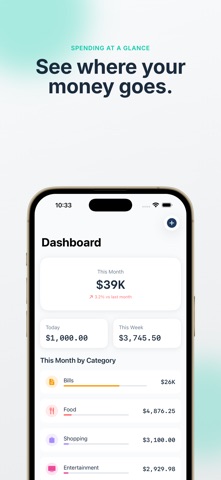


Description by Ulas Sancak Written by the developer, not by AppBrain. Click to read.
Expensia is a focused personal expense tracker for fast daily logging, recurring costs, clear insights, and monthly category budgets. Add an expense in seconds, then see spending by month and category.
TRACK EXPENSES FAST
• Add one-time expenses with quick amounts
• Organize spending in 9 clear categories
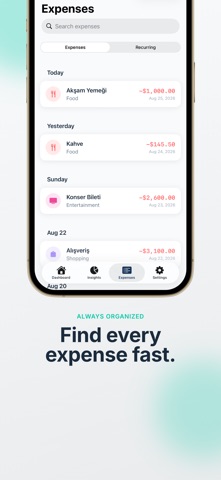
• Search and filter by name, category, or date
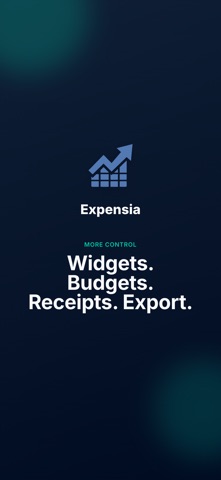
• Attach receipt photos with Expensia Pro
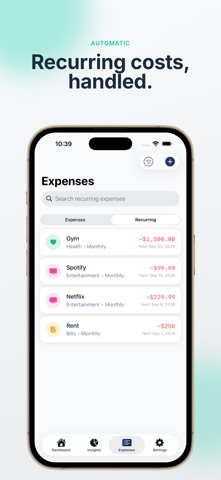
AUTOMATE RECURRING COSTS
• Schedule daily, weekly, every 2 weeks, monthly, or yearly expenses
• Pause, resume, edit, or end schedules anytime
• Let Expensia create due expenses automatically
UNDERSTAND YOUR SPENDING
• Review today, this week, and this month
• Explore 6-month trends and category breakdowns
• Check current-month spending from Home Screen widgets
• Use 50+ currencies with localized formatting
PLAN AND EXPORT WITH PRO
• Track unlimited expenses and recurring schedules
• Set monthly budgets for each category
• Save receipt photos
• Export all expenses as CSV or a one-page PDF summary
SYNC SECURELY
Sign in with Apple or Google to keep your expense data synced. Expensia has no ads and does not sell your data.
FREE PLAN
Track up to 10 manually entered expenses per month and keep 2 recurring schedules active. Automatically generated recurring expenses do not use your monthly limit.
Download Expensia and make every expense easier to see, understand, and control.
Terms of Use: https://www.apple.com/legal/internet-services/itunes/dev/stdeula/