Tick: Offline Expense Tracker is made and published by
FIRAT KONYALIOGLU.
AppBrain is an independent app data site and isn't affiliated with FIRAT KONYALIOGLU.
The app name, icon, screenshots and description belong to FIRAT KONYALIOGLU and are shown as
published on the App Store.
About Tick: Offline Expense Tracker
Tick: Offline Expense Tracker is a finance app developed by FIRAT KONYALIOGLU.
User Ratings
The app has no ratings yet.
App Information
Tick: Offline Expense Tracker is freely available from the App Store. The app size is 62.92 MB. The latest version available is 1.0.3. The last update was on October 9, 2026.
Technical Requirements
The app has a content rating of Everyone. The app has been available on the App Store since September 2026.
Description by FIRAT KONYALIOGLU(from the App Store)
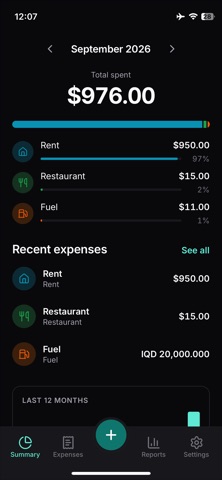
Tick is an expense tracker built around one number: five seconds. That is how long it should take to open the app, log what you just spent, and put the phone back in your pocket.
FAST BY DESIGN Type an amount, tap save. Everything else - place, category, note, tags, a photo of the receipt - is optional and can be added later. A template fills in the category, the place and the currency, and a home screen shortcut opens straight into a new expense.
READY FOR DAILY LIFE Forty-three categories are switched on the first time you open Tick. Groceries, Pharmacy, Fuel, Car Repair & Service, Rent, Electricity, Office Rent, Office Bills, Public Transit, Travel & Hotel, Taxes and more are there the moment you install. Another thirty-three wait in the list switched off, seventy-six across eleven groups in all. Add your own, and hide the ones you never use.
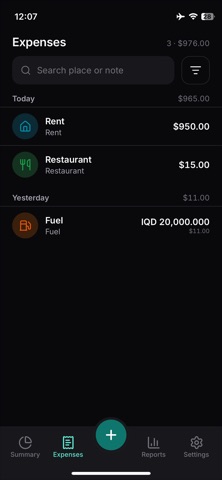
MULTIPLE CURRENCIES, DONE PROPERLY Log in any currency. Rates for thirty currencies come from the European Central Bank's daily reference feed and are frozen onto each expense at the moment you save it, so last year's report never changes because a rate moved this morning. Using a currency outside those thirty? Type the rate in yourself - the app will not guess one.
WORKS OFFLINE, WITH NO SIGNAL Everything is stored on the phone first and syncs when there is a connection. A plane, a basement, a bad line - none of it stops you logging an expense.
REPORTS THAT ANSWER A QUESTION Narrow the expense list by date, category, currency or amount, or search it by place and note. Then see where the money went by category, by place, or over time.
WHAT YOU CAN TAKE OUT Export to CSV for a spreadsheet, or to PDF for something you can send or file. Export from a report and the date range you are looking at comes with it; export from Settings and everything does. Your data leaves in a format you can open without Tick.
WHO IT IS FOR People who hold more than one currency and are tired of a tracker that quietly rewrites last month when a rate moves. People who log what they spend where there is no signal. People who want the entry typed, not imported.
MANUAL ENTRY, NO BANK SYNC Tick does not connect to your bank. No account linking, no transaction import, no receipt scanning that reads your card number. It has no approval workflows and no team accounts. Every expense in Tick is there because you typed it.
SUBSCRIPTION Tick Pro Monthly - 1 month - USD 2.99 Tick Pro Yearly - 1 year - USD 19.99 Other regions are charged the store's local equivalent. The first 14 days are free and ask for no card. After that, adding new expenses needs a subscription. Viewing, reporting and exporting keep working without one, permanently - your records stay yours whether you subscribe or not.
Terms of Use (EULA): https://www.apple.com/legal/internet-services/itunes/dev/stdeula/ Privacy Policy: https://tickexpense.com/privacy
Each subscription will automatically renew 3 days before the expiration date for
the same time period. Subscriptions can be cancelled at any time before the renewal.