

Expert Sign: eSign PDF Docs
Expert Sign: eSign PDF Docs is made and published by Julien meyer. AppBrain is an independent app data site and isn't affiliated with Julien meyer. The app name, icon, screenshots and description belong to Julien meyer and are shown as published on the App Store.
AppBrain's verdict
- Rating on App Store
- 4.43
- 7 ratings
- Last updated
- October 15, 2026
It doesn't have enough ratings yet to judge what users think.
Rankings
App Store top chartsApp Store Rankings for Expert Sign: eSign PDF Docs
Competitors
Similar apps and more from Julien meyerAlternatives to Expert Sign: eSign PDF Docs





More from Julien meyer


Releases
Updates seen on the App Store- Version
- 1.8
- Launched
- March 2022
No changelog data
User feedback
Ratings and reviews on the App StoreComments on Expert Sign: eSign PDF Docs for iOS
We don't have enough comments to show example comments. Please check back later.
Technology
Found in the app by AppBrain- Price
- Free
- App size
- 15.1 MB
- Content rating
- Everyone
Technologies used by Expert Sign: eSign PDF Docs
About the app and developer
About Expert Sign: eSign PDF Docs
Expert Sign: eSign PDF Docs is an utilities app developed by Julien meyer.
What is the rating of Expert Sign: eSign PDF Docs?
Expert Sign: eSign PDF Docs is rated 4.43 out of 5 stars, based on 7 ratings.
Is Expert Sign: eSign PDF Docs free?
Expert Sign: eSign PDF Docs is free. The app size is 15.08 MB. The latest version available is 1.8. The last update was on October 15, 2026.
What are the requirements for Expert Sign: eSign PDF Docs?
The app has a content rating of Everyone. The app has been available on the App Store since March 2022.
Developer information for Julien meyer
Address:
Frequently asked questions about Expert Sign: eSign PDF Docs
Is Expert Sign: eSign PDF Docs free?
Yes. Expert Sign: eSign PDF Docs is free on the App Store.
Is Expert Sign: eSign PDF Docs still available?
Yes. Expert Sign: eSign PDF Docs is on the App Store, and the last update we saw was on October 15, 2026.
How large is Expert Sign: eSign PDF Docs?
Expert Sign: eSign PDF Docs is 15.08 MB.
Is Expert Sign: eSign PDF Docs suitable for children?
App Store rates the content of Expert Sign: eSign PDF Docs as suitable for everyone.
How do people rate Expert Sign: eSign PDF Docs?
Expert Sign: eSign PDF Docs scores 4.43 out of 5 stars, from 7 ratings on the App Store.
Who made Expert Sign: eSign PDF Docs?
Expert Sign: eSign PDF Docs was developed by Julien meyer. It is listed in the utilities category on the App Store.
What are the best alternatives to Expert Sign: eSign PDF Docs?
People looking at Expert Sign: eSign PDF Docs also look at these utilities apps: DocSign - Online Document Sign, MyScanner PRO+, e-Sign : Upload & Sign Docs, COLLADA Viewer, Device Trust Passport.
Store listing
By Julien meyer, from the App Store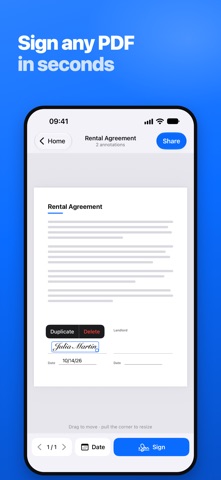

Description by Julien meyer Written by the developer, not by AppBrain. Click to read.
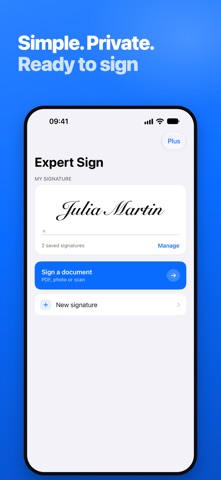
Open the file, sign it, share it. That is the whole app.
WHAT YOU CAN DO
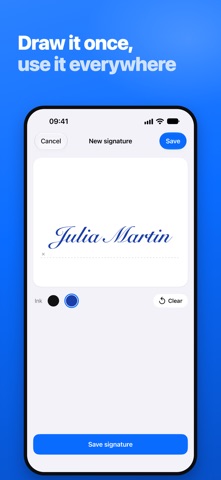
• Draw your signature with your finger, in black or blue ink
• Keep several signatures and initials, and pick the right one in a tap
• Import a photo of your handwritten signature: the paper background is removed automatically
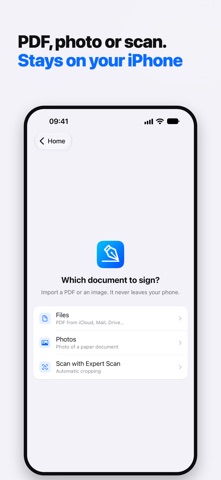
• Sign PDF documents and photos of paper documents
• Add today's date in one tap
• Drag to place each signature exactly where it belongs, pull the corner to resize it
• Duplicate a signature to initial every page
• Import from Files, Photos, Mail, iCloud Drive or any cloud service
• Import straight from Expert Scan to sign what you just scanned
• Export by email, by message, or into any other app
BUILT FOR PAPERWORK THAT WILL NOT WAIT
Rental agreements, NDAs, school forms, delivery notes, invoices, consent forms, employment contracts: anything that arrives as a PDF and has to go back signed today.
PRIVATE BY DESIGN
Your documents are signed right on your iPhone. They are never uploaded to our servers.
FREE TO TRY
Sign your first 10 documents for free. Expert Sign Plus, a one-time purchase, unlocks unlimited signing and removes ads.
Part of the Expert suite, alongside Expert Scan.
Questions or ideas: https://jmapp.com