AppBrain
AppBrain
  • Apps
  • Apps being viewed right now Trending apps today Most popular apps All-time most installed apps Top rated apps iPhone and iPad apps
  • Intelligence ▾
    Intelligence overview → Track any Android app or your whole market
    Track & analyze
    Keyword Tracker & OptimizerTrack & improve Play rankings App Performance ReportOne-off PDF for any app StatisticsFree Android & Play market stats
    Promote your app
    Featured Apps App Links
  • Intelligence
  • Pricing
  • Dashboard
  • Sign up
  • Log in
App Store Apps > Utilities > extractall: PDF page extractor
App profile & analytics · Utilities · Data updated 2026-10-06
extractall: PDF page extractor icon

extractall: PDF page extractor

by Vincenzo Famao · Free · Version 1.6
Availability On the App Store since May 2026 ↗
Rating on App Store
–
Rating
–
0 reviews
Best rank
–
not in the top lists
Last updated
October 1, 2026
1.6

extractall: PDF page extractor is made and published by Vincenzo Famao. AppBrain is an independent app data site and isn't affiliated with Vincenzo Famao. The app name, icon, screenshots and description belong to Vincenzo Famao and are shown as published on the App Store.

About extractall: PDF page extractor

extractall: PDF page extractor is an utilities app developed by Vincenzo Famao.

User Ratings

The app has no ratings yet.

App Information

extractall: PDF page extractor is freely available from the App Store. The app size is 12.00 MB. The latest version available is 1.6. The last update was on October 1, 2026.

Technical Requirements

The app has a content rating of Everyone. The app has been available on the App Store since May 2026.

Description by Vincenzo Famao (from the App Store)
Find and extract the right pages from your long PDFs, in seconds. On iPhone, iPad and Mac.

Got a PDF with hundreds of pages but only need a few specific ones? extractall searches for the words you choose, highlights the results and creates a new PDF with only the pages that matter. No more endless scrolling, screenshots, or printing and reassembling by hand.

Born from a real office problem: pulling recurring documents — payslips, invoices, contracts, tax forms — buried inside huge files, without wasting hours.

TWO WAYS TO EXTRACT
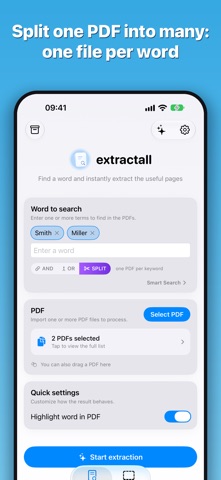
• WORDS: search one or more words (AND / OR) and get only the pages that contain them.
• AREA (new in 1.6): select a zone of the page — a name, a client code, a heading — and extractall extracts the pages every time the text in that zone changes. Ideal for splitting one big PDF into one file per client, employee or supplier.

KEY FEATURES
• Search one or more words in PDFs, with AND and OR
• Split: a separate PDF for each search term — e.g. one file per employee
• Preview the pages found before extracting
• Highlight results inside the PDF
• Reorder, exclude or merge extracted pages with drag and drop
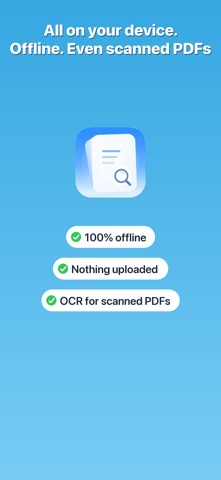
• Supports scanned PDFs too (OCR)
• Automatic folders: link an iCloud or local folder — extractions save there by themselves and you get a notification when a new PDF arrives
• Built-in archive to organise and share your extracted files
• Themes, backgrounds, button styles and zoom to make the interface yours
• Available in English, Italian, German, French and Spanish

PRIVACY FIRST
PDF processing happens on your device: nothing is uploaded to our servers, your documents stay yours. Works fully offline. iCloud folders are your own space and are linked only if you choose to.

FREE AND PREMIUM
Try extraction for free. With extractall Premium (monthly or yearly subscription) you unlock multi-word search, highlighting, Area mode, unlimited PDFs and all customisation options.

Perfect for anyone who works with documents every day — admin, accounting, HR, professionals — and just as handy for studying or organising your own files.

Terms of Use (EULA): https://www.apple.com/legal/internet-services/itunes/dev/stdeula/
Show more Show less

More data about extractall: PDF page extractor

Price Free
Rating No ratings
Ranking Not ranked
Version 1.6
App size 12.0 MB
Suitable for Everyone

Screenshots

extractall: PDF page extractor Screenshot 1 of 8
extractall: PDF page extractor Screenshot 2 of 8
extractall: PDF page extractor Screenshot 3 of 8
extractall: PDF page extractor Screenshot 4 of 8
extractall: PDF page extractor Screenshot 5 of 8
extractall: PDF page extractor Screenshot 6 of 8
extractall: PDF page extractor Screenshot 7 of 8
extractall: PDF page extractor Screenshot 8 of 8
Screenshots by Vincenzo Famao, from the the App Store listing
Official page on the App Store

Alternatives to extractall: PDF page extractor

Pagelet - Delete PDF Pages icon Pagelet - Delete PDF Pages
Jhomar Maravillas
0.0
Free
PDFPager - Reorder Combine PDF icon PDFPager - Reorder Combine PDF
Life Utility Apps, LLC
5.0
Free
1 ratings
PDF: Photo, Sign & Converter icon PDF: Photo, Sign & Converter
Sami Ullah
0.0
Free
PDF Copilot - AI PDF Expert icon PDF Copilot - AI PDF Expert
Sky Fun
5.0
Free
4 ratings
PDF Editor - Merge & Split icon PDF Editor - Merge & Split
Moon Technolabs Pvt Ltd
5.0
Free
3 ratings
Eye Measure-Ruler&,Distance,PD icon Eye Measure-Ruler&,Distance,PD
意 胡
4.5
Free
15 ratings
MapaREVE icon MapaREVE
Red Eléctrica de España
0.0
Free
Zip Extractor & Rar Opener Pro icon Zip Extractor & Rar Opener Pro
Valentyn Shynkaruk
4.0
Free
3 ratings

Changelog of extractall: PDF page extractor

No changelog data

Developer information for Vincenzo Famao

Vincenzo Famao

Address:

Share extractall: PDF page extractor

Comments on extractall: PDF page extractor for iOS

We don't have enough comments to show example comments. Please check back later.

App Store Rankings for extractall: PDF page extractor

This app is not ranked

Technologies used by extractall: PDF page extractor

Frequently asked questions about extractall: PDF page extractor

Is extractall: PDF page extractor free?

Yes. extractall: PDF page extractor is free on the App Store.

Is extractall: PDF page extractor still available?

Yes. extractall: PDF page extractor is on the App Store, and the last update we saw was on October 1, 2026.

How large is extractall: PDF page extractor?

extractall: PDF page extractor is 12.00 MB.

Is extractall: PDF page extractor suitable for children?

App Store rates the content of extractall: PDF page extractor as suitable for everyone.

Who made extractall: PDF page extractor?

extractall: PDF page extractor was developed by Vincenzo Famao. It is listed in the utilities category on the App Store.

What are the best alternatives to extractall: PDF page extractor?

People looking at extractall: PDF page extractor also look at these utilities apps: Pagelet - Delete PDF Pages, PDFPager - Reorder Combine PDF, PDF: Photo, Sign & Converter, PDF Copilot - AI PDF Expert, PDF Editor - Merge & Split.

Popular Utilities Apps Top new apps Today's trending apps Price drops on Google Play Apps other people are watching
Pagelet - Delete PDF Pages icon Pagelet - Delete PDF Pages
PDFPager - Reorder Combine PDF icon PDFPager - Reorder Combine PDF
PDF: Photo, Sign & Converter icon PDF: Photo, Sign & Converter
PDF Copilot - AI PDF Expert icon PDF Copilot - AI PDF Expert
PDF Editor - Merge & Split icon PDF Editor - Merge & Split
Eye Measure-Ruler&,Distance,PD icon Eye Measure-Ruler&,Distance,PD
MapaREVE icon MapaREVE
Zip Extractor & Rar Opener Pro icon Zip Extractor & Rar Opener Pro
Overview Alternatives Reviews Rankings Technology
AppBrain Intelligence premium content

Subscribe now to get full and unlimited access to AppBrain Intelligence. You'll have access to:

  • App Intelligence dashboard (performance timeline, competitor comparison, country rankings, insight cards)
  • Detailed ranking data per app
  • Full timeline per developer
  • Device market shares data per country
  • Unlimited keyword tracking
1 Month

$75/mo
(billed every month)

SAVE 0%
Subscribe
3 Months

$65/mo
($195 billed every 3 months)

SAVE 13%
Subscribe
1 Year

$57.50/mo
($690 billed every year)

SAVE 23%
Subscribe
Each subscription will automatically renew 3 days before the expiration date for the same time period. Subscriptions can be cancelled at any time before the renewal.

AppBrain is an app data site, we track rankings, ratings, installs for all apps and games on Google Play and the App Store. AppBrain doesn't host app files or APKs, all install links go directly to the official store. All trademarks are owned by their respective owners.

More apps

  • Top Android apps being viewed
  • Idle Farm Tycoon - Merge Crops
  • Nook Earn App Android App
  • Video Ringtone Incoming Call

App statistics

  • Android statistics
  • Google Play Developer stats
  • Trending Android Apps
  • Trending iOS apps
  • Top popular Apps
  • Buy the best Android phone
  • Buy & sell app businesses

About AppBrain

  • Contact
  • Privacy
  • Documentation
  • DMCA takedowns
  • Articles
  • Blog
  • Free App-Ads.Txt Validation
© 2010-2026 - AppBrain