AppBrain
AppBrain
  • Apps
  • Apps being viewed right now Trending apps today Most popular apps All-time most downloaded apps Top rated apps iPhone and iPad apps
  • Intelligence ▾
    Intelligence overview → Track any Android app or your whole market
    Track & analyze
    Keyword Tracker & OptimizerTrack & improve Play rankings App Performance ReportOne-off PDF for any app StatisticsFree Android & Play market stats
    Promote your app
    Featured Apps App Links
  • Intelligence
  • Pricing
  • Dashboard
  • Sign up
  • Log in
Last updated on: 2026-09-24
App Store Apps > Photo & Video > Face Blur AI - Hide & Censor
Face Blur AI - Hide & Censor icon

Face Blur AI - Hide & Censor

3.2
Igor Bidenko
5.00
1 reviews
Free

Face Blur AI - Hide & Censor Screenshot 1 of 10
Face Blur AI - Hide & Censor Screenshot 2 of 10
Face Blur AI - Hide & Censor Screenshot 3 of 10
Face Blur AI - Hide & Censor Screenshot 4 of 10
Face Blur AI - Hide & Censor Screenshot 5 of 10
Face Blur AI - Hide & Censor Screenshot 6 of 10
Face Blur AI - Hide & Censor Screenshot 7 of 10
Face Blur AI - Hide & Censor Screenshot 8 of 10
Face Blur AI - Hide & Censor Screenshot 9 of 10
Face Blur AI - Hide & Censor Screenshot 10 of 10
5.00 ยท 1 reviews
View on the App Store

About Face Blur AI - Hide & Censor

Face Blur AI - Hide & Censor is a photo & video app developed by Igor Bidenko.

What is the rating of Face Blur AI - Hide & Censor?

Face Blur AI - Hide & Censor is rated 5.00 out of 5 stars, based on one rating ratings.

Is Face Blur AI - Hide & Censor free?

Face Blur AI - Hide & Censor is free to download. The download size is 14.40 MB. The latest version available is 3.2. The last update was on September 21, 2026.

What are the requirements for Face Blur AI - Hide & Censor?

The app has a content rating of Everyone. The app has been available on the App Store since May 2026.

Description
Blur faces in photos with one tap. Auto face detection, manual brush, and three censor styles. Fully offline, no upload, no account, no ads.

Face Blur AI is the fastest way to hide faces in your photos before you share them. Open a photo, tap a face, and it is blurred. No servers, no sign-up, no waiting.

CORE FEATURES
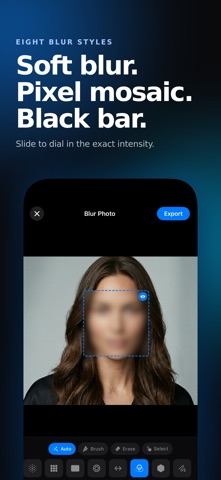
- Auto face detection. On-device AI finds every face instantly. Works offline.
- Manual brush. Paint over anything you want to hide. License plates, screens, signs, text in documents, or a face the AI missed.
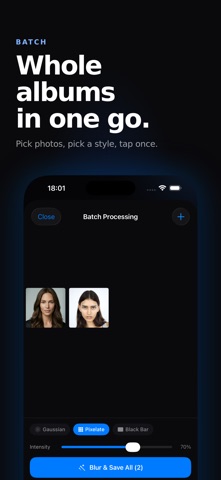
- Three censor styles: smooth Gaussian blur, classic pixelate mosaic, and solid black bar.
- Intensity slider for how strong the blur or mosaic looks.
- High resolution export back to Photos. No compression.
- EXIF and GPS metadata stripping. Remove location data before sharing, or keep it if you prefer. Your call.
- Live Camera mode. Faces are blurred in the camera preview before you take the shot.
- Share Extension on iOS. Use Face Blur AI from Photos, Files, or Safari without opening the app first.
- On Mac, drag and drop a photo into the window, or use Services and Quick Action right from Finder.

PRIVATE BY DESIGN
Everything runs on your device. Your photos never leave your iPhone, iPad, or Mac. There is no server, no cloud upload, no account. The AI face detection happens locally. A privacy app that actually protects your privacy.

PRO FEATURES
- Batch processing. Blur faces in dozens of photos at once.
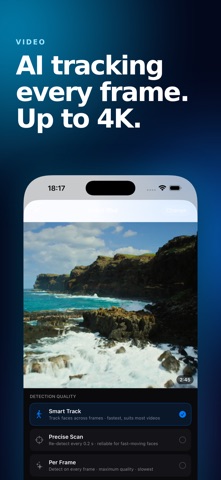
- Video blur. Auto track faces across frames with manual keyframe fallback for tricky moments. Up to 5 minutes per clip.
- 4K export for photo and video.
- Selective face blur. After auto detection, tap to choose which faces to blur and which to leave visible. Great for group photos when only some people need privacy.
- Face-Shape Blur. Instead of a plain rectangle, the blur follows the natural contour of each face. Cleaner edges, more professional look, no awkward squares over heads.
- Whole Person Blur. Hide an entire person, not just the face. AI segments the full body silhouette so clothing, hair, and outline are blurred as one. Useful for true anonymization in street photos and surveillance footage.
- Emoji and sticker overlays. Cover a face with an emoji instead of a blur. Nice for social posts and kid birthday photos.
- Aesthetic blur effects: bokeh, motion blur, and tilt-shift. For creative photo edits, not just censorship.
- Extended censor styles: gradient blur, hexagon mosaic, scribble, and paint smudge.
- Custom shapes. Blur in the shape of a star, a heart, or any path you draw.
- Live Photo support. Keep the Live Photo motion intact instead of flattening to a still.
- Project history. Save edits as a project and come back to them later.

WHO USES IT
Parents share kid photos without exposing their children's faces. Journalists and vloggers anonymize bystanders in travel videos and news clips. Teachers post classroom moments while protecting student privacy. Marketplace sellers redact license plates and screens. Photographers hide strangers in street shots. People comply with GDPR before sharing event photos to social media.

WHY THIS APP
Most photo editors hide face blur three menus deep. Face Blur AI does one thing and does it well. The auto detection catches every face in group photos. The brush handles small details. The contour follows the actual face shape, not a square. Full person blur hides whole silhouettes when a face alone is not enough. Export stays at full resolution. Nothing ever leaves your device.

Subscription Terms:
Payment charged to iTunes Account. Auto-renews unless disabled 24 hours before period ends. Manage in Account Settings.
https://www.apple.com/legal/internet-services/itunes/dev/stdeula/

Privacy - All processing happens locally on your device. No data is sent to servers. Your photos stay completely private.
Show more Show less

More data about Face Blur AI - Hide & Censor

Price Free to download
Rating 5.00 based on a single rating
Ranking Not ranked
Version 3.2
App download size 14.4 MB
Suitable for Everyone

Alternatives to Face Blur AI - Hide & Censor

BlurQ: Face Blur Photo & Video icon BlurQ: Face Blur Photo & Video
Anas Hafidi
4.3
Free
18 ratings
Censor: Face Blur & Pixelate icon Censor: Face Blur & Pixelate
PRODEKS
4.6
Free
68 ratings
Blur Video AI: Face & Mosaic icon Blur Video AI: Face & Mosaic
Natallia Minvaleyeva
4.7
Free
923 ratings
BlurFace icon BlurFace
Lukas Lubbe
4.8
Free
115 ratings
Blur Video - AI Blur Maker icon Blur Video - AI Blur Maker
Sohel Ibna Saad
4.6
Free
2.0K ratings
Blur Video & Mosaic icon Blur Video & Mosaic
Yu Abe
4.5
Free
4.4K ratings
Blur-Video icon Blur-Video
Alan Cushway
4.8
Free
13.8K ratings
Blur Photo Editor: blur effect icon Blur Photo Editor: blur effect
Ryoichi Fukugawa
4.7
Free
1.6K ratings

More from Igor Bidenko

System Status Monitor: CPU RAM icon System Status Monitor: CPU RAM
Igor Bidenko
4.2
Free
21 ratings
Family Trivia Games & Quiz AI icon Family Trivia Games & Quiz AI
Igor Bidenko
4.7
Free
7 ratings
Wi-Fi Analyzer Network Scanner icon Wi-Fi Analyzer Network Scanner
Igor Bidenko
5.0
Free
7 ratings
Face Score: Symmetry Analyzer icon Face Score: Symmetry Analyzer
Igor Bidenko
5.0
Free
5 ratings
GeoGuess - World Map Quiz Game icon GeoGuess - World Map Quiz Game
Igor Bidenko
5.0
Free
3 ratings
Anti Pest & Mosquito Sound icon Anti Pest & Mosquito Sound
Igor Bidenko
5.0
Free
3 ratings
Sonic Water Eject: Fix Speaker icon Sonic Water Eject: Fix Speaker
Igor Bidenko
5.0
Free
2 ratings
Duplicate Storage Cleaner AI icon Duplicate Storage Cleaner AI
Igor Bidenko
5.0
Free
2 ratings

Changelog of Face Blur AI - Hide & Censor

No changelog data

Developer information for Igor Bidenko

Igor Bidenko

Address:

Share Face Blur AI - Hide & Censor

Comments on Face Blur AI - Hide & Censor for iOS

We don't have enough comments to show example comments. Please check back later.

App Store Rankings for Face Blur AI - Hide & Censor

This app is not ranked

Technologies used by Face Blur AI - Hide & Censor

Frequently asked questions about Face Blur AI - Hide & Censor

Is Face Blur AI - Hide & Censor free?

Yes. Face Blur AI - Hide & Censor is free to download from the App Store.

Is Face Blur AI - Hide & Censor still available?

Yes. Face Blur AI - Hide & Censor is on the App Store, and the last update we saw was on September 21, 2026.

How large is the Face Blur AI - Hide & Censor download?

Face Blur AI - Hide & Censor is 14.40 MB to download.

Is Face Blur AI - Hide & Censor suitable for children?

App Store rates the content of Face Blur AI - Hide & Censor as suitable for everyone.

How do people rate Face Blur AI - Hide & Censor?

Face Blur AI - Hide & Censor has one rating of 5.00 stars on the App Store.

Who made Face Blur AI - Hide & Censor?

Face Blur AI - Hide & Censor was developed by Igor Bidenko. It is listed in the photo & video category on the App Store.

What are the best alternatives to Face Blur AI - Hide & Censor?

People looking at Face Blur AI - Hide & Censor also look at these photo & video apps: BlurQ: Face Blur Photo & Video, Censor: Face Blur & Pixelate, Blur Video AI: Face & Mosaic, BlurFace, Blur Video - AI Blur Maker.

Popular Photo & Video Apps Today's trending apps Top new apps Apps other people are watching Apps on sale
Overview Reviews Alternatives Rankings Technology
BlurQ: Face Blur Photo & Video icon BlurQ: Face Blur Photo & Video
Censor: Face Blur & Pixelate icon Censor: Face Blur & Pixelate
Blur Video AI: Face & Mosaic icon Blur Video AI: Face & Mosaic
BlurFace icon BlurFace
Blur Video - AI Blur Maker icon Blur Video - AI Blur Maker
Blur Video & Mosaic icon Blur Video & Mosaic
Blur-Video icon Blur-Video
Blur Photo Editor: blur effect icon Blur Photo Editor: blur effect
AppBrain Intelligence premium content

Subscribe now to get full and unlimited access to AppBrain Intelligence. You'll have access to:

  • App Intelligence dashboard (performance timeline, competitor comparison, country rankings, insight cards)
  • Detailed ranking data per app
  • Full timeline per developer
  • Device market shares data per country
  • Unlimited keyword tracking
1 Month

$75/mo
(billed every month)

SAVE 0%
Subscribe
3 Months

$65/mo
($195 billed every 3 months)

SAVE 13%
Subscribe
1 Year

$57.50/mo
($690 billed every year)

SAVE 23%
Subscribe
Each subscription will automatically renew 3 days before the expiration date for the same time period. Subscriptions can be cancelled at any time before the renewal.

AppBrain is a directory focused on discovering great apps and games. We give statistics, rankings and search options that Google Play and the App Store don't have. All trademarks are owned by their respective owners. AppBrain doesn't offer APKs or binaries, and always lets users install the official version from Google Play or the App Store.

More apps

  • Top Android apps being viewed
  • CFU2Go Android App
  • Offline Games
  • Sudoku: Brain & Puzzle Games

App statistics

  • Android statistics
  • Google Play Developer stats
  • Trending Android Apps
  • Trending iOS apps
  • Top popular Apps
  • Buy the best Android phone
  • Android apps for sale

About AppBrain

  • Contact
  • Privacy
  • Documentation
  • DMCA takedowns
  • Articles
  • Blog
  • Free webpage for your Android app
© 2010-2026 - AppBrain