



AppBrain's verdict
- Rating on App Store
- 5.00
- 8 ratings
- Last updated
- September 29, 2026
- Size
- 14.8 MB
It doesn't have enough ratings yet to judge what users think.
User feedback
Ratings and reviews on the App StoreComments on Wi-Fi Analyzer Network Scanner for iOS
We don't have enough comments to show example comments. Please check back later.
Store listing
By Igor Bidenko, from the App StoreDescription by Igor Bidenko Written by the developer, not by AppBrain. Click to read.
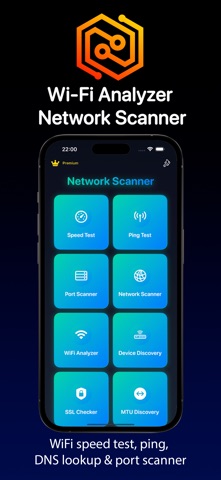
Whether you are a network administrator managing enterprise infrastructure, an IT professional diagnosing connectivity issues, or a home user wanting to optimize your WiFi performance, this network tools suite delivers professional results with an intuitive interface.
WIFI SPEED TEST AND NETWORK PERFORMANCE
Our advanced speed test engine measures your internet connection with precision. Test download speeds, upload speeds, and latency to understand your true network performance. The WiFi analyzer displays detailed metrics including signal strength measurements, channel interference analysis, and network quality assessment.
The integrated ping test supports both TCP and UDP protocols, allowing you to check connectivity to any server worldwide. Monitor response times, track packet loss, and analyze network stability with comprehensive statistics. New jitter measurement helps identify network consistency issues that affect VoIP calls, online gaming, and video streaming quality.
DNS PERFORMANCE BENCHMARK
Compare DNS provider performance with our DNS benchmark feature. Test response times from eight popular DNS services including Cloudflare DNS, Google Public DNS, Quad9, OpenDNS, and AdGuard DNS. Our DNS lookup tool also supports comprehensive record type queries for technical analysis.
NETWORK LATENCY HEATMAP
Visualize your connection quality to servers around the world with our interactive latency heatmap. Test network latency across sixteen global server locations.
NETWORK SCANNER AND DEVICE DISCOVERY
Discover every device connected to your local network with our powerful LAN scanner. The network scanner identifies all devices on your WiFi network, displaying IP addresses, MAC addresses, and vendor information. Create a complete inventory including routers, computers, smartphones, tablets, smart TVs, and IoT devices.
SECURITY MONITORING AND SPY DETECTOR
Protect your network with built-in security monitoring tools. The spy detector functionality helps identify suspicious or unauthorized devices connected to your WiFi network.
PORT SCANNER AND NETWORK DIAGNOSTICS
The professional port scanner checks for open TCP and UDP ports on any host. Customize port ranges for targeted scanning or use predefined ranges for common services. Identify running services, check firewall configurations, and diagnose connectivity issues with detailed scan results.
Additional diagnostic tools include MTU discovery for optimizing packet sizes, host analyzer for detailed network interface information, and Wake on LAN for remotely powering on computers.
IP TOOLS AND NETWORK UTILITIES
Access a complete suite of IP utilities within the app. The subnet calculator helps plan network addressing schemes with CIDR notation support. Reverse DNS lookup identifies hostnames from IP addresses. IP geolocation reveals geographic location and ISP information for any IP address worldwide. The WHOIS domain lookup provides registration details for any domain name. Our QR code generator creates shareable codes for WiFi credentials. Bonjour and mDNS service discovery identifies available network services automatically.
WIFI ANALYSIS AND SIGNAL OPTIMIZATION
Our WiFi analyzer provides detailed channel analysis to identify interference and optimize router placement. Signal strength mapping helps locate dead zones and areas with weak coverage.
Whether you need to run a quick ping test, perform comprehensive WiFi analysis, scan your network for connected devices, benchmark DNS providers, or test global latency, this network analyzer toolkit has you covered.
Terms of Use: https://www.apple.com/legal/internet-services/itunes/dev/stdeula/
Safety and technology
Found in the app by AppBrain- Price
- Free
- App size
- 14.8 MB
- Content rating
- Everyone
Technologies used by Wi-Fi Analyzer Network Scanner
Releases
Updates seen on the App Store- Version
- 6.4
- Launched
- August 2025
No changelog data
Alternatives
Similar apps and more from Igor BidenkoAlternatives to Wi-Fi Analyzer Network Scanner


More from Igor Bidenko


Rankings
App Store top chartsApp Store Rankings for Wi-Fi Analyzer Network Scanner
About the app and developer
About Wi-Fi Analyzer Network Scanner
Wi-Fi Analyzer Network Scanner is an utilities app developed by Igor Bidenko.
What is the rating of Wi-Fi Analyzer Network Scanner?
Wi-Fi Analyzer Network Scanner is rated 5.00 out of 5 stars, based on 8 ratings.
Is Wi-Fi Analyzer Network Scanner free?
Wi-Fi Analyzer Network Scanner is free. The app size is 14.77 MB. The latest version available is 6.4. The last update was on September 29, 2026.
What are the requirements for Wi-Fi Analyzer Network Scanner?
The app has a content rating of Everyone. The app has been available on the App Store since August 2025.
Wi-Fi Analyzer Network Scanner is made and published by Igor Bidenko. AppBrain is an independent app data site and isn't affiliated with Igor Bidenko. The app name, icon, screenshots and description belong to Igor Bidenko and are shown as published on the App Store.
Developer information for Igor Bidenko
Address: