

Fax from iPhone - Scan & Send
Fax from iPhone - Scan & Send is made and published by Smart Tool Studio. AppBrain is an independent app data site and isn't affiliated with Smart Tool Studio. The app name, icon, screenshots and description belong to Smart Tool Studio and are shown as published on the App Store.
AppBrain's verdict
EstablishedWell rated- Rating on App Store
- 4.45
- 256 ratings
- Last updated
- February 20, 2023
- Size
- 22.4 MB
Users rate it well: 4.5 stars from 256 ratings.
User feedback
Ratings and reviews on the App StoreComments on Fax from iPhone - Scan & Send for iOS
We don't have enough comments to show example comments. Please check back later.
Store listing
By Smart Tool Studio, from the App Store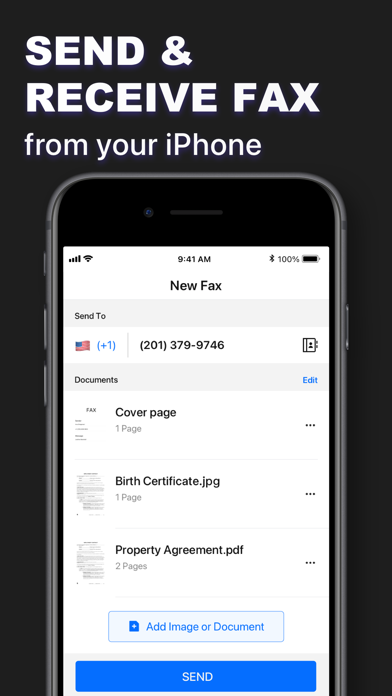


Description by Smart Tool Studio Written by the developer, not by AppBrain. Click to read.
Fax can scan all types of documents with the advanced built-in scanning technology, the documents can include contracts, receipts, paper notes, timesheets, books, photos, passports, ID cards, cards, posters, licenses, newspapers, menus, certificates, letters, etc. You can surely save time and money with this simple & tiny fax app.
Fax makes mobile faxing easy and enables you to send, receive, view, edit and sign faxes wherever you are. You can also select documents to fax from common cloud services like iCloud, Google Drive or Dropbox.
Main features:
◆Send Fax From iPhone◆
- Send faxes from your iPhone anytime, anywhere. No fax machines or dedicated phone lines are required.
- Available to fax any paper documents like contracts, invoices, bills, etc.
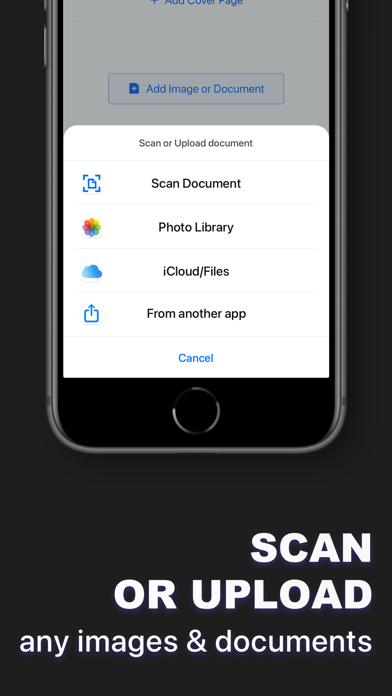
- Fax photos and images: take photos and scan documents using images from your camera roll or scratch.
- Service covers more than 90 countries
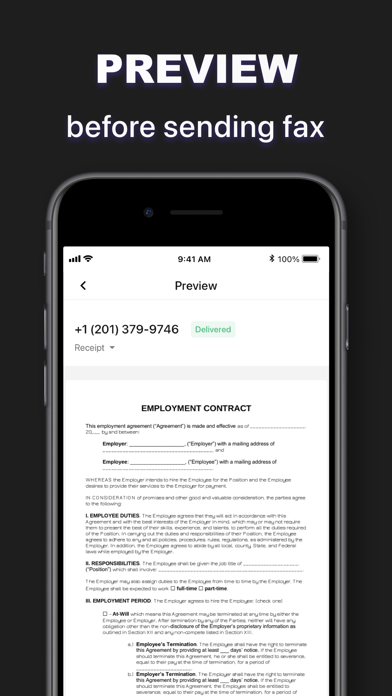
- Preview and adjust sent files
- Easily edit and sign faxes
- Combine multiple documents into one fax
- Custom the fax cover sheet
- Support address book to select recipient numbers
◆Receive Faxes From iPhone◆
- Get a dedicated number for receiving faxes
- Receive faxes from anywhere in the world
◆Upload Any Types of Files◆
- Available to upload all types of file types (PDF, DOC, JPG, PNG and TIFF, HTML)
- Create new documents with images at any time
- Support importing images, documents, PDFs from iCloud, Google Drive and Dropbox
◆Tracking History◆
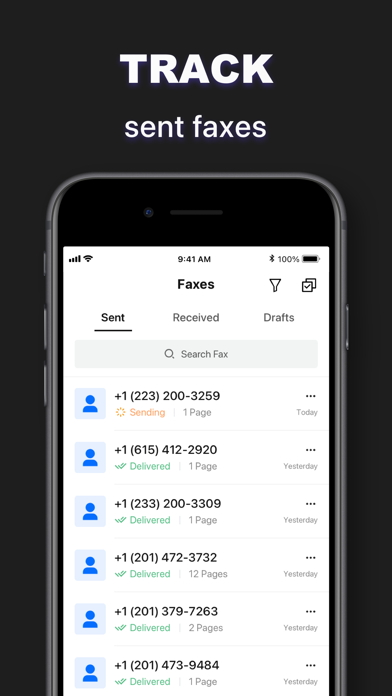
Easily track fax delivery status, and ensure all documents are sent and received
◆Built-in Innovative Document Scanner◆
- Scan documents and convert to high quality PDF, JPEG or JPG
- Save scanned images in black and white or other filters
- Automatic and correct detection of the edges of any scannable object
- Batch scan
- Advanced document scanner and image processing including automatic document corner detection, perspective correction, color enhancement and more
◆Fax Sharing◆
- Send & receive faxes and share in just a few taps
- Share received faxes via email and Gmail
- Every fax you received will be stored in PDF format so that you can email it anytime, anywhere
- Share and upload files to Dropbox, iCloud or Google Drive
◆Send Faxes in Multiple Scenes◆
- Affidavit
- Protocol
- Annual report
- Balance sheet
- Medical report
- Sales notes
- Contract
- Commercial invoice
- Company registration certificate
- University application
- Engagement letter
◆ Subscription Terms ◆
Subscription options: 1-week; 1-month; 1-year
• Payment will be charged to iTunes Account at confirmation of purchase
• Subscription automatically renews unless auto-renew is turned off at least 24 hours before the end of the current period
• Account will be charged for renewal within 24 hours prior to the end of the current period and the renewal fee will be determined
• Subscriptions may be managed by the user and auto-renewal may be turned off by going to the user's Account Settings after purchase
• Any unused portion of a free trial period (if offered) will be forfeited when the user purchases a subscription to that publication (if applicable)
• You can cancel a free trial or subscription at any time by turning off auto-renew through your iTunes account settings. This must be done 24 hours before the end of the free trial or subscription period to avoid being charged. Cancellation will take effect on the day following the last day of the current subscription period and you will be downgraded to free service
If you have any questions, feedbacks, suggestions or just want to say hi, please feel free to contact us via "mobileusercontact@gmail.com".
Privacy Policy:
https://ifax.mavericks-link.com/privacy.html
Terms of use:
https://ifax.mavericks-link.com/useragreement.html
Safety and technology
Found in the app by AppBrain- Price
- Free
- App size
- 22.4 MB
- Content rating
- Everyone
Technologies used by Fax from iPhone - Scan & Send
Releases
Updates seen on the App Store- Version
- 1.3.2
- Launched
- October 2019
No changelog data
Alternatives
Similar apps and more from Smart Tool StudioAlternatives to Fax from iPhone - Scan & Send



More from Smart Tool Studio



Rankings
App Store top chartsApp Store Rankings for Fax from iPhone - Scan & Send
About the app and developer
About Fax from iPhone - Scan & Send
Fax from iPhone - Scan & Send is a business app developed by Smart Tool Studio.
User Ratings
Fax from iPhone - Scan & Send is rated 4.45 out of 5 stars. The rating is based on 260 ratings.
App Information
Fax from iPhone - Scan & Send is freely available from the App Store. The app size is 22.36 MB. The latest version available is 1.3.2. The last update was on February 20, 2023.
Technical Requirements
The app has a content rating of Everyone. The app has been available on the App Store since October 2019.
Developer information for Smart Tool Studio
Address:
Frequently asked questions about Fax from iPhone - Scan & Send
Is Fax from iPhone - Scan & Send free?
Yes. Fax from iPhone - Scan & Send is free on the App Store.
Is Fax from iPhone - Scan & Send still available?
Yes. Fax from iPhone - Scan & Send is on the App Store, and the last update we saw was on February 20, 2023.
How large is Fax from iPhone - Scan & Send?
Fax from iPhone - Scan & Send is 22.36 MB.
Is Fax from iPhone - Scan & Send suitable for children?
App Store rates the content of Fax from iPhone - Scan & Send as suitable for everyone.
How do people rate Fax from iPhone - Scan & Send?
Fax from iPhone - Scan & Send scores 4.45 out of 5 stars, from 256 ratings on the App Store.
Who made Fax from iPhone - Scan & Send?
Fax from iPhone - Scan & Send was developed by Smart Tool Studio. It is listed in the business category on the App Store.
What are the best alternatives to Fax from iPhone - Scan & Send?
People looking at Fax from iPhone - Scan & Send also look at these business apps: FAX App : send fax from iPhone, FAX online - Send FAX online, Simple Fax - Fax From iPhone, Simple Fax-Send fax from phone, FAX from iPhone free of ads.