
Themes-Wallpaper&Icon Changer
Themes-Wallpaper&Icon Changer is made and published by Smart Tool Studio. AppBrain is an independent app data site and isn't affiliated with Smart Tool Studio. The app name, icon, screenshots and description belong to Smart Tool Studio and are shown as published on the App Store.
AppBrain's verdict
EstablishedWell rated- Rating on App Store
- 4.27
- 546 ratings
- Last updated
- June 6, 2024
Users rate it well: 4.3 stars from 546 ratings.
Rankings
App Store top chartsApp Store Rankings for Themes-Wallpaper&Icon Changer
Competitors
Similar apps and more from Smart Tool StudioAlternatives to Themes-Wallpaper&Icon Changer






More from Smart Tool Studio



Releases
Updates seen on the App Store- Version
- 1.1.8
- Launched
- January 2021
No changelog data
User feedback
Ratings and reviews on the App StoreComments on Themes-Wallpaper&Icon Changer for iOS
We don't have enough comments to show example comments. Please check back later.
Technology
Found in the app by AppBrain- Price
- Free
- App size
- 304.8 MB
- Content rating
- Everyone
Technologies used by Themes-Wallpaper&Icon Changer
About the app and developer
About Themes-Wallpaper&Icon Changer
Themes-Wallpaper&Icon Changer is a graphics & design app developed by Smart Tool Studio.
What is the rating of Themes-Wallpaper&Icon Changer?
Themes-Wallpaper&Icon Changer is rated 4.27 out of 5 stars, based on 550 ratings.
Is Themes-Wallpaper&Icon Changer free?
Themes-Wallpaper&Icon Changer is free. The app size is 304.79 MB. The latest version available is 1.1.8. The last update was on June 6, 2024.
What are the requirements for Themes-Wallpaper&Icon Changer?
The app has a content rating of Everyone. The app has been available on the App Store since January 2021.
Developer information for Smart Tool Studio
Address:
Frequently asked questions about Themes-Wallpaper&Icon Changer
Is Themes-Wallpaper&Icon Changer free?
Yes. Themes-Wallpaper&Icon Changer is free on the App Store.
Is Themes-Wallpaper&Icon Changer still available?
Yes. Themes-Wallpaper&Icon Changer is on the App Store, and the last update we saw was on June 6, 2024.
How large is Themes-Wallpaper&Icon Changer?
Themes-Wallpaper&Icon Changer is 304.79 MB.
Is Themes-Wallpaper&Icon Changer suitable for children?
App Store rates the content of Themes-Wallpaper&Icon Changer as suitable for everyone.
How do people rate Themes-Wallpaper&Icon Changer?
Themes-Wallpaper&Icon Changer scores 4.27 out of 5 stars, from 546 ratings on the App Store.
Who made Themes-Wallpaper&Icon Changer?
Themes-Wallpaper&Icon Changer was developed by Smart Tool Studio. It is listed in the graphics & design category on the App Store.
What are the best alternatives to Themes-Wallpaper&Icon Changer?
People looking at Themes-Wallpaper&Icon Changer also look at these graphics & design apps: Icon, Widgets & Themes, Icon Changer: Widget.s, Themes, CustomKit: Icons & Backgrounds, Daily Theme: Aesthetic Widgets, App ICON Changer - Theme Maker.
Store listing
By Smart Tool Studio, from the App Store


Description by Smart Tool Studio Written by the developer, not by AppBrain. Click to read.
"Theme for iPhone" the Screen Maker allows you to freely customize the stylish themes and add widgets! Various aesthetic wallpapers compatible with iOS 16, come and design your phone layout!
"Theme for iPhone" makes it easy to customize & style your iPhone and can greatly improve the convenience of using iPhone. Best aesthetic theme packs app for iOS 16! If you are looking forward to the new features of iOS 16, don't miss it!
GORGEOUS THEMES
• Explore a new range of updates of Valentine‘s Day with Themes! Set up new Valentine‘s Day themes to decorate your phone! Be ready to get into holiday mood!
• Themes now supports the Favorites feature! Like your favorite themes and find them more easily!
• Want a unique phone? "Theme for iPhone" has your back. All kinds of aesthetic themes that can make your home screen more personalized! Help you design a new mobile layout!
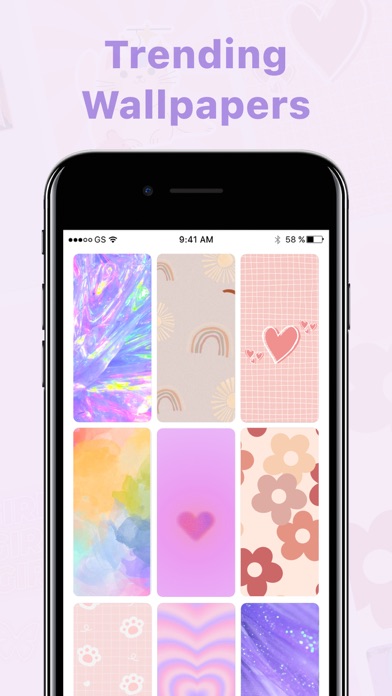
• You can choose different wallpapers with various colors and themes to design your phone layout!
APP ICON
• Batch Install Icons, one tap to install all the icons you want
• Icon replacement, choose the app you want to replace icons
• Easy to set up, support manual setting and automatic setting to change icon
VARIOUS AESTHETIC WIDGETS
• You can add time, photo and even note to your home screen to let them become a personalized widget.
Say Goodbye to Boring and Dull Home Scree! Come to pick up themes to transfer your home screen to an aesthetic art work! Our "Theme for iPhone" makes your home screen more personalized and attractive!
For a long time we were stuck with a monotonous and boring home screen, but now things has changed! With our app you are able to decorate your home screen! Try to customize your home screen and decorate it with amazing themes! Bring your screen to life with "Theme for iPhone"!
All kinds of themes are available for you to choose. In addition, the constantly updated themes will make you always have a new experience, and the quality themes can be changed whenever you want!
More features:
-Different themes with icon packages for you to choose
-Customize you home screen
-Launch the app using shortcuts
◆ SUBSCRIPTION TERMS ◆
Title: one.month.subscription.themes
Length of Subscription: 1 Month
Price: Free for 3 days, $9.99/ month
Title: one.week.subscription.themes
Length of Subscription: 1 Week
Price: Free for 3 days, then $3.99/ week after free trial
• Payment will be charged to iTunes Account at confirmation of purchase
• Subscription automatically renews unless auto-renew is turned off at least 24 hours before the end of the current period
• Account will be charged for renewal within 24 hours prior to the end of the current period, and identify the cost of the renewal
• Subscriptions may be managed by the user and auto-renewal may be turned off by going to the user's Account Settings after purchase
• Any unused portion of a free trial period, if offered, will be forfeited when the user purchases a subscription to that publication, where applicable
• You can cancel a free trial or subscription anytime by turning off auto-renewal through your iTunes account settings. This must be done 24 hours before the end of a free trial or subscription period to avoid being charged. The cancellation will take effect the day after the last day of the current subscription period, and you will be downgraded to the free service.
If you have any questions or suggestions, or just want to say hi, Please feel free to contact us through mobileusercontact@gmail.com
Privacy Policy: http://appicon.mobilestudio.cc/privacy.html
Term of Use:http://appicon.mobilestudio.cc/useragreement.html