

Icon, Widgets & Themes
Icon, Widgets & Themes is made and published by Peter Jones. AppBrain is an independent app data site and isn't affiliated with Peter Jones. The app name, icon, screenshots and description belong to Peter Jones and are shown as published on the App Store.
AppBrain's verdict
EstablishedWell rated- Rating on App Store
- 4.36
- 11,655 ratings
- Last updated
- September 3, 2026
Users rate it well: 4.4 stars from 11,655 ratings.
Rankings
App Store top chartsApp Store Rankings for Icon, Widgets & Themes
Competitors
Similar apps and more from Peter JonesAlternatives to Icon, Widgets & Themes




More from Peter Jones


Releases
Updates seen on the App Store- Version
- 12.1
- Launched
- November 2020
No changelog data
User feedback
Ratings and reviews on the App StoreComments on Icon, Widgets & Themes for iOS
We don't have enough comments to show example comments. Please check back later.
Technology
Found in the app by AppBrain- Price
- Free
- App size
- 240.3 MB
- Content rating
- Everyone
Technologies used by Icon, Widgets & Themes
About the app and developer
About Icon, Widgets & Themes
Icon, Widgets & Themes is a graphics & design app developed by Peter Jones.
What is the rating of Icon, Widgets & Themes?
Icon, Widgets & Themes is rated 4.36 out of 5 stars, based on 12 thousand ratings.
Is Icon, Widgets & Themes free?
Icon, Widgets & Themes is free. The app size is 240.32 MB. The latest version available is 12.1. The last update was on September 3, 2026.
What are the requirements for Icon, Widgets & Themes?
The app has a content rating of Everyone. The app has been available on the App Store since November 2020.
Developer information for Peter Jones
Address:
Store listing
By Peter Jones, from the App Store


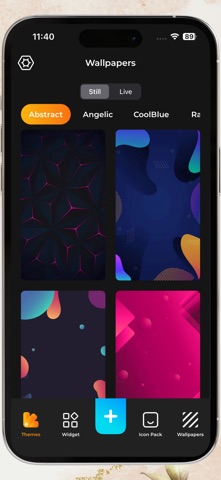
Description by Peter Jones Written by the developer, not by AppBrain. Click to read.
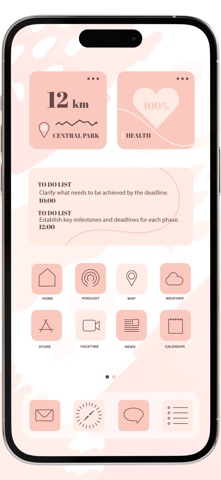
For too long, have been stuck with stock icons and could not personalize your home screen. That’s no longer! With Icon Changer, you now have the ability to customize your app icons in 100’s of different colors, themes, styles and create the perfect home screen aesthetic you’ve always dreamed of.
Inside Icon Changer you can get access to all your favourite app icons. The Shortcuts app you will not need to download. All you will need to do is download our app to start making your iPhone look like our App Store screenshots & much more!
Themes Included
- iOS 14 Themes
- Aesthetic Theme
- Thanksgiving Theme
- Neon Themes
- Christmas Themes
- Diwali Themes
500# Icons
- Instagram Icon
- Facebook Icon
- Safari Icon
- Google Icon
- Twitter Icon
- YouTube Icon
- Snapchat Icon
- Pinterest Icon
- WhatsApp icon
- LinkedIn Icon
- Notes Icon
- TikTok Icon
- Reddit Icon
- Zoom Icon
- Amazon Icon
- Walmart Icon
- Quora Icon
- Camera Icon
- FaceTime Icon
- Health Icon
- BBC News Icon
- Messenger Icon
- Netflix Icon
- Skype Icon
- WeChat Icon
- Weather Icon
- Calculator Icon And many More….!
If you want to change your app icons to make it more cuter or more stylish, then come and try Icon Changer! Have fun creating!
To access to premium icons, wallpapers and theme it requires subscriptions
Icon Changer Pro Subscription Info:
- Monthly Subscription - $5.99
- Yearly Subscription - $19.99
Payment will be charged to iTunes Account at confirmation of purchase
Subscriptions are automatically renewed unless automatic renewal is turned off at least 24 hours before the end of the current period, user can cancel in account settings
Privacy Policy: https://rightbrainllc.wordpress.com/privacy-policy/
Terms of use: https://rightbrainllc.wordpress.com/terms-of-use/