

Fax PDFs - Send Documents
Fax PDFs - Send Documents is made and published by Ravi chandran M. AppBrain is an independent app data site and isn't affiliated with Ravi chandran M. The app name, icon, screenshots and description belong to Ravi chandran M and are shown as published on the App Store.
AppBrain's verdict
- Last updated
- September 16, 2024
- Size
- 19.7 MB
User feedback
Ratings and reviews on the App StoreComments on Fax PDFs - Send Documents for iOS
We don't have enough comments to show example comments. Please check back later.
Store listing
By Ravi chandran M, from the App Store



Description by Ravi chandran M Written by the developer, not by AppBrain. Click to read.
Key Features:
• Send Faxes Quickly: Easily send faxes from your iPhone or iPad in a few simple steps. Perfect for business or personal use.
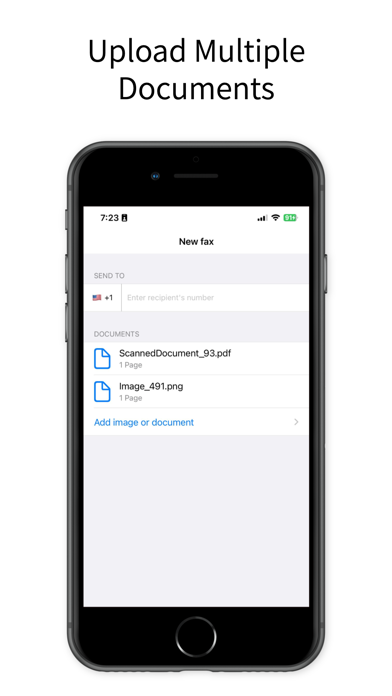
• Wide Document Support: Fax various types of documents including PDFs, photos, and Word files. Upload from your device or cloud storage.
• Secure & Confidential: Ensure your documents are sent securely with advanced encryption. Protect your sensitive information.
• Intuitive Interface: User-friendly design makes sending faxes a breeze. Perfect for all ages and tech skill levels.
• Fax History: Keep track of all your sent faxes with our comprehensive fax history feature. Never lose track of your documents.
• International Faxing: Send faxes globally to over 90 countries. Stay connected no matter where you are.
• Real-time Notifications: Get instant updates on the status of your faxes. Know exactly when your fax has been delivered.
Why Choose Our Fax App?
• Convenience: Send faxes directly from your iPhone or iPad without needing a fax machine.
• Cost-effective: Save money on fax services and eliminate the need for a landline.
• Efficiency: Send faxes quickly, helping you stay productive and efficient.
• Mobility: Fax on-the-go from your mobile device. Perfect for busy professionals and travellers.
How It Works:
• Download and install the Fax PDFs - Send Docs on your iPhone or iPad.
• Open the app and select the document you want to fax, and pick the subscription plan between Weekly, Monthly & Yearly.
• Enter the recipient’s fax number and any additional information.
• Hit send and wait for the confirmation notification.
Experience the future of faxing with our Fax PDFs - Send Docs. Download now and simplify your faxing needs with the power of your iPhone and iPad!
Subscription Information:
• Subscription options are: Weekly, Monthly and Yearly. Weekly Plan: Send up to 15 documents per week, Monthly Plan: Send up to 30 documents per month, Yearly Plan: Send up to 360 documents per year.
• Your iTunes Account will be charged with the payment after purchase confirmation
• Subscription will be automatically renewed at least 24 hours before the end of the current period. Auto-renewal can be manually turned off in the corresponding settings.
• User can manage the subscriptions. Auto-renewal can be deactivated in the Account Settings after a successful purchase.
Privacy Policy: https://sites.google.com/view/faxfromiphone-ifaxdocs/terms-of-use
Terms of Use: https://sites.google.com/view/faxfromiphone-ifaxdocs/privacy-policy
Please refer to EULA here: https://www.apple.com/legal/internet-services/itunes/dev/stdeula/
If you have any questions or suggestions, we are always ready to help: wallpapestudio@gmail.com
Safety and technology
Found in the app by AppBrain- Price
- Free
- App size
- 19.7 MB
- Content rating
- Everyone
Technologies used by Fax PDFs - Send Documents
Releases
Updates seen on the App Store- Version
- 1.2
- Launched
- July 2024
No changelog data
Alternatives
Similar apps and more from Ravi chandran MAlternatives to Fax PDFs - Send Documents





More from Ravi chandran M


Rankings
App Store top chartsApp Store Rankings for Fax PDFs - Send Documents
About the app and developer
About Fax PDFs - Send Documents
Fax PDFs - Send Documents is a business app developed by Ravi chandran M.
User Ratings
The app has no ratings yet.
App Information
Fax PDFs - Send Documents is freely available from the App Store. The app size is 19.70 MB. The latest version available is 1.2. The last update was on September 16, 2024.
Technical Requirements
The app has a content rating of Everyone. The app has been available on the App Store since July 2024.
Developer information for Ravi chandran M
Address:
Frequently asked questions about Fax PDFs - Send Documents
Is Fax PDFs - Send Documents free?
Yes. Fax PDFs - Send Documents is free on the App Store.
Is Fax PDFs - Send Documents still available?
Yes. Fax PDFs - Send Documents is on the App Store, and the last update we saw was on September 16, 2024.
How large is Fax PDFs - Send Documents?
Fax PDFs - Send Documents is 19.70 MB.
Is Fax PDFs - Send Documents suitable for children?
App Store rates the content of Fax PDFs - Send Documents as suitable for everyone.
Who made Fax PDFs - Send Documents?
Fax PDFs - Send Documents was developed by Ravi chandran M. It is listed in the business category on the App Store.
What are the best alternatives to Fax PDFs - Send Documents?
People looking at Fax PDFs - Send Documents also look at these business apps: Fax From iPhone :Send iFax App, Easy Faxer app - Simply Fax It, Fax from iPhone - send files, Send Fax: Online Fax Service, Send Fax from Mobile Phone App.