

FieldCalc - GPS Area Measure
FieldCalc - GPS Area Measure is made and published by Pravin Gondaliya. AppBrain is an independent app data site and isn't affiliated with Pravin Gondaliya. The app name, icon, screenshots and description belong to Pravin Gondaliya and are shown as published on the App Store.
AppBrain's verdict
EstablishedLoved by users- Rating on App Store
- 4.52
- 10,269 ratings
- Last updated
- October 14, 2026
- Size
- 70.8 MB
Users love it: 4.5 stars from 10,269 ratings. Its best ranking is #78 in Top Grossing, Utilities in Indonesia.
User feedback
Ratings and reviews on the App StoreComments on FieldCalc - GPS Area Measure for iOS
We don't have enough comments to show example comments. Please check back later.
Store listing
By Pravin Gondaliya, from the App Store


Description by Pravin Gondaliya Written by the developer, not by AppBrain. Click to read.
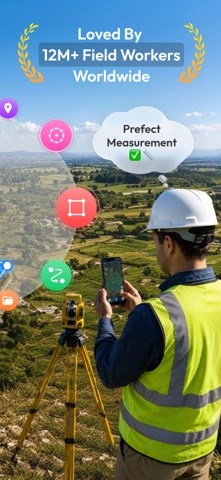
Whether you are a farmer planning crop fields, a surveyor mapping property, or a homeowner measuring your yard, Measure Distance & Plot Acres makes land measurement straightforward for anyone who needs quick and dependable results on the go.
Ultimate Features for Reliable Measurements in FieldCalc!
1) Real-Time GPS Area Measurement
- Need to measure a large field or plot area instantly? With FieldCalc's advanced GPS area measurement feature, simply walk your property boundaries or manually tap points on the map.
- Our algorithm calculates precise area measurements in real-time, supporting multiple units (acres, square feet, hectares & more).
- Whether you're surveying residential property, agricultural land or commercial plots, get instant results with pinpoint accuracy using GPS.
- Measuring irregular properties? FieldCalc's cut-hole(Area Subtraction) feature allows you to deduct areas from your main measurement - perfect for properties with ponds, buildings, or excluded zones.
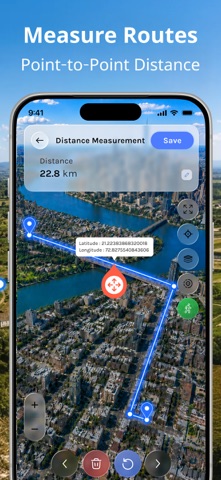
2) Accurate Distance Measurement
- Measure distances between any two points with GPS precision. Whether you're calculating property boundaries, fence lines, or land dimensions, FieldCalc's distance measurement tool provides reliable results.
- Choose between walk mode for active field surveying or manual point-tapping for detailed mapping work. Perfect for contractors, real estate agents, and property surveyors.
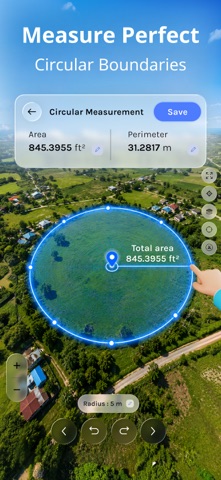
3) Circular Area Measurement
- Measure circular plots, pond areas, and round properties with our specialized circular measurement feature.
- Set your desired radius, walk around the perimeter, or manually tap points to calculate circular areas accurately.
- Ideal for measuring circular agricultural fields, water tanks, swimming pools, and round property sections.
4) Marker & Coordinate
Find exact latitude and longitude coordinates for any location on your map.
• Identify exact GPS coordinates instantly
• Edit coordinates manually for precise adjustments
• Display markers on interactive maps
These coordinates are perfect for property records, land documentation, and surveying reference points.
5) Save Complete Measurement Data
Every measurement tells a story. FieldCalc lets you save measurement records including:
• Full measurement data
• Custom icons and group categorization
• Attached photos and documentation
• Organize your measurements efficiently with custom groups.
Why Surveyors Choose FieldCalc:
- Professional-Grade Accuracy: GPS precision meets surveying standards
- Multiple Measurement Modes: Walk, manual tap
- Comprehensive Data Management: Save, organize, and retrieve measurements
- Photo Documentation: Attach images to your measurements
Perfect for:
• Professional Surveyors & Land Measurers
• Real Estate Agents & Property Managers
• Farmers & Agricultural Professionals
• Construction & Contractors
• Property Buyers & Sellers
• Land Developers
• GPS Mapping Enthusiasts
Are you looking for an app that combines surveying precision with user-friendly design? FieldCalc delivers professional surveying tools in an intuitive mobile & web interface. Measure properties with confidence, save detailed records with photos, and manage multiple projects effortlessly with our color-coded group system.
Download FieldCalc today and transform property measurement from complicated guesswork into simple, accurate surveying. Get professional results every time.
Disclaimer:
- This app offers paid features that require an additional purchase for full access. To enjoy all the content and functionality, a subscription is required.
- Street View displays previously captured imagery and is not a live or real-time camera feed. Images may not reflect current conditions.
Privacy Policy: https://fieldcalc.app/privacy
Terms of Use: https://fieldcalc.app/terms
Safety and technology
Found in the app by AppBrain- Price
- Free
- App size
- 70.8 MB
- Content rating
- Everyone
Technologies used by FieldCalc - GPS Area Measure
Releases
Updates seen on the App Store- Version
- 7.0
- Launched
- June 2017
No changelog data
Alternatives
Similar apps and more from Pravin GondaliyaAlternatives to FieldCalc - GPS Area Measure







More from Pravin Gondaliya


Rankings
App Store top charts- Highest rank
- #78
- Chart
- Top Grossing
- Utilities
- Country
- Indonesia
About the app and developer
About FieldCalc - GPS Area Measure
FieldCalc - GPS Area Measure is an utilities app developed by Pravin Gondaliya.
User Ratings
FieldCalc - GPS Area Measure is rated 4.52 out of 5 stars. The rating is based on 10 thousand ratings.
App Information
FieldCalc - GPS Area Measure is freely available from the App Store. The app size is 70.80 MB. The latest version available is 7.0. The last update was on October 14, 2026.
Technical Requirements
The app has a content rating of Everyone. The app has been available on the App Store since June 2017.
Developer information for Pravin Gondaliya
Address: