

FileBrowser for Education
FileBrowser for Education is made and published by Stratospherix Ltd. AppBrain is an independent app data site and isn't affiliated with Stratospherix Ltd. The app name, icon, screenshots and description belong to Stratospherix Ltd and are shown as published on the App Store.
AppBrain's verdict
- Last updated
- October 18, 2026
Rankings
App Store top chartsApp Store Rankings for FileBrowser for Education
Competitors
Similar apps and more from Stratospherix LtdAlternatives to FileBrowser for Education







More from Stratospherix Ltd




Releases
Updates seen on the App Store- Version
- 26.7
- Launched
- January 2016
No changelog data
User feedback
Ratings and reviews on the App StoreComments on FileBrowser for Education for iOS
We don't have enough comments to show example comments. Please check back later.
Technology
Found in the app by AppBrain- Price
- $9.99
- App size
- 70.3 MB
- Content rating
- Everyone
Technologies used by FileBrowser for Education
About the app and developer
About FileBrowser for Education
FileBrowser for Education is an education app developed by Stratospherix Ltd.
User Ratings
The app has no ratings yet.
App Information
FileBrowser for Education costs $9.99. The app size is 70.33 MB. The latest version available is 26.7. The last update was on October 18, 2026.
Technical Requirements
The app has a content rating of Everyone. The app has been available on the App Store since January 2016.
Developer information for Stratospherix Ltd
Address:
Store listing
By Stratospherix Ltd, from the App Store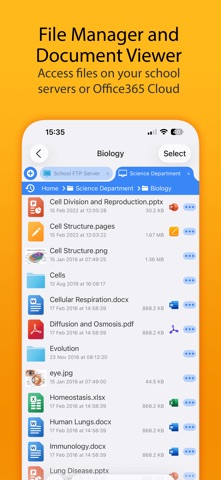



Description by Stratospherix Ltd Written by the developer, not by AppBrain. Click to read.
== Bulk purchase discount available via an Apple School Manager account ==
With FileBrowser for Education, users can benefit from direct and secure file access to servers, workstations and other storage devices on the network. No additional configuration of IT systems is necessary.
Office Apps Integration
- Use the document picker in MS Office apps to open files from network file servers, edit them and automatically save back.
Core Features
- Access file servers and iCloud storage
- View documents and optionally store them for offline viewing
- Show a video, PowerPoint or Keynote direct from the server
- Copy and move between any type of storage, from single files to whole directories
- Integrates with other apps allowing you to edit, save and share files
- Integrates with your existing infrastructure, including Active Directory
- Integrates with iOS data protection, utilising hardware-based encryption to secure content
- VPN on-demand support for third-party VPN clients
- Supports Microsoft Distributed File System (DFS)
- Requires no additional software on file servers
MDM Integration
- Centralised distribution of FileBrowser configuration settings
- Enforced security lockdown
- Confirm to your Mobile Security Policies
- Prevent users from changing local settings
- Selectively override any local configuration setting
- Distribute file server connection details
- Control whether offline viewing/storage is permitted
- Control whether content can be emailed as attachments
- ‘Kiosk’ mode for highly directed read-only file access
FileBrowser uses the SMB1, SMB2 & SMB3 network access protocols (also known as CIFS or Windows File Sharing). This enables access to Macs, PCs, NAS drives, & Windows File Servers.
It can also connect to the following types of server:
- Microsoft SharePoint
- Microsoft OneDrive for Business (as part of Office365)
- WebDAV servers
- FTP servers
- SFTP servers
- Dropbox cloud storage
For fast friendly support please email support@stratospherix.com. Please note that we are only able to provide support in English.