

FileFly Network File Transfer
FileFly Network File Transfer is made and published by Amal Ajith. AppBrain is an independent app data site and isn't affiliated with Amal Ajith. The app name, icon, screenshots and description belong to Amal Ajith and are shown as published on the App Store.
AppBrain's verdict
- Last updated
- September 7, 2026
- Size
- 2.96 MB
User feedback
Ratings and reviews on the App StoreComments on FileFly Network File Transfer for iOS
We don't have enough comments to show example comments. Please check back later.
Store listing
By Amal Ajith, from the App Store




Description by Amal Ajith Written by the developer, not by AppBrain. Click to read.
ONE APP, EVERY COMPUTER YOU OWN
Most ways of getting a file off a phone stop at the edge of one ecosystem. FileFly does not. The same app runs on Windows, macOS and Linux, and your iPhone talks to all three in exactly the same way.
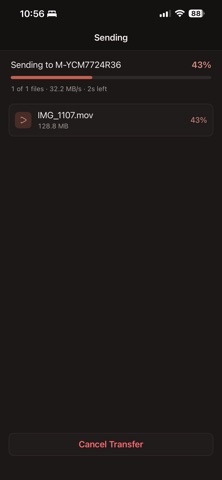
iPhone to Windows — put a video on the family PC without a cable, a cloud account or an email to yourself.
iPhone to Linux — send straight to a workstation, a laptop or a home server that nothing else on your phone will talk to.
iPhone to Mac — move a folder of photos across in seconds, without waiting for anything to sync.
iPhone to iPhone — two phones on the same Wi-Fi, sending directly to each other.
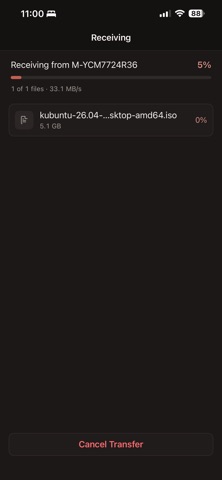
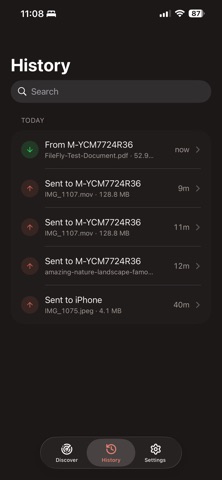
It works both ways. Send from your phone to your computer, or from your computer to your phone, with the same three taps.
NOTHING TO SET UP
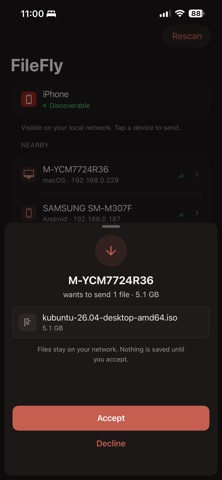
Install FileFly on your computer from fileflyapp.com, then open the app on your phone. Your computer is already in the list. No pairing codes, no IP addresses, no accounts at either end — the two devices find each other the moment they are on the same Wi-Fi.
SEND WITHOUT OPENING THE APP
FileFly lives in the iOS share sheet. Send a photo straight from Photos, or a document straight from Files, pick the device, and it goes.
RECEIVED FILES GO WHERE YOU EXPECT
Photos and videos are saved to your photo library. Everything else lands in the FileFly folder in the Files app, ready to open with any app on your phone.
NO LIMITS
A 4K video, a whole photo album, a disk image — if it fits on your phone, it transfers. No queue, no compression, no cap on file size, and no upload waiting on your broadband. The file crosses your Wi-Fi at the speed of your Wi-Fi.
YOU DECIDE WHAT ARRIVES
Nothing is transferred until you accept it. Every device carries its own key, shown in Settings, so you can check exactly who you are sending to before you say yes.
NOTHING IS COLLECTED
There is no account to create and no server of ours in the middle. FileFly has no analytics and gathers no data about you or your files. Your files move directly between your devices and never leave your local network.
WHAT YOU NEED
Two devices on the same Wi-Fi network, with FileFly open on both. That is the whole requirement.
Safety and technology
Found in the app by AppBrain- Price
- Free
- App size
- 2.96 MB
- Content rating
- Everyone
Technologies used by FileFly Network File Transfer
Releases
Updates seen on the App Store- Version
- 1.0.1
- Launched
- June 2021
No changelog data
Alternatives
Similar apps and more from Amal AjithAlternatives to FileFly Network File Transfer


Also available on Google Play

Rankings
App Store top chartsApp Store Rankings for FileFly Network File Transfer
About the app and developer
About FileFly Network File Transfer
FileFly Network File Transfer is a productivity app developed by Amal Ajith.
What is the rating of FileFly Network File Transfer?
FileFly Network File Transfer has no ratings yet.
Is FileFly Network File Transfer free?
FileFly Network File Transfer is free. The app size is 2.96 MB. The latest version available is 1.0.1. The last update was on September 7, 2026.
What are the requirements for FileFly Network File Transfer?
The app has a content rating of Everyone. The app has been available on the App Store since June 2021.
Developer information for Amal Ajith
Address:
Frequently asked questions about FileFly Network File Transfer
Is FileFly Network File Transfer free?
Yes. FileFly Network File Transfer is free on the App Store.
Is FileFly Network File Transfer still available?
Yes. FileFly Network File Transfer is on the App Store, and the last update we saw was on September 7, 2026.
How large is FileFly Network File Transfer?
FileFly Network File Transfer is 2.96 MB.
Is FileFly Network File Transfer suitable for children?
App Store rates the content of FileFly Network File Transfer as suitable for everyone.
Who made FileFly Network File Transfer?
FileFly Network File Transfer was developed by Amal Ajith. It is listed in the productivity category on the App Store.
What are the best alternatives to FileFly Network File Transfer?
People looking at FileFly Network File Transfer also look at these productivity apps: Refleto, FileFly | Share & Upload Files, AvgCube, Mind Prompt, Stellar Flow: Focus Timer.