

Scan & Sign PDF Scanner
Scan & Sign PDF Scanner is made and published by END ONLINE SLU. AppBrain is an independent app data site and isn't affiliated with END ONLINE SLU. The app name, icon, screenshots and description belong to END ONLINE SLU and are shown as published on the App Store.
AppBrain's verdict
- Last updated
- September 3, 2026
- Size
- 8.46 MB
User feedback
Ratings and reviews on the App StoreComments on Scan & Sign PDF Scanner for iOS
We don't have enough comments to show example comments. Please check back later.
Store listing
By END ONLINE SLU, from the App Store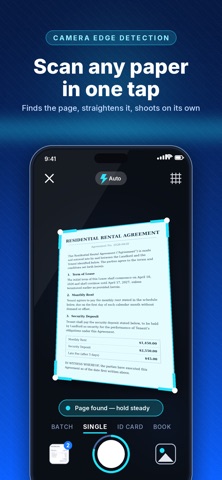

Description by END ONLINE SLU Written by the developer, not by AppBrain. Click to read.
EVERYTHING STAYS ON YOUR DEVICE
Capture, image processing and text recognition all run offline on your iPhone. Your documents are never uploaded to a server.
FIVE CAPTURE MODES
- Single: one clean page at a time
- Batch: keep shooting and build a multi-page document
- ID Card: front and back laid out on a single page
- Book: facing pages split automatically
- QR & Barcode: read, copy, open or share
SHARP, READABLE SCANS
Live edge detection with an auto-shutter that fires when the page is framed and steady. Fine-tune the four corners by hand, rotate, then pick a filter: Original, Magic Color, Grayscale or Black & White. Brightness and contrast sliders for the difficult pages.
SIGN AND ANNOTATE
Draw your signature once and reuse it forever. Drop it on any page, then drag and resize it exactly where it belongs. Or annotate freehand in three colors and three widths.
TEXT RECOGNITION
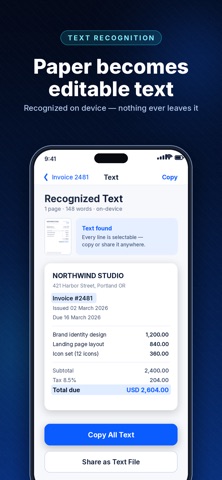
Pull the text out of any page with on-device OCR - copy it, share it, or search your whole library by the words inside your scans.
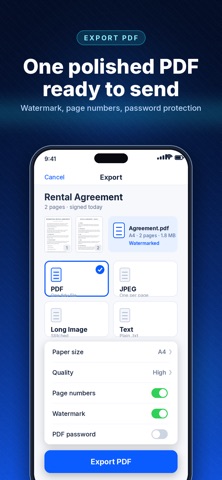
EXPORT THE WAY YOU NEED
- Multi-page PDF
- One JPEG per page
- A single stitched long image
- Plain text file
Choose paper size and quality, add page numbers, a diagonal watermark, or a password to protect the PDF.
STAY ORGANIZED
Folders, tags, starred documents, search, duplicate, merge and reorder pages. Grid or list view. A 30-day Trash so nothing disappears by accident.
PERFECT FOR
Contracts and agreements, receipts and invoices, IDs and passports, handwritten notes, whiteboards, homework, books and articles, and any form that needs a signature.
SCAN & SIGN PRO
Pro unlocks unlimited scanning, every capture mode, photo import, all export formats, text recognition, signing, page editing and organizing.
- $9.99 per week with a 3-day free trial
- Cancel anytime in your App Store settings
Payment is charged to your Apple ID at the end of the free trial. The subscription renews automatically unless it is cancelled at least 24 hours before the end of the current period. You can manage or cancel it in your App Store account settings.
https://www.apple.com/legal/internet-services/itunes/dev/stdeula/
Safety and technology
Found in the app by AppBrain- Price
- Free
- App size
- 8.46 MB
- Content rating
- Everyone
Technologies used by Scan & Sign PDF Scanner
Releases
Updates seen on the App Store- Version
- 1.0.2
- Launched
- August 2026
No changelog data
Alternatives
Similar apps and more from END ONLINE SLUAlternatives to Scan & Sign PDF Scanner


More from END ONLINE SLU


Rankings
App Store top chartsApp Store Rankings for Scan & Sign PDF Scanner
About the app and developer
About Scan & Sign PDF Scanner
Scan & Sign PDF Scanner is a productivity app developed by END ONLINE SLU.
User Ratings
The app has no ratings yet.
App Information
Scan & Sign PDF Scanner is freely available from the App Store. The app size is 8.46 MB. The latest version available is 1.0.2. The last update was on September 3, 2026.
Technical Requirements
The app has a content rating of Everyone. The app has been available on the App Store since August 2026.
Developer information for END ONLINE SLU
Address: