

PDF Scanner – Scan & Sign
PDF Scanner – Scan & Sign is made and published by Nguyen Thi Ngoc Any. AppBrain is an independent app data site and isn't affiliated with Nguyen Thi Ngoc Any. The app name, icon, screenshots and description belong to Nguyen Thi Ngoc Any and are shown as published on the App Store.
AppBrain's verdict
- Last updated
- May 29, 2026
- Size
- 3.03 MB
User feedback
Ratings and reviews on the App StoreComments on PDF Scanner – Scan & Sign for iOS
We don't have enough comments to show example comments. Please check back later.
Store listing
By Nguyen Thi Ngoc Any, from the App Store



Description by Nguyen Thi Ngoc Any Written by the developer, not by AppBrain. Click to read.
EVERYTHING ON DEVICE
Your scans, signatures, and OCR text never leave your iPhone. No accounts, no cloud uploads, no tracking. PDF Scanner ships with zero analytics and zero ad networks in v1.
SCAN
• Multi-page document scanner powered by VisionKit
• Four filters: Original, Grayscale, Black & White, and Enhanced
• Review screen with drag-to-reorder, rotate, delete, and per-page filter
• Auto-fit page sizing so phone-scanned pages don't get letterboxed
OCR – 12 LANGUAGES
• English, Vietnamese, Simplified Chinese, Japanese, Korean, Spanish, French, German, and more
• Runs in parallel across every page using Apple's Vision framework
• Recognized text is saved alongside the PDF and powers the in-app search
• Generate fully searchable PDFs with an invisible text layer
EDIT
• Organize pages: drag to reorder, rotate, or delete inside any PDF
• Merge multiple PDFs into one
• Split a PDF into page ranges
• Compress to shrink file size for email or upload
• Convert images to PDF (Photos picker or share extension)
SIGN
• Draw your signature with Apple Pencil or your finger
• Save unlimited signatures to a reusable library
• Drag and pinch to place; PDF Scanner flattens the result so it survives
in any viewer
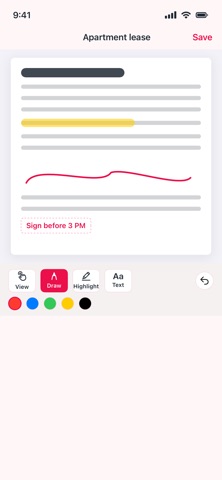
ANNOTATE
• Free-form ink with five colors
• Highlighter for marking up scans
• Text boxes for callouts and notes
• One-tap undo
SECURE
• Password-protect any PDF with industry-standard encryption
• Remove a password if you have the original
• Optional Face ID / Passcode lock for the entire app
ORGANIZE
• Folders with rename, move, and delete
• Favorite the documents you reach for daily
• Full-text Spotlight search — find scans by content, not just filename
• Sort by date, name, or size
SHARE & PRINT
• AirPrint to any nearby printer
• Email PDFs as attachments without leaving the app
• Open in any other iOS app via the share sheet
• Share Extension: receive PDFs and images from Safari, Photos, and Mail
PRODUCTIVITY
• Long-press the app icon for instant "Scan now" or "Import PDF"
• Siri & Shortcuts: "Scan a document with PDF Scanner"
• iPad-ready universal app
PDF Scanner v1 is fully free and ad-free. No subscriptions, no banners, no upsells. Future versions may add an optional Pro tier — your existing documents will always stay free to open and edit.
Safety and technology
Found in the app by AppBrain- Price
- Free
- App size
- 3.03 MB
- Content rating
- Everyone
Technologies used by PDF Scanner – Scan & Sign
Releases
Updates seen on the App Store- Version
- 1.0.0
- Launched
- May 2026
No changelog data
Alternatives
Similar apps and more from Nguyen Thi Ngoc AnyAlternatives to PDF Scanner – Scan & Sign


More from Nguyen Thi Ngoc Any


Rankings
App Store top chartsApp Store Rankings for PDF Scanner – Scan & Sign
About the app and developer
About PDF Scanner – Scan & Sign
PDF Scanner – Scan & Sign is a productivity app developed by Nguyen Thi Ngoc Any.
User Ratings
The app has no ratings yet.
App Information
PDF Scanner – Scan & Sign is freely available from the App Store. The app size is 3.03 MB. The latest version available is 1.0.0. The last update was on May 29, 2026.
Technical Requirements
The app has a content rating of Everyone. The app has been available on the App Store since May 2026.
Developer information for Nguyen Thi Ngoc Any
Address:
Frequently asked questions about PDF Scanner – Scan & Sign
Is PDF Scanner – Scan & Sign free?
Yes. PDF Scanner – Scan & Sign is free on the App Store.
Is PDF Scanner – Scan & Sign still available?
Yes. PDF Scanner – Scan & Sign is on the App Store, and the last update we saw was on May 29, 2026.
How large is PDF Scanner – Scan & Sign?
PDF Scanner – Scan & Sign is 3.03 MB.
Is PDF Scanner – Scan & Sign suitable for children?
App Store rates the content of PDF Scanner – Scan & Sign as suitable for everyone.
Who made PDF Scanner – Scan & Sign?
PDF Scanner – Scan & Sign was developed by Nguyen Thi Ngoc Any. It is listed in the productivity category on the App Store.
What are the best alternatives to PDF Scanner – Scan & Sign?
People looking at PDF Scanner – Scan & Sign also look at these productivity apps: Scan & Sign PDF Scanner, Eritrean Calendar - Tigrinya, Tips & Tricks - for iPhone, Kuvix: Protected Journey, Charge Win: Win Rewards.