

Kuvix: Protected Journey
Kuvix: Protected Journey is made and published by MOBILE TECH LTD. AppBrain is an independent app data site and isn't affiliated with MOBILE TECH LTD. The app name, icon, screenshots and description belong to MOBILE TECH LTD and are shown as published on the App Store.
AppBrain's verdict
New- Rating on App Store
- 4.47
- 88 ratings
- Last updated
- September 16, 2026
Kuvix: Protected Journey came out 76 days ago. It doesn't have enough ratings yet to judge what users think.
Rankings
App Store top chartsApp Store Rankings for Kuvix: Protected Journey
Releases
Updates seen on the App Store- Version
- 1.2
- Launched
- August 2026
No changelog data
User feedback
Ratings and reviews on the App StoreComments on Kuvix: Protected Journey for iOS
We don't have enough comments to show example comments. Please check back later.
Technology
Found in the app by AppBrain- Price
- Free
- App size
- 22.8 MB
- Content rating
- Everyone
Technologies used by Kuvix: Protected Journey
About the app and developer
About Kuvix: Protected Journey
Kuvix: Protected Journey is a productivity app developed by MOBILE TECH LTD.
What is the rating of Kuvix: Protected Journey?
Kuvix: Protected Journey is rated 4.47 out of 5 stars, based on 88 ratings.
Is Kuvix: Protected Journey free?
Kuvix: Protected Journey is free. The app size is 22.80 MB. The latest version available is 1.2. The last update was on September 16, 2026.
What are the requirements for Kuvix: Protected Journey?
The app has a content rating of Everyone. The app has been available on the App Store since August 2026.
Developer information for MOBILE TECH LTD
Address:
Store listing
By MOBILE TECH LTD, from the App Store


Description by MOBILE TECH LTD Written by the developer, not by AppBrain. Click to read.
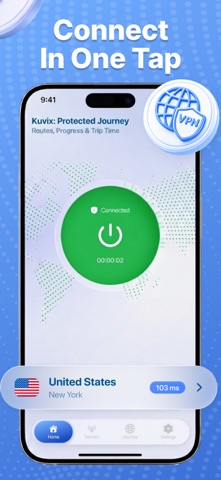
Connect in one tap, choose from available locations, and view the current connection status and protected session time directly on the main screen. Kuvix keeps the core experience straightforward while adding a visual journey feature for users who want to monitor their active session in a more engaging way.
WHAT YOU GET
• One-tap connection control
• Access to available locations
• Clear Connected, Connecting, and Disconnected states
• Current protected session time
• Journey Progress on the main and Journey screens
• A visual route between selected cities
• Protected Time statistics
• Flight Miles and Total Trips after a completed journey
• Clean and intuitive navigation
PROTECTED CONNECTION
Choose an available location and start your connection with one tap.
Kuvix clearly displays whether the connection is active, still connecting, or disconnected. The current location, connection status, and protected session time are shown directly in the interface without complicated settings or additional steps.
PROTECTED JOURNEY
Protected Journey is an optional visual feature connected to the active connection session.
Tap Start Journey, open the Journey section, and select a From city and a Destination city. Kuvix displays the selected route on a world map together with the current connection status, Journey Progress, and Protected Time.
When the route is completed, the journey summary shows:
• From city
• Destination city
• Protected Time
• Flight Miles
• Total Trips
The user can then tap Start New Journey and select another route.
Flight Miles and Total Trips are in-app journey statistics. They do not represent the user's physical movement, real location, or actual travel history.
SAFER ON PUBLIC NETWORKS
Public Wi-Fi in airports, hotels, cafés, and other shared locations may not always be fully trusted.
Kuvix provides a simple way to start a protected connection before browsing on Wi-Fi, mobile data, or other available networks. The app clearly shows whether the connection is active so the user can monitor the current session at any time.
SIMPLE BY DESIGN
Open the app, choose a location, and start the connection with one tap.
The main screen provides quick access to the current status, selected location, protected time, Journey Progress, available locations, Journey, and application settings.
No lengthy setup or complicated instructions are required.
SUBSCRIPTION DETAILS
Some features require an active subscription. Price, duration, free trial availability, auto-renewal terms, the Privacy Policy, and Terms of Use are displayed before you complete your purchase.
Subscriptions automatically renew unless canceled at least 24 hours before the end of the current subscription period. You can manage or cancel your subscription in your Apple ID account settings.
Privacy Policy: https://kuvix-vpn.com/policy
Terms of Use: https://kuvix-vpn.com/terms
Contact: https://kuvix-vpn.com/contacts
Support: support@kuvix-vpn.com