

FileKitPro: File Converter
FileKitPro: File Converter is made and published by 谦 徐. AppBrain is an independent app data site and isn't affiliated with 谦 徐. The app name, icon, screenshots and description belong to 谦 徐 and are shown as published on the App Store.
AppBrain's verdict
- Last updated
- October 12, 2026
Rankings
App Store top chartsApp Store Rankings for FileKitPro: File Converter
Competitors
Similar apps and more from 谦 徐Alternatives to FileKitPro: File Converter


Releases
Updates seen on the App Store- Version
- 1.1.0
- Launched
- August 2026
No changelog data
User feedback
Ratings and reviews on the App StoreComments on FileKitPro: File Converter for iOS
We don't have enough comments to show example comments. Please check back later.
Technology
Found in the app by AppBrain- Price
- Free
- App size
- 42.2 MB
- Content rating
- Everyone
Technologies used by FileKitPro: File Converter
About the app and developer
About FileKitPro: File Converter
FileKitPro: File Converter is an utilities app developed by 谦 徐.
What is the rating of FileKitPro: File Converter?
FileKitPro: File Converter has no ratings yet.
Is FileKitPro: File Converter free?
FileKitPro: File Converter is free. The app size is 42.24 MB. The latest version available is 1.1.0. The last update was on October 12, 2026.
What are the requirements for FileKitPro: File Converter?
The app has a content rating of Everyone. The app has been available on the App Store since August 2026.
Developer information for 谦 徐
Address:
Store listing
By 谦 徐, from the App Store


Description by 谦 徐 Written by the developer, not by AppBrain. Click to read.
Convert, compress, and edit PDFs, documents, videos, audio, images, and subtitles in one place. From HEIC and WebP photos to MP4, MKV, FLAC, and DOCX, FileKitPro handles the formats you work with every day—without uploading your files or asking you to create an account.
With 80 supported input formats and 1,900+ conversion combinations, there's no need to juggle a different app for every file. Every supported format and tool is available free; FileKitPro+ unlocks unlimited batch processing and larger merges when you need them.
BUILT FOR IPHONE & IPAD
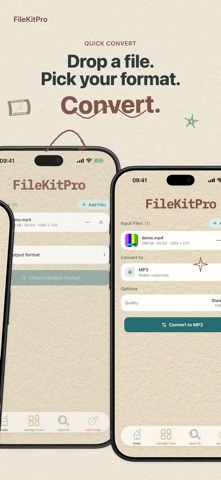
• Import a file, choose your output, fine-tune settings, then save or share the result.
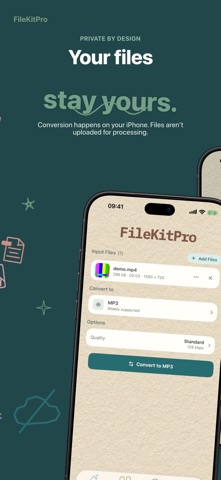
• Convert and edit directly on your device. Your files stay yours.
VIDEO CONVERTER & TOOLS
• Convert MP4, MOV, MKV, AVI, WebM, WMV, FLV and more.
• Compress videos, extract audio, or turn video clips into GIFs.
• Trim, merge, crop, resize, rotate, change speed, adjust colors, and more.
AUDIO CONVERTER & TOOLS
• Convert MP3, WAV, M4A, FLAC, AAC, OGG, Opus, AIFF and more.
• Trim, merge, normalize volume, remove silence, change speed, and apply audio filters.
• Record audio in the app and convert your recordings.
PDF & DOCUMENT TOOLS
• Convert supported Office files and documents, including DOCX, XLSX, PPTX, Markdown, HTML, EPUB, RTF, TXT, CSV, ODT, ODS, and ODP.
• Merge, split, compress, reorder, rotate, extract, add, or delete PDF pages.
• Add watermarks, remove metadata, compare PDFs, and protect or unlock PDFs with passwords.
• Create PDFs from images or export PDF pages as images.
IMAGE CONVERTER
• Convert JPG, PNG, HEIC, WebP, GIF, BMP, and TIFF.
• Compress, resize, rotate, flip, and adjust image quality.
SUBTITLE TOOLS
• Convert SRT, VTT, and ASS subtitles.
• Extract subtitle tracks or embed subtitles in video.
• Detect common text encodings, including UTF-8, GBK, Shift-JIS, and EUC-KR.
PRIVATE BY DESIGN
File processing happens on your device. Your files are not uploaded to FileKitPro servers for conversion. No account or sign-up is required, and the app includes no analytics or tracking SDK.
FREE & FILEKITPRO+
Every supported format and tool is available free. Standard tools process one input file at a time; PDF and video merge tools allow two inputs for free.
FileKitPro+ unlocks unlimited batch processing, larger merges, and saving multiple results at once. Choose a monthly or yearly subscription, or a one-time lifetime purchase. Actual prices are shown in your local App Store currency.
Terms of Use: https://www.filekitpro.com/terms.html
Privacy Policy: https://www.filekitpro.com/privacy.html