





AppBrain's verdict
Established- Rating on App Store
- 3.86
- 7 ratings
- Last updated
- January 26, 2021
- Size
- 45.0 MB
It doesn't have enough ratings yet to judge what users think.
User feedback
Ratings and reviews on the App StoreComments on Filmage Converter-ConvertVideo for iOS
We don't have enough comments to show example comments. Please check back later.
Store listing
By PDF Technologies, Inc., from the App StoreDescription by PDF Technologies, Inc. Written by the developer, not by AppBrain. Click to read.
Filmage Video Converter is the fastest video converter in the market that supports almost all video formats: MP4, AVI, 3GP, MOV, MTS, MPEG, MPG, WMV, M4V, VOB, FLV etc. It is also a video compressor by changing resolutions. This converter and compressor supports converting, changing resolution, frame rate, audio bitrate of a video file, thus providing high quality video in optimized size. It can also convert video files into Audio formats like MP3, WMA, AAC, OGG, M4A, WAV, etc formats.
After conversion is complete, you can manage your converted files like preview, share, delete the file and easily open it in another app
Conversions usually take less than 15 seconds!
Supported Input Formats Include:
mp4, flv, avi, wmv, ts, vob, mkv, mpeg-2, f4v, swf, mov, mpg, 3gp, mpeg-2 H263, mts, mp3, wma, aac, m4a, ogg, mp2, wav, amr, au, m4b, aiff, etc.
Supported Video Output Formats:
mp4, flv, avi, wmv, ts, vob, mkv, mpeg-2, f4v, swf, mov, mpg, 3gp, mpeg-2 H263, mts, etc.
Supported Audio Output Formats:
mp3, wma, aac, m4a, ogg, mp2, wav, amr, au, m4b, aiff, etc.
KEY FEATURES:
- Video Format Converter: Convert videos to MP4, AVI, FLV, MOV, WMV, TS, Apple ProRes, MPEG-2, F4V, SWF, MPG, 3GP, MPEG-2 H263, MTS and etc formats
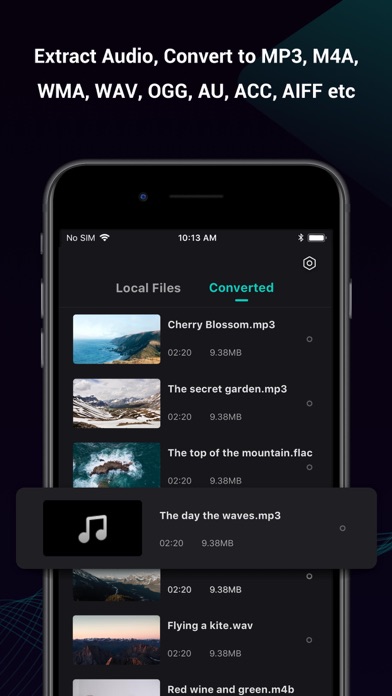
- Audio Format Conversion: Convert audios to MP3, WAV, AU, AIFF, WMA, AAC, M4A, OGG, MP2, Wav, AMR, M4B, etc formats
- Audio Extraction: Extract audio from the video, and export to MP3, WAV, AU, AIFF, WMA, AAC, M4A, OGG, MP2, Wav, AMR, M4B, etc formats(a video to audio converter)
- Video Compression: Change video resolutions from 320P to 4K resolution to change video size
- Batch Processing: Convert multiple media files in batch and in a few seconds
- Import input files from local directories(Album), Camera or from desktop, laptop computer or mobile devices if you keep these devices resides in the same WiFi network(WiFi Transfer)
- Customize Sample Rate, Bit Rate for any format audios
- Video Encoder: Supported video codecs are: H264, MPEG-4
- Video Converter and video compressor with a user-friendly interface.
Files Import Methods:
* Support multiple files import methods: Import From Album, From Camera, WiFi Transfer and From Files
* Import from Album: Select one or more files from your album
* Import from Camera: Use your camera to make a video
* Import from Files: Select one or more files from your Files (Supported iOS 11 and later)
* WiFi Transfer: Transfer your files from your Mac, PC or any other devices under the same WiFi network
Audio to MP3 / WAV / AAC / WMA Converter:
- Audio and music converter converts any audio to MP3, WAV, AAC, etc.
- The best mp3 converter that turns any video to mp3 music file
Super-fast HD Conversion:
- HD conversion without any quality loss
- Convert video at 90x faster speed
Pro version:
- Convert videos to MOV, WMV, TS, MPEG-2, F4V, SWF, MPG, 3GP, MPEG-2 H263, MTS, VOB
- Convert audios to WAV, M4A, AU, AIFF with no quality loss
- Export videos without watermark
- Convert videos to 4K, 1080P videos
- Convert multiple files in batch
- Customize the video Frame Rate on 16, 20, 24, 25, 27, 28, 30 FPS
- Customize the video Bit Rate on 7500, 10000, 12000, 16000, 20000, 28000, 35000 bps, etc
Need any help? Please feel free to contact us at support@filmagepro.com or check out https://www.filmagepro.com
Safety and technology
Found in the app by AppBrain- Price
- Free
- App size
- 45.0 MB
- Content rating
- Everyone
Technologies used by Filmage Converter-ConvertVideo
Releases
Updates seen on the App Store- Version
- 1.0.2
- Launched
- June 2020
No changelog data
Alternatives
Similar apps and more from PDF Technologies, Inc.Alternatives to Filmage Converter-ConvertVideo







More from PDF Technologies, Inc.







Rankings
App Store top chartsApp Store Rankings for Filmage Converter-ConvertVideo
About the app and developer
About Filmage Converter-ConvertVideo
Filmage Converter-ConvertVideo is an utilities app developed by PDF Technologies, Inc.
What is the rating of Filmage Converter-ConvertVideo?
Filmage Converter-ConvertVideo is rated 3.86 out of 5 stars, based on 7 ratings.
Is Filmage Converter-ConvertVideo free?
Filmage Converter-ConvertVideo is free. The app size is 44.98 MB. The latest version available is 1.0.2. The last update was on January 26, 2021.
What are the requirements for Filmage Converter-ConvertVideo?
The app has a content rating of Everyone. The app has been available on the App Store since June 2020.
Filmage Converter-ConvertVideo is made and published by PDF Technologies, Inc. AppBrain is an independent app data site and isn't affiliated with PDF Technologies, Inc. The app name, icon, screenshots and description belong to PDF Technologies, Inc. and are shown as published on the App Store.
Developer information for PDF Technologies, Inc.
Address:
Frequently asked questions about Filmage Converter-ConvertVideo
Is Filmage Converter-ConvertVideo free?
Yes. Filmage Converter-ConvertVideo is free on the App Store.
Is Filmage Converter-ConvertVideo still available?
Yes. Filmage Converter-ConvertVideo is on the App Store, and the last update we saw was on January 26, 2021.
How large is Filmage Converter-ConvertVideo?
Filmage Converter-ConvertVideo is 44.98 MB.
Is Filmage Converter-ConvertVideo suitable for children?
App Store rates the content of Filmage Converter-ConvertVideo as suitable for everyone.
How do people rate Filmage Converter-ConvertVideo?
Filmage Converter-ConvertVideo scores 3.86 out of 5 stars, from 7 ratings on the App Store.
Who made Filmage Converter-ConvertVideo?
Filmage Converter-ConvertVideo was developed by PDF Technologies, Inc. It is listed in the utilities category on the App Store.
What are the best alternatives to Filmage Converter-ConvertVideo?
People looking at Filmage Converter-ConvertVideo also look at these utilities apps: Video Files Converter MP3 GIF, Format Converter, MOV Converter, MOV to MP4, MP4Plus Video Converter mp3/4, Remux - Video Converter.