




AppBrain's verdict
- Last updated
- September 28, 2022
- Size
- 50.2 MB
User feedback
Ratings and reviews on the App StoreComments on Filmage Screen-Screen Recorder for iOS
We don't have enough comments to show example comments. Please check back later.
Store listing
By PDF Technologies, Inc., from the App StoreDescription by PDF Technologies, Inc. Written by the developer, not by AppBrain. Click to read.
Filmage Screen Recorder is an all-in-one screen & audio recording and video editing software, with it you can:
- Capture any activities from your Mac screen
- Record vivid video tutorials, personal presentations or product demo
- Record online courses or Youtube videos
- Capture live streams, online video & audio
- Capture Zoom or business meetings
- Record gameplay tricks or entertainment videos
- Mirror and record iPad / iPhone screen on Mac
- Convert your video to over 500 formats
Filmage Screen is totally ad-free, letting you work without interruption. With this screen flow on Mac, it can be the best screen recorder, video editor and video converter for your work, study and entertainment.
>>> Intuitive Video/Audio Recording Tools
- Capture Screen, Camera, iOS Devices and Audio to create online courses or meetings, video or game tutorials, product demo with ease
- Record a full screen, a target window or any custom areas
- Picture in picture mode helps to create a video overlay that you can record camera while recording screen and then play them simultaneously
- Support dragging page window to record external display screen
- Mirror iPhone/iPad screen to your Mac screen and record iPhone/iPad, Mac screen simultaneously
- Schedule recording: Set start time and recording length in advance and it will start/stop automatically
- Record video or audio without a watermark when exporting
- Capture audio system sound, microphone sound, or any other sound with system built-in microphone or any audio input devices
- Record HD videos in 4K/1080P/720P, and set 15fps to 60fps for a smoother video
- Support to set cursor effect for a better presentation
- No recording time limits
- Provide Start / Stop / Pause / Resume Recording shortcuts to make your recording easily
>>> Professional Video Editing Suite
- Enhance videos with full editing suite for faster, easier editing
- Drag videos, audios, images into video timeline and move them as you like
- Professional video edit suite with voiceover, music and dynamic subtitle effect, highly customizable
- Edit video with annotate tools: text box, shapes, freehand drawing, etc. and edit with split, cut, delete and more, making your video more engaging.
- Customize the content / color / size / position of text to create personalized subtitles as text watermarks for copyright protection
- Adjust speed at 0.5x to 2.0x, free control of audio and video length
- Edit, export, and play audio files separately
>>> Powerful Videos Converter Tools
- Convert any videos to MP4, Apple ProRes, MOV, 3GP, VOB, MKV, M4V, WMV, AVI, MPG, FLV, F4V, SWF, TS, and more other video formats
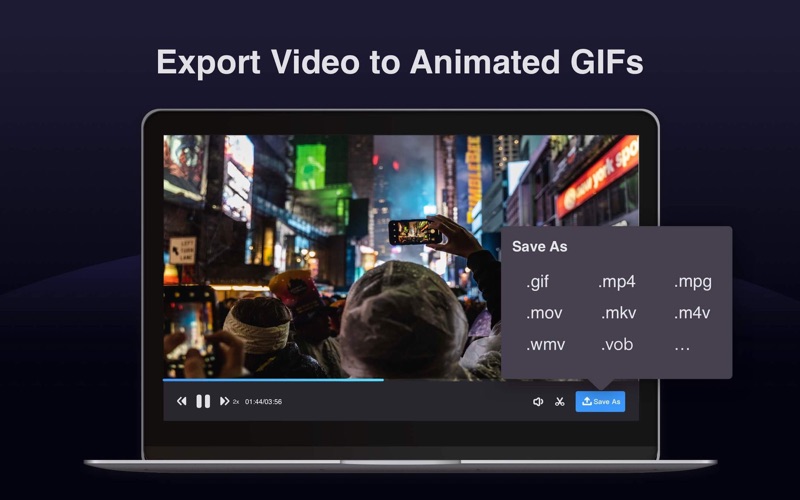
- Export your videos as animated GIFs(GIF maker)
- Batch converter allows to convert videos to the same or different formats simultaneously with 30X faster and without quality loss
>>> Quicktime Media Player
- Support playing almost any video format: MP4, MOV, AVI, MKV, F4V, F4B, and more
- Video files can be opened by default with Filmage Screen
>>> Media Files Management
- Sharing audio and video via Email, Message and Airdrop
- Upload and share media files to Youtube and other platforms
- Easily rename, edit, convert, play, export, share or delete video files
- Process HD video in 4K/ 1080P/ 720P and other resolutions for further editing
If you have questions, please email us to support@filmagepro.com
or check out: https://www.filmagepro.com
Safety and technology
Found in the app by AppBrain- Price
- Free
- App size
- 50.2 MB
- Content rating
- Everyone
Technologies used by Filmage Screen-Screen Recorder
Releases
Updates seen on the App Store- Version
- 1.4.7
- Launched
- October 2019
No changelog data
Alternatives
Similar apps and more from PDF Technologies, Inc.More from PDF Technologies, Inc.






Rankings
App Store top chartsApp Store Rankings for Filmage Screen-Screen Recorder
About the app and developer
About Filmage Screen-Screen Recorder
Filmage Screen-Screen Recorder is a photo & video app developed by PDF Technologies, Inc.
What is the rating of Filmage Screen-Screen Recorder?
Filmage Screen-Screen Recorder has no ratings yet.
Is Filmage Screen-Screen Recorder free?
Filmage Screen-Screen Recorder is free. The app size is 50.18 MB. The latest version available is 1.4.7. The last update was on September 28, 2022.
What are the requirements for Filmage Screen-Screen Recorder?
The app has a content rating of Everyone. The app has been available on the App Store since October 2019.
Filmage Screen-Screen Recorder is made and published by PDF Technologies, Inc. AppBrain is an independent app data site and isn't affiliated with PDF Technologies, Inc. The app name, icon, screenshots and description belong to PDF Technologies, Inc. and are shown as published on the App Store.
Developer information for PDF Technologies, Inc.
Address: