AppBrain
AppBrain
  • Apps
  • Apps being viewed right now Trending apps today Most popular apps All-time most installed apps Top rated apps iPhone and iPad apps
  • Intelligence ▾
    Intelligence overview → Track any Android app or your whole market
    Track & analyze
    Keyword Tracker & OptimizerTrack & improve Play rankings App Performance ReportOne-off PDF for any app StatisticsFree Android & Play market stats
    Promote your app
    Featured Apps App Links
  • Intelligence
  • Pricing
  • Dashboard
  • Sign up
  • Log in
App Store Apps > Utilities > Finale Keyboard
App profile & analytics · Utilities · Data updated 2026-10-16
Finale Keyboard icon

Finale Keyboard

by Grant Oganyan · $14.99 · Version 3.0.1
Availability On the App Store since March 2022 ↗
Rating on App Store
4.22/5
23 ratings
Rating
4.22
23 reviews
Best rank
–
not in the top lists
Last updated
October 7, 2026
3.0.1
AppBrain's verdict

It doesn't have enough ratings yet to judge what users think.

Finale Keyboard is made and published by Grant Oganyan. AppBrain is an independent app data site and isn't affiliated with Grant Oganyan. The app name, icon, screenshots and description belong to Grant Oganyan and are shown as published on the App Store.

About Finale Keyboard

Finale Keyboard is an utilities app developed by Grant Oganyan.

What is the rating of Finale Keyboard?

Finale Keyboard is rated 4.22 out of 5 stars, based on 23 ratings.

Is Finale Keyboard free?

Finale Keyboard costs $14.99. The app size is 327.21 MB. The latest version available is 3.0.1. The last update was on October 7, 2026.

What are the requirements for Finale Keyboard?

The app has a content rating of Everyone. The app has been available on the App Store since March 2022.

Description by Grant Oganyan (from the App Store)
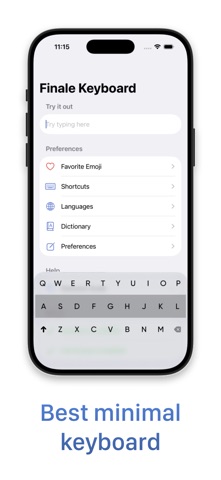
Finale Keyboard is a gesture-based minimal keyboard loaded with smart features to help you type faster. Ever used Fleksy (R.I.P)? You'll feel right at home. A new, freshly renovated, modern home.

Finale Keyboard is not your typical keyboard. While you type characters as usual, most other actions - like inserting spaces, autocorrecting, adding punctuation, and more - are done using swipe gestures.

Gestures allow you to type much faster than traditional keyboards. While they may take a few days to get used to, once they become second nature, you won't want to type without them.

Finale Keyboard also has the smallest footprint of any keyboards available on iPhone. So, not only will you type faster, but you'll also reclaim valuable screen real estate.


-- Features --

- Smallest keyboard for the iPhone:
Save your screen real estate for what matters the most.

- Easy-to-master gestures that let you type faster:
Type blazingly fast with convenient gestures for your most important actions.

- Smart autocorrect:
Swipe right after typing a word to quickly autocorrect it and insert a space. Don't worry about typos - Finale will take care of misspellings for you.

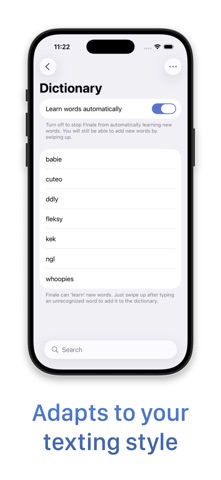
- Learns your vocabulary:
Often use "gonna", "wanna", "yaaas", or have your own unique slang? Finale Keyboard will automatically learn words you type often and add them to its dictionary.

- Shortcuts:
Add shortcuts to any key and trigger them with a downward swipe or a long-press. Insert emojis, contact information, perform cut / copy / paste, and more.

- Clipboard history:
Access your clipboard history to quickly paste anything you copied before. Perfect for links, codes, addresses, numbers and other text you might need to reuse.

- Dynamic touch zones:
Finale Keyboard predicts which characters you are most likely to type next and will dynamically increase their touch zones to help you be more accurate.

- Favorite Emojis:
Create a personalized emoji layout so your most-used emojis are always exactly where you expect them.

- Custom extensions:
Build custom actions to load data or trigger actions in third-party apps and services, right from your keyboard.


-- Gestures guide --

Essential

- swipe right: Autocorrect a word and insert a space
- swipe right after a space: Insert punctuation
- swipe up or down: Cycle through suggestions
- swipe left: Delete words
- swipe right on 'shift': Toggle symbols
- swipe left on 'backspace': Open emojis
- swipe down: Close emojis
- swipe up on 'backspace': Return

Shortcuts

- swipe down on a shortcut key: Use shortcut
- hold 'backspace': Peek at shortcuts

Miscellaneous

- swipe up on 'shift': Change language
- swipe up: Learn a new word
- hold 'shift': Toggle autocorrection
- hold and slide anywhere: Move cursor
- swipe up and hold: Continuously type a character
- swipe left or right with two fingers: Switch one-handed mode

Keyboard controls

- swipe down on 'backspace': Hide keyboard
- swipe down on 'shift': Change keyboard

Supported languages: Arabic, Belarusian, Bulgarian, Catalan, Croatian, Czech, Dutch, English, French, German, Hebrew, Hungarian, Italian, Kazakh, Latvian, Lithuanian, Polish, Portuguese (Brazil), Portuguese (Portugal), Romanian, Russian, Serbian, Spanish, Swedish, Ukrainian.

Email me at grant@finaletodo.com to request the language you need!
Show more Show less

More data about Finale Keyboard

Price $14.99
Rating 4.22 based on 23 ratings
Ranking Not ranked
Version 3.0.1
App size 327.2 MB
Suitable for Everyone

Screenshots

Finale Keyboard Screenshot 1 of 8
Finale Keyboard Screenshot 2 of 8
Finale Keyboard Screenshot 3 of 8
Finale Keyboard Screenshot 4 of 8
Finale Keyboard Screenshot 5 of 8
Finale Keyboard Screenshot 6 of 8
Finale Keyboard Screenshot 7 of 8
Finale Keyboard Screenshot 8 of 8
Screenshots by Grant Oganyan, from the the App Store listing
Official page on the App Store

Alternatives to Finale Keyboard

DTNet - Desktop Browser icon DTNet - Desktop Browser
汝泉 张
4.7
$0.99
71 ratings
Padlok - Door & Gate Codes icon Padlok - Door & Gate Codes
Illumineering
4.6
Free
19 ratings
Pocket Pass Manager icon Pocket Pass Manager
Reliby Solutions
4.2
Free
17 ratings
CardsFlash - Flashcards Learn icon CardsFlash - Flashcards Learn
Michael Steurer
0.0
Free
Afterminder - Fast reminders icon Afterminder - Fast reminders
Filip Nemecek
4.8
Free
5 ratings
Browser - Dark Mode for Safari icon Browser - Dark Mode for Safari
Hong Nhi Tran
5.0
$1.99
3 ratings
Armor - SMS Spam Filter icon Armor - SMS Spam Filter
Hangzhou ChangJing Technology Co., Ltd.
5.0
$0.99
2 ratings
Cue It - Interval Timer icon Cue It - Interval Timer
Justin Hopkins
4.6
$2.99
17 ratings

More from Grant Oganyan

Finale Habits: Daily Tracker icon Finale Habits: Daily Tracker
Grant Oganyan
4.7
$1.99
230 ratings
Finale To Do: Tasks & Habits icon Finale To Do: Tasks & Habits
Grant Oganyan
4.7
Free
167 ratings
Finale Passport icon Finale Passport
Grant Oganyan
5.0
Free
1 ratings

Changelog of Finale Keyboard

No changelog data

Developer information for Grant Oganyan

Grant Oganyan

Address:

Share Finale Keyboard

Comments on Finale Keyboard for iOS

We don't have enough comments to show example comments. Please check back later.

App Store Rankings for Finale Keyboard

This app is not ranked

Technologies used by Finale Keyboard

Today's trending apps Price drops on Google Play Popular Utilities Apps Top new apps Apps other people are watching
DTNet - Desktop Browser icon DTNet - Desktop Browser
Padlok - Door & Gate Codes icon Padlok - Door & Gate Codes
Pocket Pass Manager icon Pocket Pass Manager
CardsFlash - Flashcards Learn icon CardsFlash - Flashcards Learn
Afterminder - Fast reminders icon Afterminder - Fast reminders
Browser - Dark Mode for Safari icon Browser - Dark Mode for Safari
Armor - SMS Spam Filter icon Armor - SMS Spam Filter
Cue It - Interval Timer icon Cue It - Interval Timer
Overview Alternatives Reviews Rankings Technology
AppBrain Intelligence premium content

Subscribe now to get full and unlimited access to AppBrain Intelligence. You'll have access to:

  • App Intelligence dashboard (performance timeline, competitor comparison, country rankings, insight cards)
  • Detailed ranking data per app
  • Full timeline per developer
  • Device market shares data per country
  • Unlimited keyword tracking
1 Month

$75/mo
(billed every month)

SAVE 0%
Subscribe
3 Months

$65/mo
($195 billed every 3 months)

SAVE 13%
Subscribe
1 Year

$57.50/mo
($690 billed every year)

SAVE 23%
Subscribe
Each subscription will automatically renew 3 days before the expiration date for the same time period. Subscriptions can be cancelled at any time before the renewal.

AppBrain is an app data site, we track rankings, ratings, installs for all apps and games on Google Play and the App Store. AppBrain doesn't host app files or APKs, all install links go directly to the official store. All trademarks are owned by their respective owners. As an Amazon Associate AppBrain earns from qualifying purchases.

More apps

  • Top Android apps being viewed
  • PocketByte: AI Game Maker
  • 2248 Home: Merge Number Puzzle
  • RostamVPN - VPN Fast & Secure

App statistics

  • Android statistics
  • Google Play Developer stats
  • Trending Android Apps
  • Trending iOS apps
  • Top popular Apps
  • Buy the best Android phone
  • Buy & sell app businesses

About AppBrain

  • Contact
  • Privacy
  • Documentation
  • DMCA takedowns
  • Articles
  • Blog
  • Tips to improve your Android promotional campaign
© 2010-2026 - AppBrain