

FindItLater - Photo notes
FindItLater - Photo notes is made and published by 鹏 杨. AppBrain is an independent app data site and isn't affiliated with 鹏 杨. The app name, icon, screenshots and description belong to 鹏 杨 and are shown as published on the App Store.
AppBrain's verdict
- Last updated
- August 10, 2026
- Size
- 1.13 MB
User feedback
Ratings and reviews on the App StoreComments on FindItLater - Photo notes for iOS
We don't have enough comments to show example comments. Please check back later.
Store listing
By 鹏 杨, from the App Store

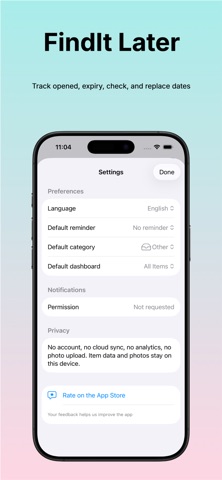
Description by 鹏 杨 Written by the developer, not by AppBrain. Click to read.
Use it for everyday items that are easy to forget: passports, spare keys, medicine, skincare, pantry food, cables, tools, travel items, storage boxes, and household supplies. For each item, you can save a photo, title, category, storage location, notes, and important dates such as opened date, expiry date, check date, or replace date.
The app is designed for one simple job: helping you find things later and deal with them on time. Instead of searching through your photo library, Notes, or chat history, you can keep item memory in one place and search it quickly by name, category, location, or reminder status.
Key features:
- Save an item with photo, name, category, and storage location
- Add notes to remember details that matter later
- Track opened, expiry, check, and replace dates
- Set local reminders so due-soon and overdue items are easy to catch
- Browse and search your saved items quickly
- Share a simple photo memory card when needed
- Keep everything private and easy to manage
FindIt Later is built for people who want a lightweight personal system for remembering real-world items without using a complicated inventory app.
Privacy matters:
- No account
- No subscription
- No ads
- No cloud sync
- Your item data stays on your device
If you have ever asked yourself “Where did I put that?” or “When do I need to check this again?”, FindIt Later gives you a faster and more reliable answer.
Feature requests or improvement ideas are welcome. All feedback is regularly reviewed and used to guide future updates:
Email: 842797413@qq.com
Or leave thoughts in an App Store review
Every suggestion is taken seriously.
Safety and technology
Found in the app by AppBrain- Price
- $0.99
- App size
- 1.13 MB
- Content rating
- Everyone
Technologies used by FindItLater - Photo notes
Releases
Updates seen on the App Store- Version
- 2.0
- Launched
- May 2026
No changelog data
Alternatives
Similar apps and more from 鹏 杨Alternatives to FindItLater - Photo notes


More from 鹏 杨


Rankings
App Store top chartsApp Store Rankings for FindItLater - Photo notes
About the app and developer
About FindItLater - Photo notes
FindItLater - Photo notes is a productivity app developed by 鹏 杨.
What is the rating of FindItLater - Photo notes?
FindItLater - Photo notes has no ratings yet.
Is FindItLater - Photo notes free?
FindItLater - Photo notes costs $0.99. The app size is 1.13 MB. The latest version available is 2.0. The last update was on August 10, 2026.
What are the requirements for FindItLater - Photo notes?
The app has a content rating of Everyone. The app has been available on the App Store since May 2026.
Developer information for 鹏 杨
Address:
Frequently asked questions about FindItLater - Photo notes
Is FindItLater - Photo notes free?
No. FindItLater - Photo notes costs $0.99 on the App Store.
Is FindItLater - Photo notes still available?
Yes. FindItLater - Photo notes is on the App Store, and the last update we saw was on August 10, 2026.
How large is FindItLater - Photo notes?
FindItLater - Photo notes is 1.13 MB.
Is FindItLater - Photo notes suitable for children?
App Store rates the content of FindItLater - Photo notes as suitable for everyone.
Who made FindItLater - Photo notes?
FindItLater - Photo notes was developed by 鹏 杨. It is listed in the productivity category on the App Store.
What are the best alternatives to FindItLater - Photo notes?
People looking at FindItLater - Photo notes also look at these productivity apps: Texty Copy: Fields & OCR, Apple Size Count, WallDone: Task Sticker Wall, DayKit: Personal Logbook, Awan – Smart Reminders.