

Texty Copy: Fields & OCR
Texty Copy: Fields & OCR is made and published by Michael Robinson. AppBrain is an independent app data site and isn't affiliated with Michael Robinson. The app name, icon, screenshots and description belong to Michael Robinson and are shown as published on the App Store.
AppBrain's verdict
- Last updated
- April 23, 2026
Rankings
App Store top chartsApp Store Rankings for Texty Copy: Fields & OCR
Competitors
Similar apps and more from Michael RobinsonAlternatives to Texty Copy: Fields & OCR


More from Michael Robinson


Releases
Updates seen on the App Store- Version
- 1.1.1
- Launched
- April 2026
No changelog data
User feedback
Ratings and reviews on the App StoreComments on Texty Copy: Fields & OCR for iOS
We don't have enough comments to show example comments. Please check back later.
Technology
Found in the app by AppBrain- Price
- Free
- App size
- 4.30 MB
- Content rating
- Everyone
Technologies used by Texty Copy: Fields & OCR
About the app and developer
About Texty Copy: Fields & OCR
Texty Copy: Fields & OCR is a productivity app developed by Michael Robinson.
User Ratings
The app has no ratings yet.
App Information
Texty Copy: Fields & OCR is freely available from the App Store. The app size is 4.30 MB. The latest version available is 1.1.1. The last update was on April 23, 2026.
Technical Requirements
The app has a content rating of Everyone. The app has been available on the App Store since April 2026.
Developer information for Michael Robinson
Address:
Store listing
By Michael Robinson, from the App Store



Description by Michael Robinson Written by the developer, not by AppBrain. Click to read.
Point your camera at text. Tap the words you want. They're on your clipboard. That's the whole app (apart from the rest of it).
Not just plain text — Texty Copy captures structured fields for books, business cards, addresses, quotes, receipts, or any mode you build yourself.
No sign-ups. No tutorials. No "upgrade to unlock." You open it, it works.
Quick mode
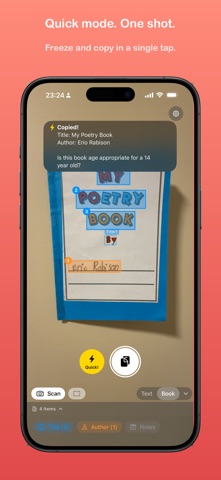
Quick mode freezes and copies in one shot — no tapping, no choosing. Sometimes it nails exactly what you wanted. Sometimes you get the barcode. Nailing the Snap → Tap → Copy combo never gets old.
Free selection
Don't want everything? Tap individual OCR blocks to pick exactly the text you need. Got a wall of blocks? Drag a dashed rectangle across them and grab them all at once. Long-press to select every block on screen. Cherry-pick, bulk-select, or mix the two — the whole frozen frame is yours.
Five built-in modes for real life:
Text — Grab anything. Paragraphs, labels, serial numbers, that Wi-Fi password on the back of the router.
Book — Point at a book. Title and author drop into separate fields, ready to paste into your reading list.
Card — Business cards become name, title, company, phone, email, and website. Each field, one tap to copy.
Quote — Capture a passage and its source. No more "I think it was from that one book."
Address — Street, city, state, zip. Sorted and formatted without you squinting at an envelope.
POWER MODE — Make your own
Create custom scan modes with exactly the fields you need. Newspaper? Recipe? Invoice? Pick from built-in fields, add smart detectors for dates, prices, phone numbers and links, or write your own regex patterns. Your scanner, your rules.
You can even add fields to the built-in modes — want Currency on your Card scanner? Just add it.
Smart detectors
Five ready-made extractors that find things automatically:
• Date — natural-language dates and times
• Currency — prices in any format ($1,234.56, €99, 1234 USD)
• Phone — phone numbers
• Link — URLs and web addresses
• Address — full postal addresses in one line
• Actually there are more than five
Add any of them to any mode with one tap.
Custom wraps
Add your own prefix and suffix to any copied text. Wrap in quotes, brackets, markdown — whatever your workflow needs.
Learn by doing
A built-in Learn tab walks you through every feature with hands-on demos you can tap and long-press — the lessons react like the real app. Three tiers: GO for the basics, GO HARDER for the power-user moves, and GO TO FULL POWER for custom modes, fields, and regex. Skim what you need, skip the rest.
Private by design
All text recognition and extraction happens on-device using Apple Vision. Custom fields, regex patterns, detector matching — everything runs locally. Nothing leaves your phone. No servers. No accounts. No analytics. No data to leak because there's no data to collect.
One price. No surprises.
Pay once. Use it forever. No subscriptions, no feature gates, no "premium tier." Every feature, every mode, every update — included.