AppBrain
AppBrain
  • Apps
  • Apps being viewed right now Trending apps today Most popular apps All-time most installed apps Top rated apps iPhone and iPad apps
  • Intelligence ▾
    Intelligence overview → Track any Android app or your whole market
    Track & analyze
    Keyword Tracker & OptimizerTrack & improve Play rankings App Performance ReportOne-off PDF for any app StatisticsFree Android & Play market stats
    Promote your app
    Featured Apps App Links
  • Intelligence
  • Pricing
  • Dashboard
  • Sign up
  • Log in
App Store Apps > Music > Fingering 2
App profile & analytics · Music · Data updated 2026-10-17
Fingering 2 icon

Fingering 2

by Patrick Q. Kelly · $6.99 · Version 2.9
Availability On the App Store since September 2016 ↗
Rating on App Store
–
Rating
–
0 reviews
Best rank
–
not in the top lists
Last updated
April 1, 2023
2.9

Fingering 2 is made and published by Patrick Q. Kelly. AppBrain is an independent app data site and isn't affiliated with Patrick Q. Kelly. The app name, icon, screenshots and description belong to Patrick Q. Kelly and are shown as published on the App Store.

About Fingering 2

Fingering 2 is a music app developed by Patrick Q. Kelly.

What is the rating of Fingering 2?

Fingering 2 has no ratings yet.

Is Fingering 2 free?

Fingering 2 costs $6.99. The app size is 152.22 MB. The latest version available is 2.9. The last update was on April 1, 2023.

What are the requirements for Fingering 2?

The app has a content rating of Everyone. The app has been available on the App Store since September 2016.

Description by Patrick Q. Kelly (from the App Store)
“This is a must have app for every music teacher, students and enthusiast.”
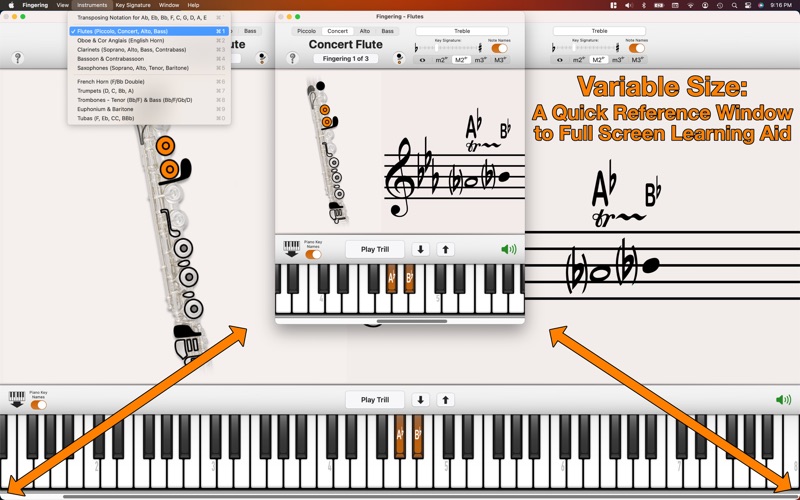
Immediate access to fingerings (with alternates and trills) for each instrument’s entire playable range. Get fingerings from the written or concert pitch.

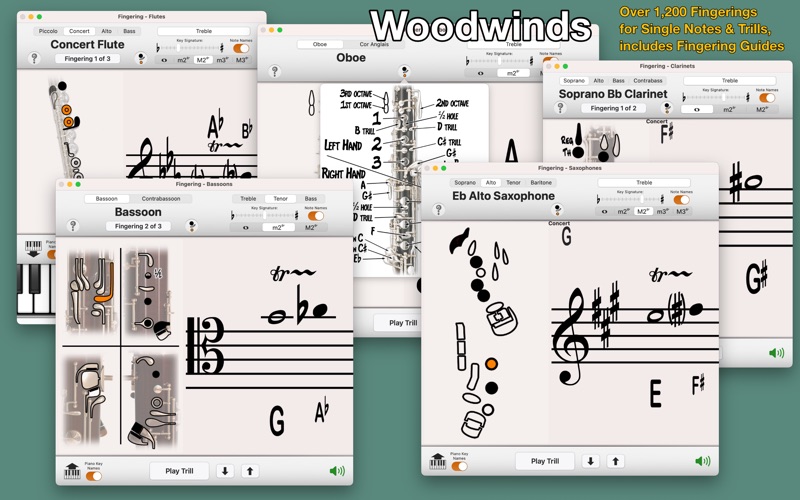
Woodwinds: Piccolo, Concert, Alto and Bass Flutes, Oboe and Cor Anglais, Soprano, Alto, Bass and Contrabass Clarinets, Bassoon and Contrabassoon, Soprano, Alto, Tenor and Baritone Saxophones
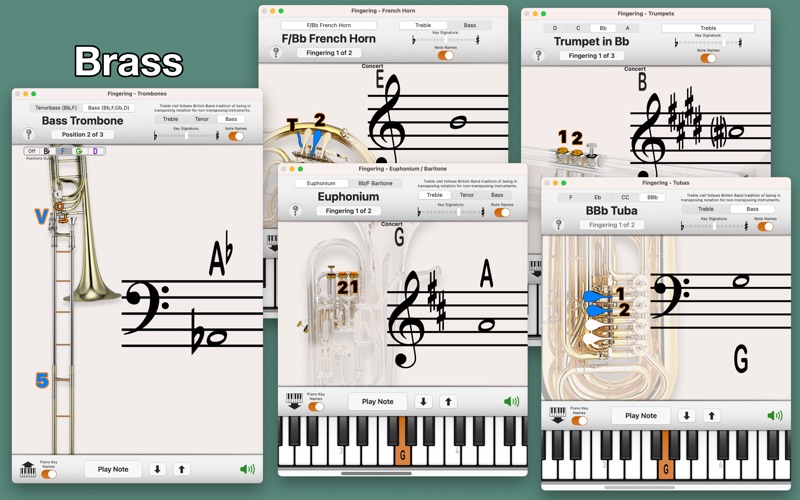
Brass: F/Bb Double French Horn, A, Bb, C and D Trumpets (Cornet, Flugelhorn), Bb/F Tenorbass and Bb/F/Gb/D Bass Trombones, Euphonium and Baritone, BBb, CC, Eb and F Tubas

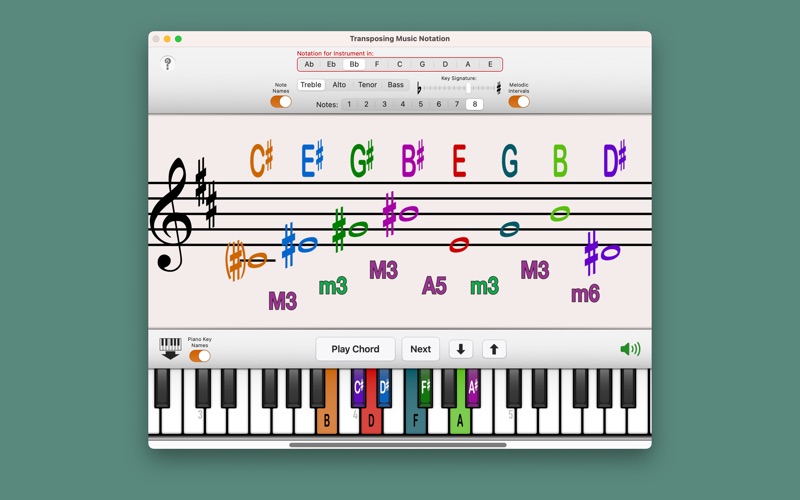
The additional ‘Transposing Music Notation' displays the note name, the location on the piano, and the musical notation (Treble, Alto, Tenor or Bass clef) for instruments in: Ab, Eb, Bb, F, C, G, D, A, and E.

• All woodwinds have trill fingerings for minor 2nd and major 2nd intervals.
• Flutes and Saxophones have additional fingerings for minor 3rd and major 3rd trills.
• Alto and Tenor Sax include altissimo fingerings up to written F, two octaves above the top line F of the treble clef.
• All Woodwinds include visual guides to the key names and locations on the instrument to understand the fingering charts better.
• Trombones include position guides for the different valve combinations.

Common Clefs for Select Instruments:
• Bassoon and Contrabassoon include Treble, Tenor and Bass clefs.
• Bb/F Tenorbass Trombone, Bb/F/Gb/D Bass Trombone, Euphonium and Baritone include Treble, Tenor and Bass clefs.
• F/Bb Double French Horn, BBb Tuba, CC Tuba, Eb Tuba, and F Tuba include Treble and Bass clefs.

Affects Bb/F Tenorbass and Bb/F/Gb/D Bass Trombones, Euphonium, Baritone, and BBb, Eb and F Tubas.

How to Use:
Pick a written note (click on the staff) and have the fingering displayed and concert pitch played on the piano.
Play a concert pitch on the piano (click on the piano) and have that pitch's fingering displayed and the transposed note written on the staff.

• If there are alternate fingerings available for a note or trill, a button will allow you to navigate through them.
• Use the 'Play Note' or 'Play Trill' button to repeatedly hear what's being displayed.
• Use the mute button to access the fingerings without hearing the pitches.

Selecting a Pitch:
Using the Staff (transposed for the current instrument): Simply click and drag up and down on the staff to select the note, drag right for sharp, left for flat, or drag up and down right or left of the note for constant sharps and flats.
Using the Piano (concert pitch): Scroll to move the keyboard, click to play notes, click & hold then drag to glissando. When you glissando up the keyboard, notes will be notated with sharps, when you glissando down, notes will be notated with flats. When you click specific notes they will be notated in the most common accidental for that note. ie: Eb rather than D#, F# rather than Gb.
Use the up and down arrows to move chromatically up and down without clicking the music staff or piano keyboard.
Show more Show less

Screenshots

Fingering 2 Screenshot 1 of 4
Fingering 2 Screenshot 2 of 4
Fingering 2 Screenshot 3 of 4
Fingering 2 Screenshot 4 of 4
Screenshots by Patrick Q. Kelly, from the the App Store listing
Official page on the App Store

More from Patrick Q. Kelly

Fingering icon Fingering
Patrick Q. Kelly
4.8
$4.99
156 ratings
Vocal Exercises icon Vocal Exercises
Patrick Q. Kelly
4.5
$4.99
59 ratings
Maestro icon Maestro
Patrick Q. Kelly
4.8
$2.99
57 ratings
Fingering Woodwinds • icon Fingering Woodwinds •
Patrick Q. Kelly
5.0
$3.99
30 ratings
Fingering Strings • icon Fingering Strings •
Patrick Q. Kelly
4.1
$3.99
23 ratings
Fingering XL icon Fingering XL
Patrick Q. Kelly
4.7
$4.99
22 ratings
Twelve Tone icon Twelve Tone
Patrick Q. Kelly
4.7
$4.99
16 ratings
Note Names & Pitches icon Note Names & Pitches
Patrick Q. Kelly
4.6
$1.99
16 ratings

Changelog of Fingering 2

No changelog data

Developer information for Patrick Q. Kelly

Patrick Q. Kelly

Address:

Share Fingering 2

Comments on Fingering 2 for iOS

We don't have enough comments to show example comments. Please check back later.

App Store Rankings for Fingering 2

This app is not ranked

Technologies used by Fingering 2

Frequently asked questions about Fingering 2

Is Fingering 2 free?

No. Fingering 2 costs $6.99 on the App Store.

Is Fingering 2 still available?

Yes. Fingering 2 is on the App Store, and the last update we saw was on April 1, 2023.

How large is Fingering 2?

Fingering 2 is 152.22 MB.

Is Fingering 2 suitable for children?

App Store rates the content of Fingering 2 as suitable for everyone.

Who made Fingering 2?

Fingering 2 was developed by Patrick Q. Kelly. It is listed in the music category on the App Store.

Popular Music Apps Top new apps Price drops on Google Play Apps other people are watching Today's trending apps
More hot apps 🔥
Overview Reviews Rankings Technology
AppBrain Intelligence premium content

Subscribe now to get full and unlimited access to AppBrain Intelligence. You'll have access to:

  • App Intelligence dashboard (performance timeline, competitor comparison, country rankings, insight cards)
  • Detailed ranking data per app
  • Full timeline per developer
  • Device market shares data per country
  • Unlimited keyword tracking
1 Month

$75/mo
(billed every month)

SAVE 0%
Subscribe
3 Months

$65/mo
($195 billed every 3 months)

SAVE 13%
Subscribe
1 Year

$57.50/mo
($690 billed every year)

SAVE 23%
Subscribe
Each subscription will automatically renew 3 days before the expiration date for the same time period. Subscriptions can be cancelled at any time before the renewal.

AppBrain is an app data site, we track rankings, ratings, installs for all apps and games on Google Play and the App Store. AppBrain doesn't host app files or APKs, all install links go directly to the official store. All trademarks are owned by their respective owners. As an Amazon Associate AppBrain earns from qualifying purchases.

More apps

  • Top Android apps being viewed
  • VOKA 3D Anatomy and Physiology
  • View TierMaker - Tier List Maker
  • HackLab: Hacker Simulator Game

App statistics

  • Android statistics
  • Google Play Developer stats
  • Trending Android Apps
  • Trending iOS apps
  • Top popular Apps
  • Buy the best Android phone
  • Buy & sell app businesses

About AppBrain

  • Contact
  • Privacy
  • Documentation
  • DMCA takedowns
  • Articles
  • Blog
  • The AppBrain advertising system
© 2010-2026 - AppBrain