FlashDrop - file sharing is an overall app developed by ButterFalcon.
Download Statistics
User Ratings
The app has no ratings yet.
App Information
FlashDrop - file sharing is FREE to download. The APK download size is 49.88 MB. The latest version available is 1.4.0. The last update was on December 19, 2025.
Technical Requirements
The app has a content rating of Everyone. The app has been available on Google Play December 2025.
Description
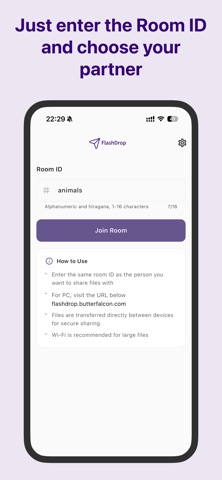
FlashDrop is a simple, secure, and fast file-sharing app. Just enter the same Room ID to instantly share any file—photos, videos, documents, and more.
【Key Features】 Simple sharing via Room ID - Just enter a Room ID of 1 to 16 characters - Share files with anyone who enters the same ID - Automatically saves previously used Room IDs
P2P (Peer-to-Peer) Connection - Direct data transfer between devices - High speed since it bypasses servers - Emphasizes privacy and security
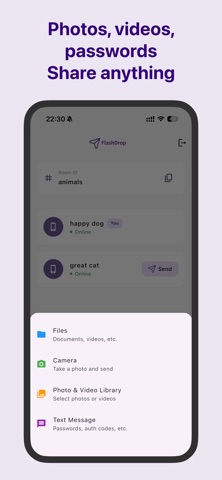
Supports Diverse File Formats - Photos/Videos: Automatically saved to your camera roll - Documents: Saved to your download folder - Text messages: Securely send sensitive info like passwords
Real-time transfer status display - Check transfer progress in real time - Shows file size and transfer speed - Includes cancel function
Batch send multiple files - Select up to 20 files simultaneously - Supports drag-and-drop - Instantly share photos taken with your camera
【Useful Scenarios】 • Sharing photos and videos with friends and family • Quickly distributing meeting materials • Transferring files between devices • Sharing large files • Securely sending passwords and authentication codes
【Reliable Privacy Protection】 - Files are never stored on servers - Direct peer-to-peer transfers between devices - Room IDs persist after use for easy future access - All communications are encrypted for secure transfer
【Supported File Formats】 Images: JPEG, PNG, GIF, HEIC, etc. Videos: MP4, MOV, AVI, etc. Documents: PDF, DOCX, XLSX, PPTX, etc. Others: ZIP, TXT, CSV, etc. - All file formats supported
【How to Use】 1. Launch the app and enter the Room ID 2. Have the recipient enter the same Room ID 3. Select files and tap the Send button 4. Transfer starts automatically once the recipient approves
【Recommended Environment】 - Recommended for use on Wi-Fi (for large files) - Compatible with iOS 14.0 or later - Available on both iPad and iPhone
Terms of Service: https://flash-drop.web.app/terms_en.html Privacy Policy: https://flash-drop.web.app/privacy_en.html
Each subscription will automatically renew 3 days before the expiration date for
the same time period. Subscriptions can be cancelled at any time before the renewal.