Download Android Apps and Games
AppBrain
  • Apps
  • Apps being viewed right now Trending apps today Most popular apps All-time most downloaded apps Top rated apps
  • Intelligence ▾
    Intelligence overview → Track any Android app or your whole market
    Track & analyze
    Keyword Tracker & OptimizerTrack & improve Play rankings App Performance ReportOne-off PDF for any app StatisticsFree Android & Play market stats
    Promote your app
    Featured Apps App Links
  • Intelligence
  • Pricing
  • Dashboard
  • Sign up
  • Log in
Last updated on: 2026-06-24
App Store Apps > Weather > FLAT Weather Clock for iPhone
FLAT Weather Clock for iPhone icon

FLAT Weather Clock for iPhone

1.4.2
Takuya Aso
4.60
5 reviews
Free

FLAT Weather Clock for iPhone Screenshot 1 of 10
FLAT Weather Clock for iPhone Screenshot 2 of 10
FLAT Weather Clock for iPhone Screenshot 3 of 10
FLAT Weather Clock for iPhone Screenshot 4 of 10
FLAT Weather Clock for iPhone Screenshot 5 of 10
FLAT Weather Clock for iPhone Screenshot 6 of 10
FLAT Weather Clock for iPhone Screenshot 7 of 10
FLAT Weather Clock for iPhone Screenshot 8 of 10
FLAT Weather Clock for iPhone Screenshot 9 of 10
FLAT Weather Clock for iPhone Screenshot 10 of 10
Download from the App Store

About FLAT Weather Clock for iPhone

FLAT Weather Clock for iPhone is an overall app developed by Takuya Aso.

Download Statistics

User Ratings

FLAT Weather Clock for iPhone is rated 4.60 out of 5 stars. The rating is based on 5 ratings.

App Information

FLAT Weather Clock for iPhone is FREE to download. The APK download size is 21.60 MB. The latest version available is 1.4.2. The last update was on March 27, 2023.

Technical Requirements

The app has a content rating of Everyone. The app has been available on Google Play April 2017.

Description
◇ Summary

As a relative of this app, there is an iPad application with FLAT Weather Clock for iPad.

This iPhone App follows the basic design, but this App is used the latest SDK and written in the latest Swift version, many weather information can display in various forms. The iPhone has a narrow screen size but it has a higher portability than iPad. So I needed to think different concepts. One of the concepts of the iPad application is the clock function, but as the users frequently operates the iPhone and users can check the time by looking at the lock screen or status bar.

So the clock function becomes unnecessary. Just as it is not contradictory to the name of the application, I implemented it so that the design can be displayed as it is by tapping clock button.

◇ Feature

The iPad version packed various functions on one screen. There was little information volume and it was simple. So In the iPhone app version, I used several Tabs to display different information. You can check current weather, weekly weather forecast, and world weather information. I use almost all information obtained by weather information.

From iOS 13, you can use this app with dark mode. Please enjoy!!

■ Current Weather

With Current Tab you can check the weather info of your location. In addition, you can use the clock function and the indicator whether to bring an umbrella today. By taping the + button at the bottom of the screen you have made it possible to display even more information. I added the function to show a map in the background of the content screen. It can also be hidden from setting when it is not necessary.

■ Forecast

With Weekly Tab, you can check the weather forecast for your location (max 16 days). Information for one day is displayed on one card UI. Swipe sideways to see the next day's information. In addition, vertical scrolling is possible for additional information part. Since it is forecast to the last, please trust the latest weather.

■ World Weather

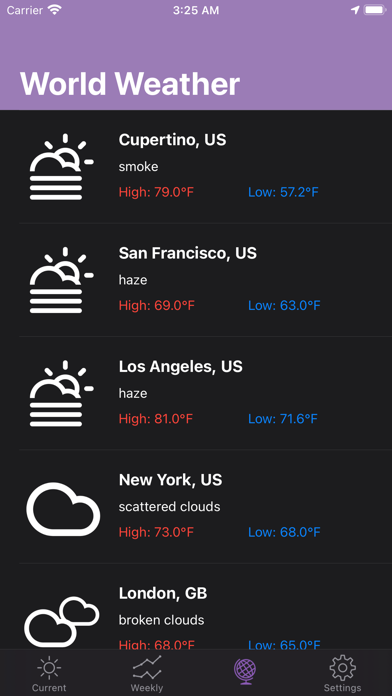
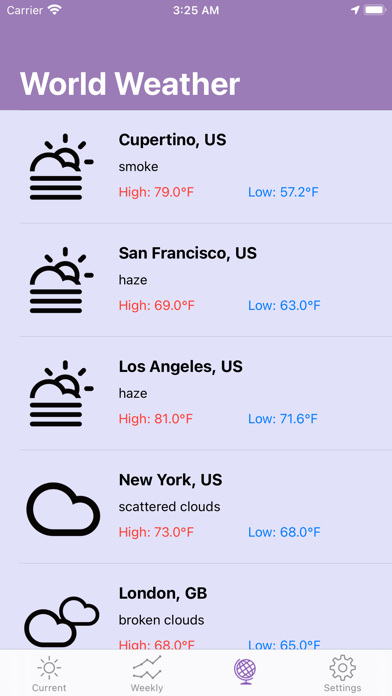
With World Tab, you made it possible to check the weather of the world. Currently fixed data is available for 20 cities. I plan to implement it so that you can freely customize it in future updates. If you have any request please send me a mail from the feedback part of the setting.

■ Customize scale and time-mode

The last Tab is a setting. You can select the display mode of your favorite scale and time on the internal setting screen. In the feedback, you can send a bug-fix request and a function addition proposal by e-mail. I would like to value user feedback. Please use all means.

◇ For Users

If you find a bug or you would like to suggest adding functionality, please send feedback from on the Settings screen.

Thanks. Have a beautiful life!!

This App obtains weather data from OpenWeatherMap APIs.
Show more Show less

More data about FLAT Weather Clock for iPhone

Price Free to download
Rating 4.60 based on 5 ratings
Ranking Not ranked
Version 1.4.2
App download size 21.6 MB
Suitable for Everyone

Alternative downloads for the FLAT Weather Clock for iPhone app

Weather Live Channal icon Weather Live Channal
sejal thesiya
3.2
Free
4 ratings
All Weather° icon All Weather°
Mohamad Hammoud
3.6
Free
5 ratings
Mini Clock - flip white noise icon Mini Clock - flip white noise
学成 黄
4.7
Free
14 ratings
Transparency Weather icon Transparency Weather
经纬 王
4.5
Free
48 ratings
Weather - Forecasts icon Weather - Forecasts
ASN GROUP LLC
4.4
Free
192 ratings
More active
USA Weather forecast icon USA Weather forecast
ID Mobile SA
4.6
Free
16 ratings
Weather Live Forecast ' icon Weather Live Forecast '
Matrix Software Co.
4.6
Free
144 ratings
Fine° icon Fine°
Yoshihiko Eto
4.4
Free
736 ratings

More from Takuya Aso

Memories - 乗車記録アプリ icon Memories - 乗車記録アプリ
Takuya Aso
4.0
Free
1 ratings
Color Convertor icon Color Convertor
Takuya Aso
0.0
Free
Kintai-chan icon Kintai-chan
Takuya Aso
0.0
Free

Changelog of FLAT Weather Clock for iPhone

No changelog data

Developer information for Takuya Aso

Takuya Aso

Address:

Share FLAT Weather Clock for iPhone

Comments on FLAT Weather Clock for iPhone for iOS

We don't have enough comments to show example comments. Please check back later.

App Store Rankings for FLAT Weather Clock for iPhone

This app is not ranked

Technologies used by FLAT Weather Clock for iPhone

Apps on sale Popular Overall Top new apps Today's trending apps Apps other people are watching
Weather Live Channal icon Weather Live Channal
All Weather° icon All Weather°
Mini Clock - flip white noise icon Mini Clock - flip white noise
Transparency Weather icon Transparency Weather
Weather - Forecasts icon Weather - Forecasts
USA Weather forecast icon USA Weather forecast
Weather Live Forecast ' icon Weather Live Forecast '
Fine° icon Fine°

Back to top
AppBrain Intelligence premium content

Subscribe now to get full and unlimited access to AppBrain Intelligence. You'll have access to:

  • App Intelligence dashboard (performance timeline, competitor comparison, country rankings, insight cards)
  • Detailed ranking data per app
  • Full timeline per developer
  • Device market shares data per country
1 Month

$75/mo
(billed every month)

SAVE 0%
Subscribe
3 Months

$65/mo
($195 billed every 3 months)

SAVE 13%
Subscribe
1 Year

$57.50/mo
($690 billed every year)

SAVE 23%
Subscribe
Each subscription will automatically renew 3 days before the expiration date for the same time period. Subscriptions can be cancelled at any time before the renewal.

AppBrain is a directory focused on discovering great apps and games. We give statistics, rankings and search options that Google Play and the App Store don't have. All trademarks are owned by their respective owners. AppBrain doesn't offer APKs or binaries, and always lets users install the official version from Google Play or the App Store.

More apps

  • Top Android apps being viewed
  • FNBRF Mobile Banking
  • MathDoku
  • View Call Boy Friend

Android Statistics

  • Android statistics
  • Google Play Developer stats
  • Trending Android Apps
  • Top popular Apps
  • Buy the best Android phone

About AppBrain

  • Contact
  • Privacy
  • Documentation
  • DMCA takedowns
  • Articles
  • Blog
  • Monetization tips: Understanding your eCPM
© 2010-2026 - AppBrain