

FlickMouse is made and published by Tetsuya Sato. AppBrain is an independent app data site and isn't affiliated with Tetsuya Sato. The app name, icon, screenshots and description belong to Tetsuya Sato and are shown as published on the App Store.
AppBrain's verdict
- Last updated
- April 3, 2026
- Size
- 1.81 MB
User feedback
Ratings and reviews on the App StoreComments on FlickMouse for iOS
We don't have enough comments to show example comments. Please check back later.
Store listing
By Tetsuya Sato, from the App Store


Description by Tetsuya Sato Written by the developer, not by AppBrain. Click to read.
The “FlickMouse Server” app is required on your Mac (macOS).
Within the same Wi-Fi network, you can control the cursor, type text, and use shortcuts — all from your iPhone.
【What you can do】
■ Trackpad controls (Free)
・One finger: move the cursor / tap: left-click
・Two fingers: right-click / scroll
・Three-finger swipes, and more
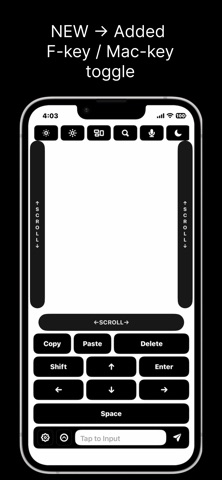
■ Scroll rails (Pro)
・One-finger vertical / horizontal scroll rails
■ Keyboard input (Pro)
・Send text from the input field at the bottom of the screen
・One-tap keys you use often, such as Enter / Delete / Arrow keys / Space
■ Shortcuts / function keys (Pro)
・Copy / Paste / Undo / Mission Control / Dock, and more
・F1–F12 keys grouped at the top
【Free vs Pro】
■ Free
・Move the cursor / left & right click / scroll / swipe gestures
※Pointer controls alone are enough for video playback and simple operations.
■ Pro (Paid: subscription or one-time purchase)
・Text input
・Various key / shortcut buttons (including F1–F12)
・Vertical / horizontal scroll rails, and more
【7-day free trial】
On first launch, tap “Start free for 7 days” to try Pro features for 7 days.
After the trial ends, the app automatically switches to Free mode and you can continue using it for free.
【About subscriptions】
・Pro offers auto-renewing subscriptions (monthly / yearly).
・Your subscription will renew automatically unless you cancel at least 24 hours before the end of the current period.
・After purchase, you can manage or cancel in iPhone Settings > your name > Subscriptions.
【About the one-time purchase】
・The one-time purchase lets you use Pro features with a single payment.
【How to use (3-minute setup)】
Install “FlickMouse Server” on your Mac.
Launch Server and keep it in standby mode.
Connect your iPhone and Mac to the same Wi-Fi network.
On your iPhone, enter the IP address and port to connect.
※Once set up, you can start quickly next time with auto-reconnect.
【Communication & privacy】
・No account registration required
・Communication between iPhone and Mac is encrypted
・No ad SDKs or tracking libraries are used
Official / guide / download
・Official page: https://tech-peace-lab.jp/flickmouse/
・Setup guide: https://tech-peace-lab.jp/flickmouse/setup.html
・Direct Server download: https://tech-peace-lab.jp/flickmouse/index.html#download
Terms (EULA): https://www.apple.com/legal/internet-services/itunes/dev/stdeula/
Privacy policy: https://tech-peace-lab.jp/flickmouse/privacy
Safety and technology
Found in the app by AppBrain- Price
- Free
- App size
- 1.81 MB
- Content rating
- Everyone
Technologies used by FlickMouse
Releases
Updates seen on the App Store- Version
- 1.1.8
- Launched
- March 2026
No changelog data
Alternatives
Similar apps and more from Tetsuya SatoAlternatives to FlickMouse


More from Tetsuya Sato


Rankings
App Store top chartsApp Store Rankings for FlickMouse
About the app and developer
About FlickMouse
FlickMouse is an utilities app developed by Tetsuya Sato.
User Ratings
The app has no ratings yet.
App Information
FlickMouse is freely available from the App Store. The app size is 1.81 MB. The latest version available is 1.1.8. The last update was on April 3, 2026.
Technical Requirements
The app has a content rating of Everyone. The app has been available on the App Store since March 2026.
Developer information for Tetsuya Sato
Address:
Frequently asked questions about FlickMouse
Is FlickMouse free?
Yes. FlickMouse is free on the App Store.
Is FlickMouse still available?
Yes. FlickMouse is on the App Store, and the last update we saw was on April 3, 2026.
How large is FlickMouse?
FlickMouse is 1.81 MB.
Is FlickMouse suitable for children?
App Store rates the content of FlickMouse as suitable for everyone.
Who made FlickMouse?
FlickMouse was developed by Tetsuya Sato. It is listed in the utilities category on the App Store.
What are the best alternatives to FlickMouse?
People looking at FlickMouse also look at these utilities apps: Winnow - Personal Rankings, QuickPad - Touch & Control, kelvin light scale, Desk Remote: Mouse control, 可多小组件.