

Desk Remote: Mouse control
Desk Remote: Mouse control is made and published by Daniil Nuzhdin. AppBrain is an independent app data site and isn't affiliated with Daniil Nuzhdin. The app name, icon, screenshots and description belong to Daniil Nuzhdin and are shown as published on the App Store.
AppBrain's verdict
- Last updated
- August 1, 2026
Rankings
App Store top chartsApp Store Rankings for Desk Remote: Mouse control
Competitors
Similar apps and more from Daniil NuzhdinAlternatives to Desk Remote: Mouse control





More from Daniil Nuzhdin


Releases
Updates seen on the App Store- Version
- 1.5
- Launched
- February 2026
No changelog data
User feedback
Ratings and reviews on the App StoreComments on Desk Remote: Mouse control for iOS
We don't have enough comments to show example comments. Please check back later.
Technology
Found in the app by AppBrain- Price
- Free
- App size
- 11.0 MB
- Content rating
- Everyone
Technologies used by Desk Remote: Mouse control
About the app and developer
About Desk Remote: Mouse control
Desk Remote: Mouse control is an utilities app developed by Daniil Nuzhdin.
User Ratings
The app has no ratings yet.
App Information
Desk Remote: Mouse control is freely available from the App Store. The app size is 11.03 MB. The latest version available is 1.5. The last update was on August 1, 2026.
Technical Requirements
The app has a content rating of Everyone. The app has been available on the App Store since February 2026.
Developer information for Daniil Nuzhdin
Address:
Store listing
By Daniil Nuzhdin, from the App Store

Description by Daniil Nuzhdin Written by the developer, not by AppBrain. Click to read.
REQUIRES THE FREE MAC APP
Desk Remote comes in two parts. This app runs on your iPhone; the free Desk Remote for Mac companion app runs on your Mac. Open Desk Remote on your iPhone and tap "Send link to my Mac" — the download link goes straight to your computer by AirDrop, Messages or Mail.
Get the Mac app: https://apps.apple.com/app/id6758866900
With both installed, the two find each other over Wi-Fi or Bluetooth with zero configuration. Just open the app, tap your Mac, and start controlling.
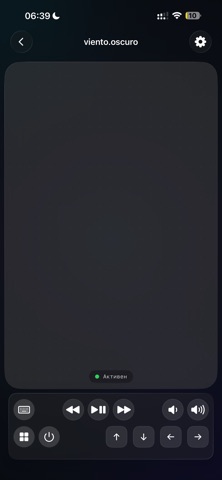
TRACKPAD
• Single finger — move the cursor
• Two fingers — scroll
• Tap — left click
• Double tap — double click
• Two-finger tap — right click
• Long press + drag — click and drag
• Pinch — zoom in/out
KEYBOARD
• Full text input
• Modifier keys: Cmd, Ctrl, Option
• F1–F12 function keys
• Arrow keys
• Backspace and special keys
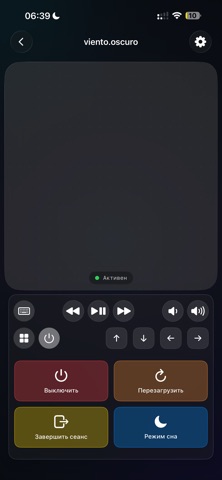
MEDIA & SYSTEM CONTROLS
• Play / Pause / Next / Previous
• Volume up & down
• Screen brightness
• Mission Control & Spotlight
APP LAUNCHER
• View all running apps on your Mac
• Switch to any app with one tap
POWER MENU
• Sleep, restart, log out, shut down — remotely
CONNECTIVITY
• Auto-discovery via Wi-Fi (Bonjour) and Bluetooth LE
• Real-time connection status
• Instant reconnection
Free version includes trackpad, scrolling, clicks, and keyboard input. Upgrade to Pro to unlock media controls, volume, brightness, F-keys, arrow keys, app launcher, power menu, and advanced gestures.
Requires the free Desk Remote for Mac app (Mac App Store, macOS 14 or later).
SUBSCRIPTION
Desk Remote Pro is an auto-renewable subscription (monthly or yearly). Payment is charged to your Apple Account. The subscription renews automatically unless canceled at least 24 hours before the end of the current period. You can manage or cancel it in your Apple Account settings.
Terms of Use (EULA): https://www.apple.com/legal/internet-services/itunes/dev/stdeula/
Privacy Policy: https://gelfand.dev/?policy=desk-remote-client