

MDReader: Markdown Editor
MDReader: Markdown Editor is made and published by Daniil Nuzhdin. AppBrain is an independent app data site and isn't affiliated with Daniil Nuzhdin. The app name, icon, screenshots and description belong to Daniil Nuzhdin and are shown as published on the App Store.
AppBrain's verdict
- Last updated
- August 18, 2026
Rankings
App Store top chartsApp Store Rankings for MDReader: Markdown Editor
Competitors
Similar apps and more from Daniil NuzhdinAlternatives to MDReader: Markdown Editor


More from Daniil Nuzhdin


Releases
Updates seen on the App Store- Version
- 1.1
- Launched
- August 2026
No changelog data
User feedback
Ratings and reviews on the App StoreComments on MDReader: Markdown Editor for iOS
We don't have enough comments to show example comments. Please check back later.
Technology
Found in the app by AppBrain- Price
- Free
- App size
- 22.2 MB
- Content rating
- Everyone
Technologies used by MDReader: Markdown Editor
About the app and developer
About MDReader: Markdown Editor
MDReader: Markdown Editor is a productivity app developed by Daniil Nuzhdin.
User Ratings
The app has no ratings yet.
App Information
MDReader: Markdown Editor is freely available from the App Store. The app size is 22.19 MB. The latest version available is 1.1. The last update was on August 18, 2026.
Technical Requirements
The app has a content rating of Everyone. The app has been available on the App Store since August 2026.
Developer information for Daniil Nuzhdin
Address:
Store listing
By Daniil Nuzhdin, from the App Store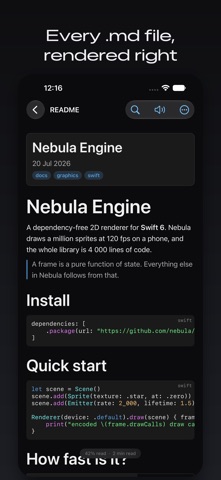

Description by Daniil Nuzhdin Written by the developer, not by AppBrain. Click to read.
FAST, EVEN ON BIG FILES
A two-tier parser scans a document in a single pass and only fully parses the blocks you can actually see. A 10 MB file opens before other editors have finished showing a spinner, and scrolling stays smooth all the way down.
RENDERS THE WHOLE OF MARKDOWN
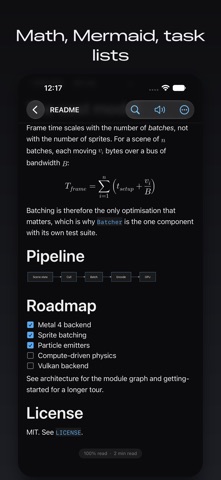
GitHub-flavoured Markdown with tables, task lists you can tick straight from reading mode, footnotes that jump both ways, YAML front matter shown as a card, LaTeX math inline and display, fenced code with syntax highlighting, and Mermaid diagrams rendered offline.
AN EDITOR THAT STAYS OUT OF THE WAY
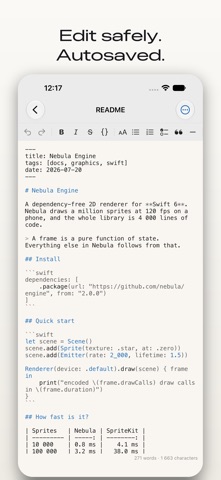
Live syntax highlighting, lists that continue and renumber themselves, bold/italic/link shortcuts, find and replace, table and formula inserters, and paste an image to save it next to the document. Autosave goes through the system file coordinator, so editing alongside Obsidian, git or iCloud is safe.
PICKS UP WHERE YOU LEFT OFF
Reading position is restored to the pixel, per document, across relaunches, rotation and window resizes.
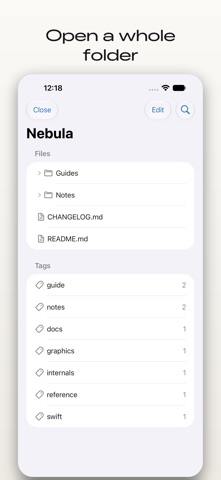
FOLDER WORKSPACES (PRO)
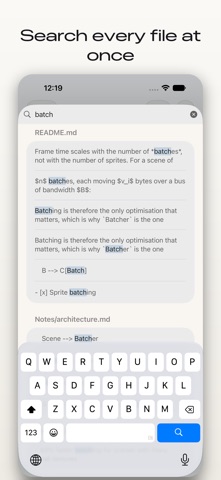
Open a whole folder: a repository's docs, an Obsidian vault, a Zettelkasten. Fuzzy quick-open, full-text search across every file in the folder, [[wiki-links]] with a backlinks panel, a front-matter tag browser, and read-only git status per file. Changes made by other apps are picked up in place, without losing your position.
MORE IN PRO
PDF export and print, publishing to GitHub Gist and Telegraph, presentation mode for slides, a custom theme editor with imported fonts, focus and typewriter modes, word-count goals, reading statistics, text-to-speech with follow-along highlighting, local version history with diffs, snippets, Vim keybindings, and an AI pack that summarises and rewrites entirely on device.
BUILT FOR APPLE PLATFORMS
One purchase covers iPhone, iPad and Mac. Keyboard shortcuts throughout, multiple windows, menu bar commands, a Share extension, Shortcuts actions, widgets, a URL scheme, Spotlight indexing, VoiceOver labels and Dynamic Type.
PRIVACY
MDReader collects nothing. No analytics SDK, no account, no server of ours to talk to. The only network traffic is what your own documents ask for, such as remote images, plus the publishing integrations you set up yourself.
FREE AND PRO
The reader and the single-file editor are free forever: all rendering including math and syntax highlighting, the base themes, table of contents, in-file search, HTML, Markdown and plain-text export, and position restore. Pro unlocks folder workspaces and the power features above, as a one-time purchase or as a yearly subscription with a free trial.
SUBSCRIPTION AND PURCHASE DETAILS
MDReader Pro (Yearly) - auto-renewable subscription, 1 year, USD 9.99 per year, including a 7-day free trial for new subscribers.
MDReader Pro (Lifetime) - one-time purchase, USD 24.99, not a subscription.
Payment is charged to your Apple Account at confirmation of purchase. A yearly subscription renews automatically unless auto-renew is turned off at least 24 hours before the end of the current period, and your account is charged for renewal within 24 hours before the period ends. You can manage or cancel the subscription in your Apple Account settings after purchase. Any unused portion of a free trial is forfeited when a subscription is purchased.
Terms of Use (EULA): https://www.apple.com/legal/internet-services/itunes/dev/stdeula/
App Terms of Service: https://gelfand.dev/mdreader/terms
Privacy Policy: https://gelfand.dev/mdreader/privacy