

Flows - Planner & Notes
Flows - Planner & Notes is made and published by HUNTER WESTLEY BOLTON. AppBrain is an independent app data site and isn't affiliated with HUNTER WESTLEY BOLTON. The app name, icon, screenshots and description belong to HUNTER WESTLEY BOLTON and are shown as published on the App Store.
AppBrain's verdict
- Rating on App Store
- 4.86
- 7 ratings
- Last updated
- August 29, 2026
- Size
- 48.5 MB
It doesn't have enough ratings yet to judge what users think.
User feedback
Ratings and reviews on the App StoreComments on Flows - Planner & Notes for iOS
We don't have enough comments to show example comments. Please check back later.
Store listing
By HUNTER WESTLEY BOLTON, from the App Store




Description by HUNTER WESTLEY BOLTON Written by the developer, not by AppBrain. Click to read.
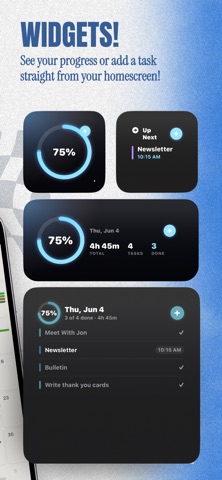
Add tasks, set time estimates and difficulty levels, then let Flows arrange your schedule. Let Auto-Schedule place them intelligently; hard tasks go in the morning, easy ones fill the gaps. View your day, week, or month at a glance.
NOTES THAT WORK WITH YOUR TASKS
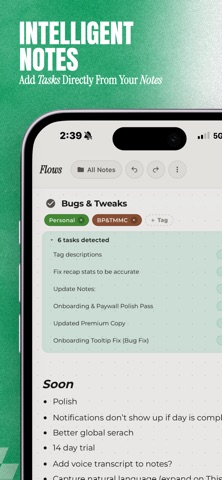
Capture ideas, meeting notes, and to-dos with a rich-text editor organized into folders. Flows can detect tasks hiding in your notes and turn them into real, schedulable items, no copy-pasting required.
SMART TAGS & AUTO-TAGGING
Create tags with descriptions and keywords, and Flows will suggest them automatically as you add tasks. Organize your work by project, priority, or whatever makes sense for your life.
STAY IN THE ZONE
Start a Pomodoro timer for any task with customizable work and break intervals (5–90 minutes). Pick from ambient sounds like rain, lo-fi beats, or white noise. When the timer ends, your progress is logged automatically.
BUILD A STREAK YOU'RE PROUD OF
Complete your daily plan to keep your streak alive. Flows understands that rest days happen; your streak won't break over a weekend. Check your weekly recap to see how your focus time, completion rate, and productivity are trending.
SEARCH EVERYTHING
Find any task or note instantly with global search. Filter by type, date range, or completion status. Sort by relevance, date, or name.
MAKE IT YOURS
Choose from 16+ handcrafted color themes, switch between dark and light mode, and pick a display font. Five notification personalities, from gentle encouragement to delightfully unhinged commentary, keep things interesting.
FLOWS PRO (30-Day Free Trial)
Unlock the full experience:
• Auto-Schedule — Intelligently fills your timeline based on difficulty, priority, and your available hours. Hard tasks land in the morning. Dreaded ones go first.
• Focus Forecast — See how your focus time trends across days and weeks. Get a Monday morning preview of what's ahead.
• Calendar Sync — Pull events from Google Calendar or Apple Calendar so your schedule and your plan live side by side.
• Notion Sync — Connect your Notion workspace and keep everything in one place.
• Slack Integration — Share your focus status with your team automatically.
• Cloud Sync — Your tasks, notes, and streaks stay in sync across all your devices.
• Unlimited Tags — Create as many tags as you need.
• All Themes — Access every color theme and future additions.
Terms & Conditions:
https://flowspomo.com/terms.html
Privacy Policy:
https://flowspomo.com/privacy.html
Safety and technology
Found in the app by AppBrain- Price
- Free
- App size
- 48.5 MB
- Content rating
- Low
Technologies used by Flows - Planner & Notes
Releases
Updates seen on the App Store- Version
- 1.5.9
- Launched
- May 2026
No changelog data
Alternatives
Similar apps and more from HUNTER WESTLEY BOLTONAlternatives to Flows - Planner & Notes


Rankings
App Store top chartsApp Store Rankings for Flows - Planner & Notes
About the app and developer
About Flows - Planner & Notes
Flows - Planner & Notes is a productivity app developed by HUNTER WESTLEY BOLTON.
What is the rating of Flows - Planner & Notes?
Flows - Planner & Notes is rated 4.86 out of 5 stars, based on 7 ratings.
Is Flows - Planner & Notes free?
Flows - Planner & Notes is free. The app size is 48.50 MB. The latest version available is 1.5.9. The last update was on August 29, 2026.
What are the requirements for Flows - Planner & Notes?
The app has a content rating of Low Maturity. The app has been available on the App Store since May 2026.
Developer information for HUNTER WESTLEY BOLTON
Address:
Frequently asked questions about Flows - Planner & Notes
Is Flows - Planner & Notes free?
Yes. Flows - Planner & Notes is free on the App Store.
Is Flows - Planner & Notes still available?
Yes. Flows - Planner & Notes is on the App Store, and the last update we saw was on August 29, 2026.
How large is Flows - Planner & Notes?
Flows - Planner & Notes is 48.50 MB.
Is Flows - Planner & Notes suitable for children?
App Store gives Flows - Planner & Notes a low maturity rating, so it is meant for older children and up.
How do people rate Flows - Planner & Notes?
Flows - Planner & Notes scores 4.86 out of 5 stars, from 7 ratings on the App Store.
Who made Flows - Planner & Notes?
Flows - Planner & Notes was developed by HUNTER WESTLEY BOLTON. It is listed in the productivity category on the App Store.
What are the best alternatives to Flows - Planner & Notes?
People looking at Flows - Planner & Notes also look at these productivity apps: JournalWrite: Journal & Stats, Tagmentia, Tase - AI Life Assistant, Quietime, Draftly AI.