

FlyArchive is made and published by Lofloop LLC. AppBrain is an independent app data site and isn't affiliated with Lofloop LLC. The app name, icon, screenshots and description belong to Lofloop LLC and are shown as published on the App Store.
AppBrain's verdict
- Last updated
- October 27, 2026
Rankings
App Store top chartsApp Store Rankings for FlyArchive
This app is not ranked
Competitors
Similar apps and more from Lofloop LLCAlternatives to FlyArchive


Releases
Updates seen on the App Store- Version
- 1.0.5
- Launched
- July 2026
No changelog data
User feedback
Ratings and reviews on the App StoreComments on FlyArchive for iOS
We don't have enough comments to show example comments. Please check back later.
Technology
Found in the app by AppBrain- Price
- Free
- App size
- 13.3 MB
- Content rating
- Everyone
Technologies used by FlyArchive
About the app and developer
About FlyArchive
FlyArchive is an utilities app developed by Lofloop LLC.
What is the rating of FlyArchive?
FlyArchive has no ratings yet.
Is FlyArchive free?
FlyArchive is free. The app size is 13.28 MB. The latest version available is 1.0.5. The last update was on October 27, 2026.
What are the requirements for FlyArchive?
The app has a content rating of Everyone. The app has been available on the App Store since July 2026.
Developer information for Lofloop LLC
Address:
Store listing
By Lofloop LLC, from the App Store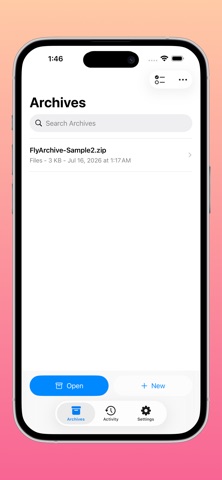

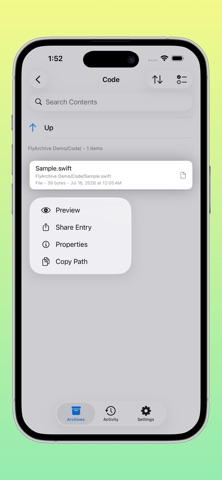
Screenshots by Lofloop LLC, from the the App Store listing
Description by Lofloop LLC Written by the developer, not by AppBrain. Click to read.
FlyArchive is a native archive utility designed for iPhone and iPad, making it easy to browse, extract, and create archives securely and efficiently.
View files and folders inside an archive without extracting everything first. FlyArchive opens archives directly from the Files app, external storage, and other document providers while keeping the original archive in place.
Key Features:
• Browse ZIP, 7Z, RAR, TAR, and many other common archive formats
• Preview files inside archives with Quick Look
• Extract an entire archive or selected files and folders
• Create ZIP, 7Z, TAR, TAR.GZ, TAR.BZ2, TAR.XZ, and TAR.ZST archives
• Add password protection to ZIP and 7Z archives
• Open and extract password-protected archives
• Search, sort, and inspect file details such as size, type, and modification date
• Test archive integrity to identify damaged or unreadable files
• Track progress, resolve conflicts, and cancel operations from the Activity center
• Save or send newly created archives using the system share sheet
Designed for Apple Devices:
FlyArchive integrates naturally with iOS and iPadOS. Open archives from the Files app, find recently opened archives with Spotlight, or use Shortcuts, Siri, and the Action Button to start the Open Archive workflow.
On iPad, FlyArchive provides a multi-column interface, multiwindow support, and hardware keyboard shortcuts for an efficient desktop-style workflow.
Security and Privacy:
Before extraction, FlyArchive checks for unsafe paths and blocks directory traversal, absolute paths, and other entries that could write outside the selected destination. Archive processing happens locally on your device.
FlyArchive does not track you or collect or upload your files or archive contents. Recent archive records, search indexes, and activity status remain on your device.
Whether you need to inspect a downloaded archive, extract a few selected files, or create a secure archive on the go, FlyArchive provides a powerful workflow that feels at home on iPhone and iPad.
View files and folders inside an archive without extracting everything first. FlyArchive opens archives directly from the Files app, external storage, and other document providers while keeping the original archive in place.
Key Features:
• Browse ZIP, 7Z, RAR, TAR, and many other common archive formats
• Preview files inside archives with Quick Look
• Extract an entire archive or selected files and folders
• Create ZIP, 7Z, TAR, TAR.GZ, TAR.BZ2, TAR.XZ, and TAR.ZST archives
• Add password protection to ZIP and 7Z archives
• Open and extract password-protected archives
• Search, sort, and inspect file details such as size, type, and modification date
• Test archive integrity to identify damaged or unreadable files
• Track progress, resolve conflicts, and cancel operations from the Activity center
• Save or send newly created archives using the system share sheet
Designed for Apple Devices:
FlyArchive integrates naturally with iOS and iPadOS. Open archives from the Files app, find recently opened archives with Spotlight, or use Shortcuts, Siri, and the Action Button to start the Open Archive workflow.
On iPad, FlyArchive provides a multi-column interface, multiwindow support, and hardware keyboard shortcuts for an efficient desktop-style workflow.
Security and Privacy:
Before extraction, FlyArchive checks for unsafe paths and blocks directory traversal, absolute paths, and other entries that could write outside the selected destination. Archive processing happens locally on your device.
FlyArchive does not track you or collect or upload your files or archive contents. Recent archive records, search indexes, and activity status remain on your device.
Whether you need to inspect a downloaded archive, extract a few selected files, or create a secure archive on the go, FlyArchive provides a powerful workflow that feels at home on iPhone and iPad.