

FlySense - Drone Site Check
FlySense - Drone Site Check is made and published by HOJUNG KIM. AppBrain is an independent app data site and isn't affiliated with HOJUNG KIM. The app name, icon, screenshots and description belong to HOJUNG KIM and are shown as published on the App Store.
AppBrain's verdict
- Last updated
- September 9, 2026
- Size
- 32.2 MB
User feedback
Ratings and reviews on the App StoreComments on FlySense - Drone Site Check for iOS
We don't have enough comments to show example comments. Please check back later.
Store listing
By HOJUNG KIM, from the App Store


Description by HOJUNG KIM Written by the developer, not by AppBrain. Click to read.
FlySense turns your phone into seven instruments that answer one question: is this spot good enough to take off from? Everything is measured and judged on the device - no account, no sign-up, no server.
LOCATION & HEADING
Coordinates, altitude above sea level (GPS corrected with an EGM96 geoid grid) and a compass dial over a vector map. With a barometer, you also get height relative to a reference point.
SHOOTING DIRECTION
Sun azimuth and elevation computed astronomically, so you know which way to shoot without flying into backlight. Sunrise, sunset, civil twilight and day length - with the night rule differences between countries shown side by side (Korea and Japan go by sunset, EASA and FAA by civil twilight).
MAGNETIC INTERFERENCE
Field strength, interference (measured versus expected from the World Magnetic Model) and dip angle. Rebar, buried pipes and parked cars distort the field your drone's compass depends on - FlySense tells you to move a few steps before it becomes a fly-away.
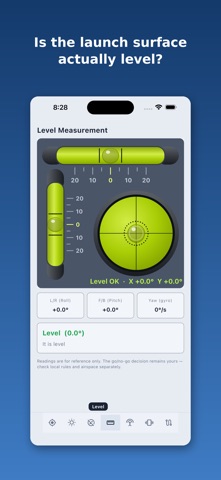
LEVEL
Tilt from vertical computed straight from the gravity vector, plus which side to shim. A tilted launch surface is where a lot of bad takeoffs begin.
ANTENNA AIMING
Tap the map to mark where your drone will be, then aim: absolute bearing, distance and how many degrees to turn - on the map and through the camera in AR.
VIBRATION
Press the phone to the frame and measure. RMS, peak, event count, a three-axis waveform and an FFT spectrum. Enter your hover RPM and FlySense matches the dominant frequency to 1x or 2x order - telling propeller imbalance apart from blade damage or frame resonance.
TRACK & ALTITUDE
Records your path and altitude, and keeps recording with the screen off. GPS drift is filtered out by a fix-quality gate, so standing still does not smear your track.
FREE, WORLDWIDE, ON DEVICE
Works anywhere with GPS, in 16 languages. Free with ads. Your measurements are processed on the phone and are never uploaded by us; the app only fetches map tiles, asks the system geocoder for a readable address, and loads ads through Google AdMob.
Readings are for reference only. The go/no-go decision remains yours - check local rules and airspace separately.
Safety and technology
Found in the app by AppBrain- Price
- Free
- App size
- 32.2 MB
- Content rating
- Everyone
Technologies used by FlySense - Drone Site Check
Releases
Updates seen on the App Store- Version
- 1.0
- Launched
- September 2026
No changelog data
Alternatives
Similar apps and more from HOJUNG KIMAlternatives to FlySense - Drone Site Check





More from HOJUNG KIM

Rankings
App Store top chartsApp Store Rankings for FlySense - Drone Site Check
About the app and developer
About FlySense - Drone Site Check
FlySense - Drone Site Check is an utilities app developed by HOJUNG KIM.
User Ratings
The app has no ratings yet.
App Information
FlySense - Drone Site Check is freely available from the App Store. The app size is 32.19 MB. The latest version available is 1.0. The last update was on September 9, 2026.
Technical Requirements
The app has a content rating of Everyone. The app has been available on the App Store since September 2026.
Developer information for HOJUNG KIM
Address: