

FMX Work List
FMX Work List is made and published by Facilities Management Express, LLC. AppBrain is an independent app data site and isn't affiliated with Facilities Management Express, LLC. The app name, icon, screenshots and description belong to Facilities Management Express, LLC and are shown as published on the App Store.
AppBrain's verdict
- Rating on App Store
- 3.59
- 22 ratings
- Last updated
- October 13, 2026
It doesn't have enough ratings yet to judge what users think.
Rankings
App Store top chartsApp Store Rankings for FMX Work List
Competitors
Similar apps and more from Facilities Management Express, LLCAlternatives to FMX Work List


Also available on Google Play

Releases
Updates seen on the App Store- Version
- 3.4.7
- Launched
- January 2025
No changelog data
User feedback
Ratings and reviews on the App StoreComments on FMX Work List for iOS
We don't have enough comments to show example comments. Please check back later.
Technology
Found in the app by AppBrain- Price
- Free
- App size
- 69.8 MB
- Content rating
- Everyone
Technologies used by FMX Work List
About the app and developer
About FMX Work List
FMX Work List is a business app developed by Facilities Management Express, LLC.
User Ratings
FMX Work List is rated 3.59 out of 5 stars. The rating is based on 22 ratings.
App Information
FMX Work List is freely available from the App Store. The app size is 69.76 MB. The latest version available is 3.4.7. The last update was on October 13, 2026.
Technical Requirements
The app has a content rating of Everyone. The app has been available on the App Store since January 2025.
Developer information for Facilities Management Express, LLC
Facilities Management Express, LLC
Address:
Store listing
By Facilities Management Express, LLC, from the App Store




Description by Facilities Management Express, LLC Written by the developer, not by AppBrain. Click to read.
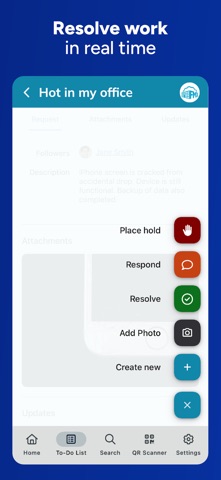
This powerful mobile app lets you tackle work orders on the go, anywhere and anytime. Resolve requests, see upcoming work, access equipment information from your mobile device, and more.
Key Features:
Real-Time Updates: Stay on top of your schedule and prioritize tasks efficiently with the To-Do List.
Streamlined Workflows: Quickly resolve or submit new work orders, and easily adjust the status of work right from the field. Add comments for seamless communication.
Mobile Equipment Access: Access critical equipment information with a simple QR code scan. Add new equipment from the field.
Time-Saving Tools: Track worker hours and navigate to important tasks effortlessly.