AppBrain
AppBrain
  • Apps
  • Apps being viewed right now Trending apps today Most popular apps All-time most installed apps Top rated apps iPhone and iPad apps
  • Intelligence ▾
    Intelligence overview → Track any Android app or your whole market
    Track & analyze
    Keyword Tracker & OptimizerTrack & improve Play rankings App Performance ReportOne-off PDF for any app StatisticsFree Android & Play market stats
    Promote your app
    Featured Apps App Links
  • Intelligence
  • Pricing
  • Dashboard
  • Sign up
  • Log in
App Store Apps > Productivity > Focus Lock - Screen Time Limit
Focus Lock - Screen Time Limit icon

Focus Lock - Screen Time Limit

by Flipd Apps · Productivity · Free
On the App Store since March 2020 · Data updated 2026-10-30

Focus Lock - Screen Time Limit is made and published by Flipd Apps. AppBrain is an independent app data site and isn't affiliated with Flipd Apps. The app name, icon, screenshots and description belong to Flipd Apps and are shown as published on the App Store.

AppBrain's verdict

EstablishedWell rated
Rating on App Store
4.32
295 ratings
Last updated
October 20, 2026
Size
68.0 MB

Users rate it well: 4.3 stars from 295 ratings.

Official page on the App Store

User feedback

Ratings and reviews on the App Store

Comments on Focus Lock - Screen Time Limit for iOS

We don't have enough comments to show example comments. Please check back later.

Store listing

By Flipd Apps, from the App Store
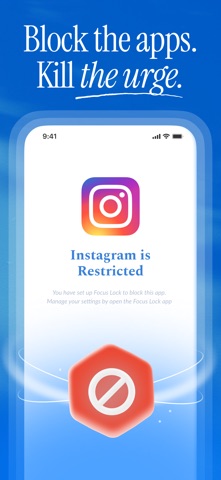
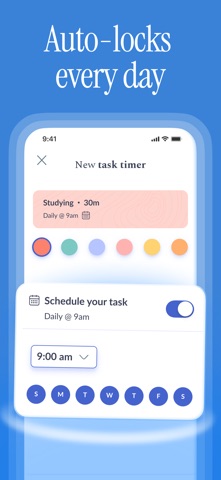
Focus Lock - Screen Time Limit Screenshot 1 of 7
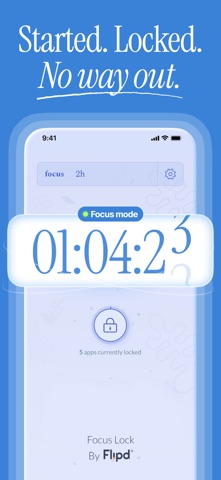
Focus Lock - Screen Time Limit Screenshot 2 of 7
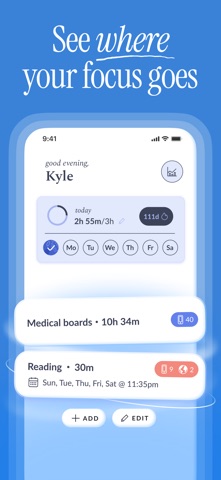
Focus Lock - Screen Time Limit Screenshot 3 of 7
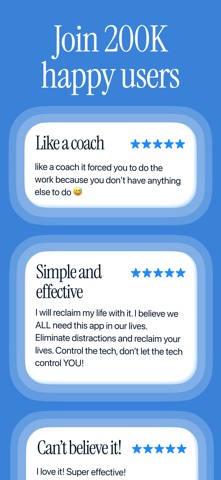
Focus Lock - Screen Time Limit Screenshot 4 of 7
Focus Lock - Screen Time Limit Screenshot 5 of 7
Focus Lock - Screen Time Limit Screenshot 6 of 7
Focus Lock - Screen Time Limit Screenshot 7 of 7
Screenshots by Flipd Apps, from the the App Store listing
Description by Flipd Apps Written by the developer, not by AppBrain. Click to read.
For over 7 years, Focus Lock is the original #1 app for limiting screen time and the easiest way to block distracting apps on your phone. With Focus Lock, you can block all or selected apps for a period of time, allowing you to focus, get more done, and simply be present without distractions. Whether you’re working from home, studying, focusing, reading, sleeping, hanging with family, or taking a detox from social media, Focus Lock will make your life a whole lot easier.


HEAR IT FROM OUR COMMUNITY:
// “I am a better person, friend, mother, and employee because of this app. I flip it on at outings with friends and family and it has truly restored my ability to break away from the chains of cell phone addiction. I could never recommend this app enough.”


// “It’s honestly the best app ever. I appreciate how much it helps me focus. That I’m able to block my apps for an hour a day helps me be more productive and feel better.”

// “Total insulation from distractions.”

// “It prevents any and all distractions without deleting apps.”

// "It saved my life, I got so much work done, and it changed my relationship with my phone."

THE BENEFITS OF FOCUS LOCK
- reduce your screentime select distracting apps to block
- set up an automatic schedule to make Focus Lock part of your daily routine
- take a digital detox without needing to delete any apps from your phone
- heighten your productivity, focus, and ability to be more present

HOW IT WORKS
- Block Your Apps: start a session by selecting the apps you want to block and the duration of your session
- Save Shortcuts: easily save a session to quickly access the same setup again for future blocks
- Whitelist Apps: select all or specific apps you want to block, organized by app category
- Tagged Goal: add a tag to your session to remember what you did
- Activities: view your recent sessions organized by date, tag, and duration
- Weekly Progress: view your progress by completed days of the week
- Day Streak: stay on track and compete against yourself with a day streak
- Daily Goal: set up a goal for how much screentime you’d like to improve


GO PREMIUM
Focus Lock is created by the team behind Flipd (App of the Day 2021). It takes a team to build and maintain our apps, which is why we ask for a subscription to support our work. Your initial trial will give you up to five free sessions, after which you’ll need to upgrade to continue using Focus Lock. We never sell data and we don’t serve ads, so your premium subscription will go toward supporting the services we provide you. Without your premium subscription, Focus and Flipd wouldn’t be able to exist! If you were previously a Flipd subscriber and are wondering about a subscription migration, contact us at info@flipdapp.co.

SUBSCRIPTION PRICING

$9.99 per month or $49.99 per year

These prices are for United States customers. Pricing in other countries may vary and actual charges may be converted to your local currency depending on the country of residence. Subscriptions will be charged to your credit card through your iTunes account. Your subscription will automatically renew at the subscription price unless canceled at least 24 hours before the end of the current period. You will not be able to cancel the current subscription once activated during the subscription period. Manage your subscriptions in your iOS Account Settings after purchase.

Terms and Conditions: http://www.flipdapp.co/terms-privacy

Support Contact: info@flipdapp.co
Official page on the App Store

Safety and technology

Found in the app by AppBrain
Price
Free
App size
68.0 MB
Content rating
Everyone

Technologies used by Focus Lock - Screen Time Limit

Releases

Updates seen on the App Store
Version
2.4.0
Launched
March 2020

No changelog data

Alternatives

Similar apps and more from Flipd Apps

Alternatives to Focus Lock - Screen Time Limit

Nevver – Phone Lock & Focus icon Nevver – Phone Lock & Focus
Coefficient Software Systems Private Limited
3.5
Free
46 ratings
Be Focused - Focus Timer icon Be Focused - Focus Timer
Denys Ievenko
4.7
Free
4.3K ratings
Flow: Focus & Pomodoro Timer icon Flow: Focus & Pomodoro Timer
Yugen GmbH
4.8
Free
1.8K ratings
Focus Keeper - Pomodoro Timer icon Focus Keeper - Pomodoro Timer
PIXO Incorporation
4.8
Free
31.7K ratings
Tiimo: To-Do List Planner icon Tiimo: To-Do List Planner
tiimo
4.6
Free
21.3K ratings
Plantie - Stay focused icon Plantie - Stay focused
JU HU
4.7
Free
1.9K ratings
Focus To-Do: Focus Timer&Tasks icon Focus To-Do: Focus Timer&Tasks
Shenzhen Tomato Software Technology Co., Ltd.
4.8
Free
14.7K ratings
Routine Planner, Habit Tracker icon Routine Planner, Habit Tracker
Routinery Corp.
4.7
Free
18.1K ratings

More from Flipd Apps

Flipd: focus & study timer icon Flipd: focus & study timer
Flipd Apps
4.5
Free
7.0K ratings
Redo: Daily Habit Tracker icon Redo: Daily Habit Tracker
Flipd Apps
4.9
Free
25 ratings

Rankings

App Store top charts

App Store Rankings for Focus Lock - Screen Time Limit

This app is not ranked

About the app and developer

About Focus Lock - Screen Time Limit

Focus Lock - Screen Time Limit is a productivity app developed by Flipd Apps.

What is the rating of Focus Lock - Screen Time Limit?

Focus Lock - Screen Time Limit is rated 4.32 out of 5 stars, based on 300 ratings.

Is Focus Lock - Screen Time Limit free?

Focus Lock - Screen Time Limit is free. The app size is 67.99 MB. The latest version available is 2.4.0. The last update was on October 20, 2026.

What are the requirements for Focus Lock - Screen Time Limit?

The app has a content rating of Everyone. The app has been available on the App Store since March 2020.

Developer information for Flipd Apps

Flipd Apps

Address:

Share Focus Lock - Screen Time Limit

Apps other people are watching Popular Productivity Apps Today's trending apps Price drops on Google Play Top new apps
Nevver – Phone Lock & Focus icon Nevver – Phone Lock & Focus
Be Focused - Focus Timer icon Be Focused - Focus Timer
Flow: Focus & Pomodoro Timer icon Flow: Focus & Pomodoro Timer
Focus Keeper - Pomodoro Timer icon Focus Keeper - Pomodoro Timer
Tiimo: To-Do List Planner icon Tiimo: To-Do List Planner
Plantie - Stay focused icon Plantie - Stay focused
Focus To-Do: Focus Timer&Tasks icon Focus To-Do: Focus Timer&Tasks
Routine Planner, Habit Tracker icon Routine Planner, Habit Tracker
Overview Alternatives Reviews Rankings Technology
AppBrain Intelligence premium content

Subscribe now to get full and unlimited access to AppBrain Intelligence. You'll have access to:

  • App Intelligence dashboard (performance timeline, competitor comparison, country rankings, insight cards)
  • Detailed ranking data per app
  • Full timeline per developer
  • Device market shares data per country
  • Unlimited keyword tracking
1 Month

$75/mo
(billed every month)

SAVE 0%
Subscribe
3 Months

$65/mo
($195 billed every 3 months)

SAVE 13%
Subscribe
1 Year

$57.50/mo
($690 billed every year)

SAVE 23%
Subscribe
Each subscription will automatically renew 3 days before the expiration date for the same time period. Subscriptions can be cancelled at any time before the renewal.

AppBrain is an app data site, we track rankings, ratings, installs for all apps and games on Google Play and the App Store. AppBrain doesn't host app files or APKs, all install links go directly to the official store. All trademarks are owned by their respective owners.

More apps

  • Top Android apps being viewed
  • Elite Case Simulator Android App
  • Quick Hit Casino Slots Games
  • Solitaire Cash

App statistics

  • Android statistics
  • Google Play Developer stats
  • Trending Android Apps
  • Trending iOS apps
  • Top popular Apps
  • Buy the best Android phone
  • Buy & sell app businesses

About AppBrain

  • Contact
  • Privacy
  • Documentation
  • DMCA takedowns
  • Blog
  • Android app Install tracking and attribution options for the AppBrain ad network
© 2010-2026 - AppBrain