

Focus4Life: Pomodoro Timer
Focus4Life: Pomodoro Timer is made and published by Tu Anh Phan. AppBrain is an independent app data site and isn't affiliated with Tu Anh Phan. The app name, icon, screenshots and description belong to Tu Anh Phan and are shown as published on the App Store.
AppBrain's verdict
- Last updated
- August 30, 2026
Rankings
App Store top chartsApp Store Rankings for Focus4Life: Pomodoro Timer
Competitors
Similar apps and more from Tu Anh PhanAlternatives to Focus4Life: Pomodoro Timer


Releases
Updates seen on the App Store- Version
- 1.0.10
- Launched
- June 2026
No changelog data
User feedback
Ratings and reviews on the App StoreComments on Focus4Life: Pomodoro Timer for iOS
We don't have enough comments to show example comments. Please check back later.
Technology
Found in the app by AppBrain- Price
- Free
- App size
- 35.5 MB
- Content rating
- Everyone
Technologies used by Focus4Life: Pomodoro Timer
About the app and developer
About Focus4Life: Pomodoro Timer
Focus4Life: Pomodoro Timer is a productivity app developed by Tu Anh Phan.
What is the rating of Focus4Life: Pomodoro Timer?
Focus4Life: Pomodoro Timer has no ratings yet.
Is Focus4Life: Pomodoro Timer free?
Focus4Life: Pomodoro Timer is free. The app size is 35.49 MB. The latest version available is 1.0.10. The last update was on August 30, 2026.
What are the requirements for Focus4Life: Pomodoro Timer?
The app has a content rating of Everyone. The app has been available on the App Store since June 2026.
Developer information for Tu Anh Phan
Address:
Frequently asked questions about Focus4Life: Pomodoro Timer
Is Focus4Life: Pomodoro Timer free?
Yes. Focus4Life: Pomodoro Timer is free on the App Store.
Is Focus4Life: Pomodoro Timer still available?
Yes. Focus4Life: Pomodoro Timer is on the App Store, and the last update we saw was on August 30, 2026.
How large is Focus4Life: Pomodoro Timer?
Focus4Life: Pomodoro Timer is 35.49 MB.
Is Focus4Life: Pomodoro Timer suitable for children?
App Store rates the content of Focus4Life: Pomodoro Timer as suitable for everyone.
Who made Focus4Life: Pomodoro Timer?
Focus4Life: Pomodoro Timer was developed by Tu Anh Phan. It is listed in the productivity category on the App Store.
What are the best alternatives to Focus4Life: Pomodoro Timer?
People looking at Focus4Life: Pomodoro Timer also look at these productivity apps: ClipVault Snippet Box, AppendX, PomoTask: Focus & Study Timer, NoFile: Share file in local, Kihya Memo: Notes & Markdown.
Store listing
By Tu Anh Phan, from the App Store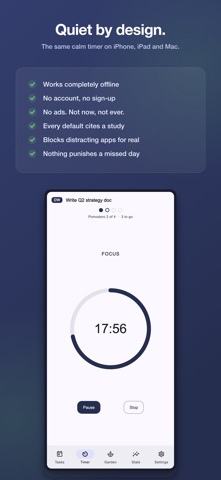


Description by Tu Anh Phan Written by the developer, not by AppBrain. Click to read.
WHY IT'S QUIET
Focus4Life doesn't run on anxiety. No punishing streaks, no guilt, no noise. Its timings and limits come from published research and from the original authors of each technique, and the research-backed settings carry an (i) with the source behind them.
FOUR RHYTHMS, EACH WITH A REASON
• Classic — 25 / 5 / 15, Cirillo's original technique
• Deep Work — 50 / 10 / 30, after Cal Newport's "Deep Work"
• Sprint — 15 / 3 / 10, a low-resistance way into a hard task
• Ultradian — 90 / 20, the Basic Rest-Activity Cycle (Kleitman; Lavie)
• A live countdown on your Lock Screen — and in the Dynamic Island on iPhones that have one — drawn by iOS itself, so it costs almost no battery
• A gentle heads-up when a task runs past the limits research links to fatigue
FOCUS LOCK — IT ACTUALLY STOPS YOU
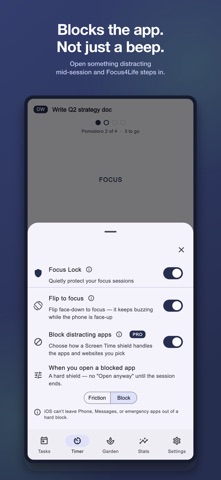
• Block distracting apps — and websites in Safari — during a session using Apple Screen Time: a real, system-enforced shield, fully opt-in, and only while a focus phase is running
• Choose gentle friction or a firm block, per session or for good
• Flip your phone face-down to drop straight into focus, and get a nudge if you pick it up too soon
• Never during a break. Never while you're paused. Never without a permission you granted yourself
A REAL TASK PLANNER, NOT A CHECKLIST
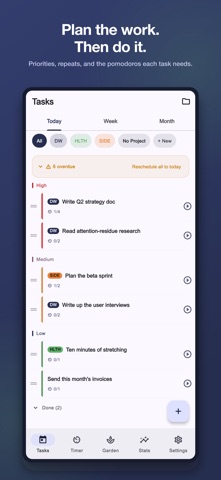
• Priorities, due dates and repeats — daily, weekdays, weekly or monthly, ending never, on a date, or after a set number of times
• Estimate a task and the app works out how many pomodoros it needs
• Today, Week and Month views; on iPad, Week and Month list your actual tasks under each day
• Notes on any task
• Nothing reschedules itself behind your back. Overdue work is a count and a button, never a scolding
PROJECTS WITH SOMETHING TO FILL
Group tasks into colour-coded projects, each with an optional note on when and where you'll do the work — an “implementation intention”, shown to make follow-through markedly more likely (Gollwitzer, 1999). Give a project a goal image, estimate its tasks, and the image uncovers itself as you focus your way through the estimate.
A GARDEN THAT REMEMBERS
Every finished session uncovers part of a hidden picture, and longer sessions uncover more. A quiet record of effort — not a leaderboard, and not a plant that dies if you take a day off. Missing a day never takes anything away.
HONEST STATS
Minutes focused, sessions completed, tasks done, and your longest single session — for today and the last 7 days. Pro adds 30-day and all-time history, plus a breakdown of which apps interrupted you.
PRIVATE BY DESIGN
• Works fully offline — no account, no sign-up, nothing in the cloud
• Your data stays on your device
• No ads. Not now, not ever.
ONE APP, EVERY SCREEN
iPhone, iPad and Mac, each running the same app with the same calm. Every device keeps its own data on itself — there is no cloud and nothing to sign in to.
FOCUS4LIFE PRO
Free covers the whole core loop: unlimited sessions, all four research presets, the entire task planner with repeats and notes, two projects, the Garden, and flip-to-focus. Pro is a one-time purchase — not a subscription — and unlocks unlimited projects, the full focus blocker, 30-day and all-time stats, custom timer durations, and your own photos in the Garden. It comes with a 7-day trial that asks for no payment card and simply ends.
We'd love your feedback — reach us anytime at phan.business.nl@gmail.com.