


AppBrain's verdict
- Last updated
- August 20, 2026
- Size
- 33.3 MB
User feedback
Ratings and reviews on the App StoreComments on Kihya Memo: Notes & Markdown for iOS
We don't have enough comments to show example comments. Please check back later.
Store listing
By Kihya, from the App StoreDescription by Kihya Written by the developer, not by AppBrain. Click to read.
Markdown is the heart of the app. When needed, the same plain-text editor also opens safe UTF-8 text and source documents without converting them to a proprietary database. There is no Kihya account to create and no required Kihya memo server. Google Drive sync and remote server folders are optional.
KEY FEATURES
• Switch instantly between Markdown source and native preview
• Toggle task checkboxes directly in preview
• Use focused Markdown tools for headings, lists, bold, italic, strike, code, links, attachments, and underline
• Convert pasted rich text into clean Markdown
• Create, edit, rename, move, and share HTML, JSON, XML, CSV, PHP, ASP, JavaScript, SQL, and other UTF-8 text or source files when needed
• Live syntax colors and line numbers without adding formatting to the file
• Static HTML/SVG, pretty JSON/XML, table, calendar, contact, and color-source previews
• Plain-text copy and paste for code; rich-text conversion only inside Markdown
• Import photos, PDFs, archives, and other files from Photos or Files
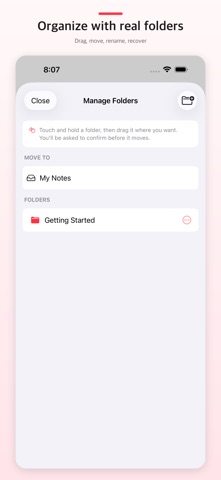
• Drag, rename, move, and safely remove nested folders in a dedicated manager
• Search file names and full note contents
• Find, Replace, and Replace All from the title menu, with case options, regex, and capture groups
• Choose Save, Discard Changes, or Keep Editing when leaving an unsaved note
• Move, rename, trash, or open past versions from the title menu
• Open Recently Deleted from the folder list to restore items to their original location or delete them permanently
• Optionally protect Recently Deleted with Face ID, Touch ID, or the device passcode
• Keep pre-save versions locally and load one into the editor without saving it immediately
• Recover the latest local edit draft after an unexpected app termination
• Optional marker-texture highlighting for bold and underlined preview text
• Preview local images and open clearly marked local-file links
• Open and share editable text, source documents, and stored files through the system Files app
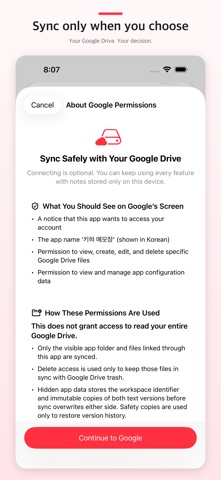
• Optionally sync original files through a visible app folder in your own Google Drive
• Add SFTP, plain FTP, explicit FTPS, or implicit FTPS servers as remote folders, with local recovery drafts, history, conflict detection, and verified saves
• Export the visible folder tree as a ZIP without trash or private history
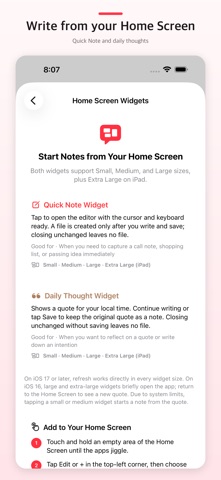
• Start writing instantly from a resizable Quick Note Home Screen widget
• See a sourced daily thought matched to morning, afternoon, evening, or night
• Continue writing beneath a thought and share it as a 4:5 image card
• Open a favorite document in full-screen reading mode from the Home Screen
• Five bundled Korean typefaces in addition to the system font
• Native phone navigation and an iPad three-pane or full-screen editor
PRIVACY BY DESIGN
• No Kihya sign-up or required login
• No ads or cross-app tracking
• Google Drive connects only when you choose it; notes are never sent to a Kihya server
• Remote connections go directly from your device to the server you enter; credentials use device-only protected storage and remote contents, hosts, paths, and user names are excluded from analytics
• SFTP and FTPS are encrypted. Plain FTP is visibly marked and requires a separate warning because its credentials, file names, and contents are not encrypted
• Firebase usage events never include note text, file names, searches, or Google account details
• Access is limited to local files and files the user explicitly selects
• Normal history and recovery drafts stay on device; pre-overwrite sync text is also protected in hidden app data in your Drive
Safety and technology
Found in the app by AppBrain- Price
- Free
- App size
- 33.3 MB
- Content rating
- Everyone
Technologies used by Kihya Memo: Notes & Markdown
Releases
Updates seen on the App Store- Version
- 1.1.0
- Launched
- August 2026
No changelog data
Alternatives
Similar apps and more from KihyaAlternatives to Kihya Memo: Notes & Markdown


More from Kihya


Rankings
App Store top chartsApp Store Rankings for Kihya Memo: Notes & Markdown
About the app and developer
About Kihya Memo: Notes & Markdown
Kihya Memo: Notes & Markdown is a productivity app developed by Kihya.
User Ratings
The app has no ratings yet.
App Information
Kihya Memo: Notes & Markdown is freely available from the App Store. The app size is 33.27 MB. The latest version available is 1.1.0. The last update was on August 20, 2026.
Technical Requirements
The app has a content rating of Everyone. The app has been available on the App Store since August 2026.
Kihya Memo: Notes & Markdown is made and published by Kihya. AppBrain is an independent app data site and isn't affiliated with Kihya. The app name, icon, screenshots and description belong to Kihya and are shown as published on the App Store.
Developer information for Kihya
Address:
Frequently asked questions about Kihya Memo: Notes & Markdown
Is Kihya Memo: Notes & Markdown free?
Yes. Kihya Memo: Notes & Markdown is free on the App Store.
Is Kihya Memo: Notes & Markdown still available?
Yes. Kihya Memo: Notes & Markdown is on the App Store, and the last update we saw was on August 20, 2026.
How large is Kihya Memo: Notes & Markdown?
Kihya Memo: Notes & Markdown is 33.27 MB.
Is Kihya Memo: Notes & Markdown suitable for children?
App Store rates the content of Kihya Memo: Notes & Markdown as suitable for everyone.
Who made Kihya Memo: Notes & Markdown?
Kihya Memo: Notes & Markdown was developed by Kihya. It is listed in the productivity category on the App Store.
What are the best alternatives to Kihya Memo: Notes & Markdown?
People looking at Kihya Memo: Notes & Markdown also look at these productivity apps: ClipVault Snippet Box, AppendX, OV Notes, Notedotech, ShineNotes.