AppBrain
AppBrain
  • Apps
  • Apps being viewed right now Trending apps today Most popular apps All-time most installed apps Top rated apps iPhone and iPad apps
  • Intelligence ▾
    Intelligence overview → Track any Android app or your whole market
    Track & analyze
    Keyword Tracker & OptimizerTrack & improve Play rankings App Performance ReportOne-off PDF for any app StatisticsFree Android & Play market stats
    Promote your app
    Featured Apps App Links
  • Intelligence
  • Pricing
  • Dashboard
  • Sign up
  • Log in
App Store Apps > Productivity > FocusGate: Screen Time Control
FocusGate: Screen Time Control icon

FocusGate: Screen Time Control

by FocusGate · Productivity · Free
On the App Store since April 2026 · Data updated 2026-11-02

FocusGate: Screen Time Control is made and published by FocusGate. AppBrain is an independent app data site and isn't affiliated with FocusGate. The app name, icon, screenshots and description belong to FocusGate and are shown as published on the App Store.

AppBrain's verdict

Rating on App Store
5.00
6 ratings
Last updated
June 7, 2026
Size
186.4 MB

It doesn't have enough ratings yet to judge what users think.

Official page on the App Store

User feedback

Ratings and reviews on the App Store

Comments on FocusGate: Screen Time Control for iOS

We don't have enough comments to show example comments. Please check back later.

Store listing

By FocusGate, from the App Store
FocusGate: Screen Time Control Screenshot 1 of 10
FocusGate: Screen Time Control Screenshot 2 of 10
FocusGate: Screen Time Control Screenshot 3 of 10
FocusGate: Screen Time Control Screenshot 4 of 10
FocusGate: Screen Time Control Screenshot 5 of 10
FocusGate: Screen Time Control Screenshot 6 of 10
FocusGate: Screen Time Control Screenshot 7 of 10
FocusGate: Screen Time Control Screenshot 8 of 10
FocusGate: Screen Time Control Screenshot 9 of 10
FocusGate: Screen Time Control Screenshot 10 of 10
Screenshots by FocusGate, from the the App Store listing
Description by FocusGate Written by the developer, not by AppBrain. Click to read.
Stop doomscrolling. Start doing.
You open Instagram "just for a second." Forty minutes later, you're still scrolling. Sound familiar?

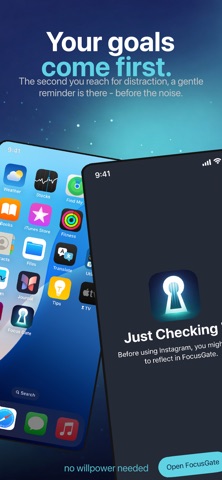
FocusGate isn't just anothe app blocker - it puts your real priorities in the way first. Set up Focus Gates with personal reminders and tasks. When you reach for a distracting app, FocusGate steps in with what actually matters to you - then lets you choose. No guilt trips. No hard locks. Just a moment of clarity that changes everything.

The result? You reclaim hours every week - not by willpower, but by design.
-------
FOCUS GATES - Your Priorities Come First

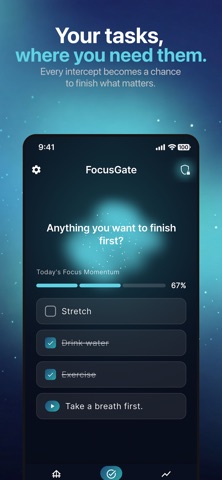
Create custom gates for any app. Each gate carries your reminders: "Did you finish that report?" "Have you called Mom back?" "Drink some water first." Complete your tasks, then continue.

• Choose which apps to gate and when (weekdays, weekends, custom schedules)
• Add personal task reminders that appear before each app opens
• Track Focus Momentum - watch your task completion grow
• Built-in breathing exercises to reset before you scroll

DOOM SCROLL CHECK-INS
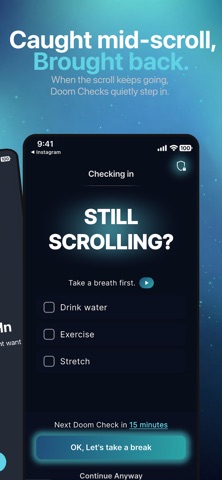
Already deep in a scroll session? FocusGate has your back.

Set check-in intervals so FocusGate asks you mid-session: "Still here on purpose?" Choose the right frequency for you and FocusGate becomes the perfect safety net for when you fall down the rabbit hole.

REAL-TIME INTERRUPTS THAT ACTUALLY HELP
FocusGate works at the system level. When you open a gated app, you're immediately redirected to your Focus Gate - no workaround, no delay.

FOCUS SCORE & PROGRESS DASHBOARD
See your digital habits transform with real data:

• Daily Focus Score (0–100) based on gates completed, breaks taken, and check-ins honored
• Native Screen Time integration for detailed usage reports
• Top Disruptors - see which apps steal the most time
• Track your progress over days, weeks, and months

SHARE YOUR WINS
Hit a milestone? FocusGate creates stunning share cards with your stats - gorgeous cosmic artwork you'll actually want to post. Show your friends what "in control" looks like.

-------
WHY FOCUSGATE IS DIFFERENT

Most screen time apps treat you like someone who needs to be locked out of your own phone. FocusGate treats you like a capable person who just needs a better system.

→ Not a hard lock - a gate. You always have the choice to continue.
→ Not a countdown timer - a task system. Your real priorities interrupt the scroll.
→ Not a guilt trip - a momentum builder. Every completed task adds to your Focus Score.
→ Not another generic utility - a beautifully crafted experience you'll actually want to use.

-------
WORKS WITH YOUR PHONE, NOT AGAINST IT

• Deep Screen Time API integration with native usage reports
• Shields distracting apps at the system level
• Smart notifications power every gate and check-in in real time


Terms, Privacy & Conditions: https://www.focusgate-app.com/focusgate/terms
Official page on the App Store Also on Google Play

Safety and technology

Found in the app by AppBrain
Price
Free
App size
186.4 MB
Content rating
Everyone

Technologies used by FocusGate: Screen Time Control

Releases

Updates seen on the App Store
Version
1.3
Launched
April 2026

No changelog data

Alternatives

Similar apps and more from FocusGate

Alternatives to FocusGate: Screen Time Control

Just a Markdown Viewer icon Just a Markdown Viewer
Christopher Tien
5.0
Free
1 ratings
Pause: Stop Doomscrolling icon Pause: Stop Doomscrolling
UPSTART INNOVATION, LLC
0.0
Free
DoomGuard: Stop Doomscrolling icon DoomGuard: Stop Doomscrolling
PARTICULAS EPICAS, LDA
0.0
Free
App Blocker & Focus: FocusGate icon App Blocker & Focus: FocusGate
Aurelian Syndicate L.L.C.
5.0
Free
3 ratings
Sparkle Sort: Cute To Do List icon Sparkle Sort: Cute To Do List
Black Boxx LLC
5.0
Free
4 ratings
yatta! To-Do List & Widget icon yatta! To-Do List & Widget
Yuichiro Honda
0.0
Free
Learn Russian by FluenTech icon Learn Russian by FluenTech
Omer COSKUN
4.8
Free
9 ratings
Storage Cleaner: Swipe Cleanup icon Storage Cleaner: Swipe Cleanup
Stephen Kuyper
4.5
Free
16 ratings

More from FocusGate

Prayer Shield: seek God first icon Prayer Shield: seek God first
FocusGate
5.0
Free
4 ratings
ShotLock: GLP-1 Shot Tracker icon ShotLock: GLP-1 Shot Tracker
FocusGate
5.0
Free
1 ratings

Also available on Google Play

FocusGate: Screen Time Control icon FocusGate: Screen Time Control
Pinnacle River
0.0
Free
100+

Rankings

App Store top charts

App Store Rankings for FocusGate: Screen Time Control

This app is not ranked

About the app and developer

About FocusGate: Screen Time Control

FocusGate: Screen Time Control is a productivity app developed by FocusGate.

User Ratings

FocusGate: Screen Time Control is rated 5.00 out of 5 stars. The rating is based on 6 ratings.

App Information

FocusGate: Screen Time Control is freely available from the App Store. The app size is 186.39 MB. The latest version available is 1.3. The last update was on June 7, 2026.

Technical Requirements

The app has a content rating of Everyone. The app has been available on the App Store since April 2026.

Developer information for FocusGate

FocusGate

Address:

Share FocusGate: Screen Time Control

Top new apps Popular Productivity Apps Price drops on Google Play Today's trending apps Apps other people are watching
Just a Markdown Viewer icon Just a Markdown Viewer
Pause: Stop Doomscrolling icon Pause: Stop Doomscrolling
DoomGuard: Stop Doomscrolling icon DoomGuard: Stop Doomscrolling
App Blocker & Focus: FocusGate icon App Blocker & Focus: FocusGate
Sparkle Sort: Cute To Do List icon Sparkle Sort: Cute To Do List
yatta! To-Do List & Widget icon yatta! To-Do List & Widget
Learn Russian by FluenTech icon Learn Russian by FluenTech
Storage Cleaner: Swipe Cleanup icon Storage Cleaner: Swipe Cleanup
Overview Alternatives Reviews Rankings Technology
AppBrain Intelligence premium content

Subscribe now to get full and unlimited access to AppBrain Intelligence. You'll have access to:

  • App Intelligence dashboard (performance timeline, competitor comparison, country rankings, insight cards)
  • Detailed ranking data per app
  • Full timeline per developer
  • Device market shares data per country
  • Unlimited keyword tracking
1 Month

$75/mo
(billed every month)

SAVE 0%
Subscribe
3 Months

$65/mo
($195 billed every 3 months)

SAVE 13%
Subscribe
1 Year

$57.50/mo
($690 billed every year)

SAVE 23%
Subscribe
Each subscription will automatically renew 3 days before the expiration date for the same time period. Subscriptions can be cancelled at any time before the renewal.

AppBrain is an app data site, we track rankings, ratings, installs for all apps and games on Google Play and the App Store. AppBrain doesn't host app files or APKs, all install links go directly to the official store. All trademarks are owned by their respective owners.

More apps

  • Top Android apps being viewed
  • Go Go Gold Casino Real Money
  • AI Football Tips - NerdyTips
  • BLE Controller – Arduino ESP32

App statistics

  • Android statistics
  • Google Play Developer stats
  • Trending Android Apps
  • Trending iOS apps
  • Top popular Apps
  • Buy the best Android phone
  • Buy & sell app businesses

About AppBrain

  • Contact
  • Privacy
  • Documentation
  • DMCA takedowns
  • Blog
  • Top Free Games Apps for your iPhone or iPad
© 2010-2026 - AppBrain