

FocusStack: Signal Over Noise
FocusStack: Signal Over Noise is made and published by MICHAEL FRANCIS MCGOVERN. AppBrain is an independent app data site and isn't affiliated with MICHAEL FRANCIS MCGOVERN. The app name, icon, screenshots and description belong to MICHAEL FRANCIS MCGOVERN and are shown as published on the App Store.
AppBrain's verdict
- Rating on App Store
- 5.00
- 2 ratings
- Last updated
- December 9, 2025
It doesn't have enough ratings yet to judge what users think.
Rankings
App Store top chartsApp Store Rankings for FocusStack: Signal Over Noise
Competitors
Similar apps and more from MICHAEL FRANCIS MCGOVERNAlternatives to FocusStack: Signal Over Noise





Releases
Updates seen on the App Store- Version
- 1.0
- Launched
- December 2025
No changelog data
User feedback
Ratings and reviews on the App StoreComments on FocusStack: Signal Over Noise for iOS
We don't have enough comments to show example comments. Please check back later.
Technology
Found in the app by AppBrain- Price
- Free
- App size
- 27.0 MB
- Content rating
- Everyone
Technologies used by FocusStack: Signal Over Noise
About the app and developer
About FocusStack: Signal Over Noise
FocusStack: Signal Over Noise is a productivity app developed by MICHAEL FRANCIS MCGOVERN.
What is the rating of FocusStack: Signal Over Noise?
FocusStack: Signal Over Noise is rated 5.00 out of 5 stars, based on 2 ratings.
Is FocusStack: Signal Over Noise free?
FocusStack: Signal Over Noise is free. The app size is 27.03 MB. The latest version available is 1.0. The last update was on December 9, 2025.
What are the requirements for FocusStack: Signal Over Noise?
The app has a content rating of Everyone. The app has been available on the App Store since December 2025.
Developer information for MICHAEL FRANCIS MCGOVERN
Address:
Frequently asked questions about FocusStack: Signal Over Noise
Is FocusStack: Signal Over Noise free?
Yes. FocusStack: Signal Over Noise is free on the App Store.
Is FocusStack: Signal Over Noise still available?
Yes. FocusStack: Signal Over Noise is on the App Store, and the last update we saw was on December 9, 2025.
How large is FocusStack: Signal Over Noise?
FocusStack: Signal Over Noise is 27.03 MB.
Is FocusStack: Signal Over Noise suitable for children?
App Store rates the content of FocusStack: Signal Over Noise as suitable for everyone.
How do people rate FocusStack: Signal Over Noise?
FocusStack: Signal Over Noise scores 5.00 out of 5 stars, from 2 ratings on the App Store.
Who made FocusStack: Signal Over Noise?
FocusStack: Signal Over Noise was developed by MICHAEL FRANCIS MCGOVERN. It is listed in the productivity category on the App Store.
What are the best alternatives to FocusStack: Signal Over Noise?
People looking at FocusStack: Signal Over Noise also look at these productivity apps: Signal Focus, Lo Focus, 12 Week Year AI Planner, Do It - Productivity Manager, New Work Offices.
Store listing
By MICHAEL FRANCIS MCGOVERN, from the App Store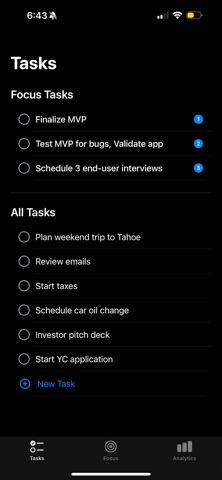


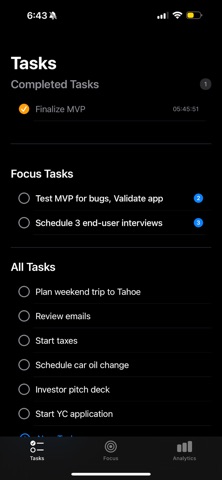


Description by MICHAEL FRANCIS MCGOVERN Written by the developer, not by AppBrain. Click to read.
When the Apple team was designing the iPod, the table was full of feature ideas: "Should it have an FM radio? A voice recorder?" Steve Jobs recognized those additions for what they were: noise. They added complexity without strengthening the product's core value. He removed them. The signal was clear and uncompromised: a device that plays music beautifully.
The signal is the three to five non-negotiable tasks that drive real results in the near term and move the mission forward. The noise is everything else: unnecessary emails, unproductive meetings, social media, minor fluctuations, and even "opportunities" that don't align with the primary objective.
FocusStack helps you identify the signal—your top 3 tasks—and cut the distractions. It's a simple framework for ranking and prioritizing what actually matters.
**Pick Your Top 3 (The Signal)**
Enter your tasks for the day. Then, review the task list and choose three tasks that actually move the needle. These are your signal—the non-negotiables. Drag them to the top of your tasks to prioritize. Everything else goes in your backlog (the noise). Each task tracks time automatically so you know how long you've been working on what matters.
**Music While You Work**
Enable do not disturb and move to the focus tab of the app. Ambient lofi music loops and your time is tracked while you focus on each task. Swipe left or right to switch songs—each one changes the background colors. Or just mute it if you prefer silence. Swipe up or down to change the task you are focusing on. Stay on this page as focus time accumulates, preventing mindless checking of other apps.
**See What You've Done**
Check out the analytics tab to see how much time you've spent focusing today and this week. Look back at completed tasks to see what you actually finished.
**Widget**
There's a home screen widget that shows your top 3 focus tasks. Handy when you don't want to open the app and keeps your tasks for the day visible on your home screen. After all focus tasks are completed, widget displays a gratifying checkmark.
**What It Does:**
• Keep track of your top 3 focus tasks
• Unlimited tasks in your backlog
• Drag and drop to organize
• Automatic time tracking per task
• Ambient music with visual themes
• Home screen widget
• Basic analytics (today's time, weekly total)
• Lock screen music controls
• Swipe to navigate between tasks and songs
The goal isn't to be busy; it's to be effective. When you consistently distinguish signal from noise, your energy is directed toward what actually produces tangible outcomes. Identify the signal, cut the distractions, and put your weight behind what truly moves the needle.
I built this because I needed something simple. Just tasks and focus time. If that sounds useful to you, give it a try.