Future Timer: Date Alarm is an utilities app developed by TSUBASA FUKUCHI.
User Ratings
The app has no ratings yet.
App Information
Future Timer: Date Alarm is freely available from the App Store. The app size is 13.17 MB. The latest version available is 1.6.0. The last update was on October 31, 2026.
Technical Requirements
The app has a content rating of Everyone. The app has been available on the App Store since March 2026.
Future Timer: Date Alarm is made and published by
TSUBASA FUKUCHI.
AppBrain is an independent app data site and isn't affiliated with TSUBASA FUKUCHI.
The app name, icon, screenshots and description belong to TSUBASA FUKUCHI and are shown as published on the App Store.
Description by TSUBASA FUKUCHI(from the App Store)
"Next Tuesday at 3pm." "3 days from now at 7am." "The 25th of every month." Schedule alarms for any date, days or months ahead. The built-in Clock app can't set an alarm for a specific date. Future Timer can. Now you can even schedule just by typing a sentence.
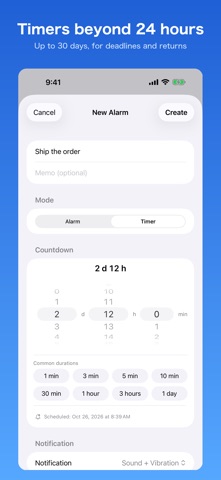
■ Features [Date Alarms] Pick a date and time, from a few hours to months ahead. [Timers] Enter days, hours, and minutes; the countdown starts when you save. [Create from Text] Type "Trash every Monday and Thursday at 8am" and the date, time, repeat, and title are filled in. On devices with Apple Intelligence, AI also tidies up the title and memo, all on device. [Repeats] Daily, weekdays, weekends, specific days, a monthly date, or every N days. Optionally skip Japanese national holidays. [Remind Me Before] Get a heads-up from 5 minutes to 1 day before. [Pause] Pause alarms during a trip or vacation; only alarms in that period are skipped. [Rings in Silent Mode] On iOS 26.1 or later, allow alarm permission and alarms ring even in Silent or Focus mode. [Snooze & Sounds] Choose snooze times, notification type, and sounds, including your own. [Templates] Save the alarms you use most and schedule them in one tap. [Calendar & Next 7 Days] See your alarms on a calendar and at a glance for the week.
■ Widgets, Apple Watch, Siri • Home and Lock Screen widgets show the time left. The medium widget has 30-min Timer and Skip buttons. • Apple Watch: see your next alarm, start a 30-minute timer, stop alarms, and add a watch-face complication. • Siri & Shortcuts: say "Schedule with Future Timer" and describe it.
■ Free and Premium • Free: unlimited alarms within 24 hours, and up to 3 alarms more than 24 hours ahead • Premium (monthly or yearly): unlimited alarms, no ads Payment is charged to your Apple ID at confirmation of purchase. Subscriptions renew automatically unless canceled at least 24 hours before the end of the current period. Manage or cancel anytime in your Apple ID settings.
Terms of Use (EULA): https://www.apple.com/legal/internet-services/itunes/dev/stdeula/ Privacy Policy: https://fukusefeb-dev.github.io/timer-alarm-privacy/
Each subscription will automatically renew 3 days before the expiration date for
the same time period. Subscriptions can be cancelled at any time before the renewal.