

GeoLog Field is made and published by BERK AKDAG. AppBrain is an independent app data site and isn't affiliated with BERK AKDAG. The app name, icon, screenshots and description belong to BERK AKDAG and are shown as published on the App Store.
AppBrain's verdict
- Last updated
- August 2, 2026
Rankings
App Store top chartsApp Store Rankings for GeoLog Field
Competitors
Similar apps and more from BERK AKDAGAlternatives to GeoLog Field





Releases
Updates seen on the App Store- Version
- 1.0.1
- Launched
- July 2026
No changelog data
User feedback
Ratings and reviews on the App StoreComments on GeoLog Field for iOS
We don't have enough comments to show example comments. Please check back later.
Technology
Found in the app by AppBrain- Price
- Free
- App size
- 39.9 MB
- Content rating
- Everyone
Technologies used by GeoLog Field
About the app and developer
About GeoLog Field
GeoLog Field is a productivity app developed by BERK AKDAG.
User Ratings
The app has no ratings yet.
App Information
GeoLog Field is freely available from the App Store. The app size is 39.91 MB. The latest version available is 1.0.1. The last update was on August 2, 2026.
Technical Requirements
The app has a content rating of Everyone. The app has been available on the App Store since July 2026.
Developer information for BERK AKDAG
Address:
Frequently asked questions about GeoLog Field
Is GeoLog Field free?
Yes. GeoLog Field is free on the App Store.
Is GeoLog Field still available?
Yes. GeoLog Field is on the App Store, and the last update we saw was on August 2, 2026.
How large is GeoLog Field?
GeoLog Field is 39.91 MB.
Is GeoLog Field suitable for children?
App Store rates the content of GeoLog Field as suitable for everyone.
Who made GeoLog Field?
GeoLog Field was developed by BERK AKDAG. It is listed in the productivity category on the App Store.
What are the best alternatives to GeoLog Field?
People looking at GeoLog Field also look at these productivity apps: VerbinderApp Calendar, Construction Calc - Civil Calc, Construction Calc Pro 7, Geology Clinometer: GeoCompass, FieldMove Clino.
Store listing
By BERK AKDAG, from the App Store


Description by BERK AKDAG Written by the developer, not by AppBrain. Click to read.
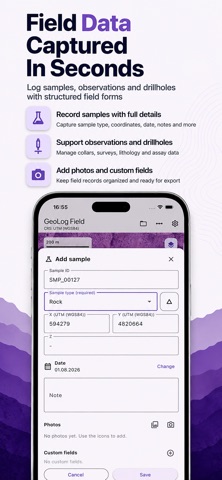
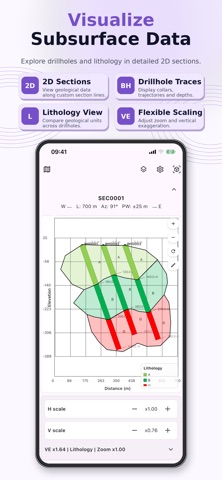
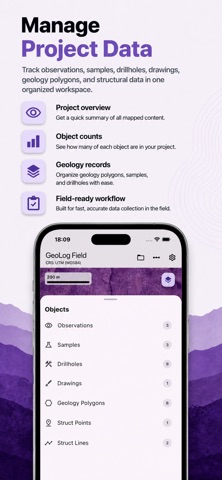
Record observations, samples, drillholes, drawings, geological map features, sections, measurements and field tracks directly on your device. Keep project records structured during fieldwork and transfer them to office workflows using supported export formats.
FIELD DATA COLLECTION
• Create geological observations with notes, coordinates and photographs
• Record Rock, Soil, Stream and Other samples
• Manage drillhole collar, survey, lithology and assay data
• Add project-specific custom fields
MAP-BASED WORKFLOWS
• Place objects using your current GPS position or the map center
• Create points, lines, polygons, rectangles, circles and text
• Record geological units, structural lines, strike and dip data
• Measure distance, bearing, area and perimeter
• Create and review geological sections
COORDINATES
• WGS84 geographic coordinates
• UTM based on WGS84
• UTM based on ED50 for supported zones
• MGRS coordinate display
TRACK RECORDING
Record field routes and review track duration, distance and point count. With the required iOS permission, recording can continue while the device is locked.
IMPORT AND EXPORT
Exchange data using supported formats including GeoLog Field project packages, CSV, XLSX, GeoJSON, KML and GPX.
OFFLINE-FIRST
Project records are stored locally on the device and remain under your control. An internet connection may be required for online map content, but your saved project data remains available locally.
GeoLog Field focuses on the practical tasks geologists need in the field: structured data collection, clear project organization and reliable transfer to the next stage of the workflow.
Legal
Terms of Use (Apple Standard EULA):
https://www.apple.com/legal/internet-services/itunes/dev/stdeula/
Privacy Policy:
https://geolog-field-website.web.app/privacy.html