

Geometry Visualization
Geometry Visualization is made and published by Solar Foundations USA, Inc. AppBrain is an independent app data site and isn't affiliated with Solar Foundations USA, Inc. The app name, icon, screenshots and description belong to Solar Foundations USA, Inc. and are shown as published on the App Store.
AppBrain's verdict
- Rating on App Store
- 5.00
- 1 ratings
- Last updated
- February 28, 2026
It doesn't have enough ratings yet to judge what users think.
Rankings
App Store top chartsApp Store Rankings for Geometry Visualization
Competitors
Similar apps and more from Solar Foundations USA, Inc.Alternatives to Geometry Visualization




Releases
Updates seen on the App Store- Version
- 1.0
- Launched
- February 2026
No changelog data
User feedback
Ratings and reviews on the App StoreComments on Geometry Visualization for iOS
We don't have enough comments to show example comments. Please check back later.
Technology
Found in the app by AppBrain- Price
- Free
- App size
- 2.25 MB
- Content rating
- Everyone
Technologies used by Geometry Visualization
About the app and developer
About Geometry Visualization
Geometry Visualization is an education app developed by Solar Foundations USA, Inc.
User Ratings
Geometry Visualization is rated 5.00 out of 5 stars. The rating is based on one rating ratings.
App Information
Geometry Visualization is freely available from the App Store. The app size is 2.25 MB. The latest version available is 1.0. The last update was on February 28, 2026.
Technical Requirements
The app has a content rating of Everyone. The app has been available on the App Store since February 2026.
Developer information for Solar Foundations USA, Inc.
Address:
Store listing
By Solar Foundations USA, Inc., from the App Store

Description by Solar Foundations USA, Inc. Written by the developer, not by AppBrain. Click to read.
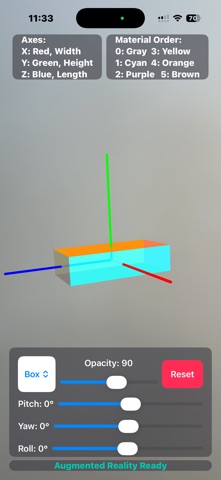
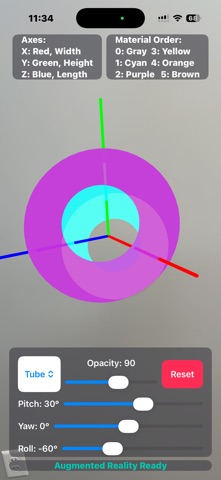
This app is a hands-on visualization tool designed for developers working with SceneKit. It helps you clearly understand how pitch, yaw, and roll interact — and how material order affects rendering on standard 3D geometries. Whether you're learning 3D graphics, debugging orientation issues, or experimenting with material stacks, this app provides a clean, interactive environment for exploration.
Explore 3D Orientation
• Adjust pitch, yaw, and roll independently
• Observe how rotation order affects final orientation
• See real-time updates as values change
• Build intuition for 3D transform behavior
Standard SceneKit Geometries; Visualize common primitives such as:
• Box
• Sphere
• Cylinder
• Cone
• Capsule
• Plane
• Other standard SceneKit shapes
Understand Material Application
• Explore how materials are applied to geometry elements
• See how material order impacts rendering
• Experiment with multi-material configurations
• Better understand SceneKit’s material indexing
Built for Developers
• Ideal for iOS and macOS developers working with SceneKit
• Great companion tool for learning 3D math concepts
• Useful for debugging transform and rendering behavior
• Clean, distraction-free interface focused on learning
If you work with SceneKit, 3D transforms, AR, or graphics programming, this app helps you see what the math is doing.