

GForm Builder® ~ Google Form
GForm Builder® ~ Google Form is made and published by TECHISTIC LTD. AppBrain is an independent app data site and isn't affiliated with TECHISTIC LTD. The app name, icon, screenshots and description belong to TECHISTIC LTD and are shown as published on the App Store.
AppBrain's verdict
- Rating on App Store
- 5.00
- 19 ratings
- Last updated
- September 30, 2025
It doesn't have enough ratings yet to judge what users think.
Rankings
App Store top chartsApp Store Rankings for GForm Builder® ~ Google Form
Competitors
Similar apps and more from TECHISTIC LTDAlternatives to GForm Builder® ~ Google Form



More from TECHISTIC LTD




Releases
Updates seen on the App Store- Version
- 1.1
- Launched
- May 2025
No changelog data
User feedback
Ratings and reviews on the App StoreComments on GForm Builder® ~ Google Form for iOS
We don't have enough comments to show example comments. Please check back later.
Technology
Found in the app by AppBrain- Price
- Free
- App size
- 74.2 MB
- Content rating
- Everyone
Technologies used by GForm Builder® ~ Google Form
About the app and developer
About GForm Builder® ~ Google Form
GForm Builder® ~ Google Form is a business app developed by TECHISTIC LTD.
User Ratings
GForm Builder® ~ Google Form is rated 5.00 out of 5 stars. The rating is based on 19 ratings.
App Information
GForm Builder® ~ Google Form is freely available from the App Store. The app size is 74.24 MB. The latest version available is 1.1. The last update was on September 30, 2025.
Technical Requirements
The app has a content rating of Everyone. The app has been available on the App Store since May 2025.
Developer information for TECHISTIC LTD
Address:
Frequently asked questions about GForm Builder® ~ Google Form
Is GForm Builder® ~ Google Form free?
Yes. GForm Builder® ~ Google Form is free on the App Store.
Is GForm Builder® ~ Google Form still available?
Yes. GForm Builder® ~ Google Form is on the App Store, and the last update we saw was on September 30, 2025.
How large is GForm Builder® ~ Google Form?
GForm Builder® ~ Google Form is 74.24 MB.
Is GForm Builder® ~ Google Form suitable for children?
App Store rates the content of GForm Builder® ~ Google Form as suitable for everyone.
How do people rate GForm Builder® ~ Google Form?
GForm Builder® ~ Google Form scores 5.00 out of 5 stars, from 19 ratings on the App Store.
Who made GForm Builder® ~ Google Form?
GForm Builder® ~ Google Form was developed by TECHISTIC LTD. It is listed in the business category on the App Store.
What are the best alternatives to GForm Builder® ~ Google Form?
People looking at GForm Builder® ~ Google Form also look at these business apps: Form Builder Vendor, Forms for Google Docs & Form, Animant: Present in 3D, Business Card Digital, Expersoft SaaS.
Store listing
By TECHISTIC LTD, from the App Store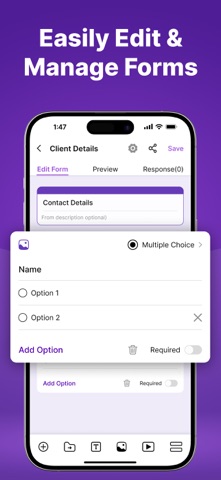


Description by TECHISTIC LTD Written by the developer, not by AppBrain. Click to read.
Designed for modern productivity, GForm Builder brings the flexibility and control of desktop form-building tools to a mobile-friendly, intuitive interface. No more fumbling through websites on a phone browser — now you can create polished, functional forms in minutes, wherever you are.
KEY FEATURES
Note: Some of the features are only available after taking paid subscription plan.
◆ Easy Form Creation
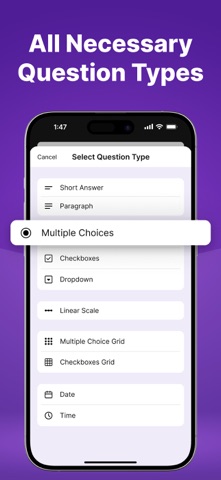
Build dynamic forms in just a few taps. Add fields like multiple choice, checkboxes, dropdowns, short answers, long responses, date pickers, scales, and more — all from a clean, native iOS interface.
◆ Mobile-First Experience
Crafted for iPhone, GForm Builder offers a seamless touch experience with drag-and-drop controls, real-time previews, and instant editing that feels natural and intuitive.
◆ Templates for Every Use
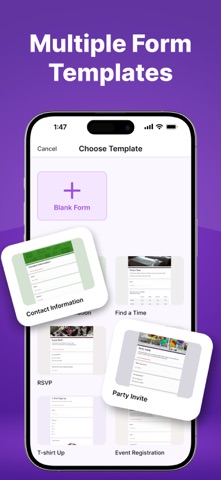
Get started quickly with built-in templates for surveys, quizzes, registration forms, job applications, feedback requests, contact forms, and more. Perfect for both personal and professional needs.
◆ Conditional Logic & Smart Flow
Create smarter forms by setting rules that show or hide questions based on previous responses. Build interactive forms that respond to user input in real time.
◆ Brand Customization & Themes
Add your logo, pick your color palette, and choose from elegant themes to make every form look polished and on-brand.
◆ Live Preview Mode
See your form exactly as respondents will — whether on mobile or desktop — while you edit. Instant visual feedback ensures everything looks just right.
◆ Offline Creation
No internet? No problem. Build forms offline and sync your work once you're back online. Ideal for travel, fieldwork, or spotty connections.
◆ Team Collaboration
Work together with colleagues by sharing edit access or view-only permissions. Plan projects, surveys, and data collection as a team with real-time collaboration tools.
◆ Secure & Private
Your data is safe. GForm Builder uses encrypted syncing and respects your privacy — we never sell or share your information.
BUILT FOR EVERYONE
• Teachers & Educators – Create assignments, quizzes, and feedback forms
• Small Businesses & Freelancers – Collect inquiries, client info, service intake, and feedback
• Event Organizers – Manage RSVPs, guest lists, and volunteer sign-ups
• HR & Admin Professionals – Design employee surveys, onboarding forms, and job applications
• Students & Researchers – Run polls, gather research data, and manage group projects
• Content Creators & Coaches – Offer signup forms, feedback channels, and more
Whether you’re running a business, teaching a class, managing a team, or just staying organized, GForm Builder helps you create custom forms that get the job done.
Start building better forms, faster — Download GForm Builder today and design the perfect form right from your iPhone.
-Subscription automatically renews unless the auto-renew is turned off at least 24 hours before the end of the current period.
-The user can manage subscriptions and turn auto-renewal off by going to the user's Account Settings after purchase.
-Payment will be charged to iTunes Account at confirmation of purchase.
Privacy Policy: https://www.techstic.org/privacy-policy.html
Terms of Use: https://www.techstic.org/terms-of-use.html