GifSnip+ is FREE to download. The APK download size is 3.73 MB. The latest version available is 1.3.2. The last update was on March 30, 2026.
Technical Requirements
The app has a content rating of Everyone. The app has been available on Google Play February 2026.
Description
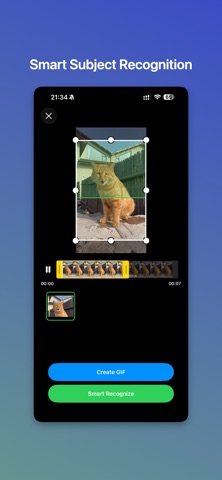
## GifSnip - Features ### Smart Subject Detection Description: AI automatically identifies moving subjects and dynamic areas in your video. How to use: Tap "Smart Detect" in the video editor. The AI analyzes your video and presents multiple focused crop options instantly.
### Precision Timeline Trimming Description: Select the exact start and end points for your GIF with frame-accurate controls. How to use: Drag the dual sliders on the timeline to set your desired time range.
### Flexible Crop Area Description: Define the perfect frame by cropping any portion of your video. How to use: Drag the crop box or adjust the 8 control handles to resize and reposition the selection area.
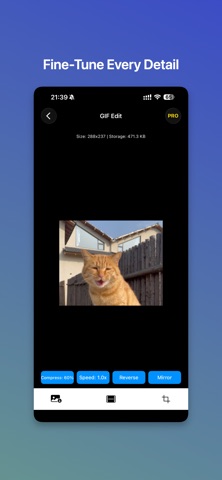
### Playback Speed Control Description: Adjust GIF speed from 0.25x slow motion to 3x fast forward. How to use: Select a preset speed option in the GIF editor.
### Reverse & Mirror Description: Create unique effects with one-tap reverse playback and horizontal flip. How to use: Tap the reverse or mirror button to instantly apply the effect.
### Compression Options Description: Balance quality and file size with adjustable compression levels. How to use: Choose from 100%, 80%, 60%, 40% or set a custom compression ratio.
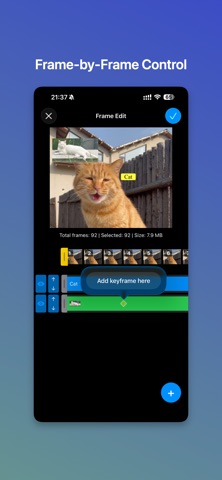
### Frame-by-Frame Editing Description: View and manage individual frames. Hide unwanted frames to refine your GIF. How to use: Browse the frame timeline and tap to select or hide specific frames.
### Keyframe Elements Description: Add text and images at specific timestamps in your GIF. How to use: Select a timestamp on the timeline, then tap to add text or image elements.
### Advanced Text Editor Description: Customize text with fonts, colors, stroke, background, and padding options. How to use: Enter your text, style it with the editing tools, then drag to position anywhere on the canvas.
### Image Overlay Description: Add and position images on your GIF with scale and drag controls. How to use: Select an image, drag to move it, use corner handles to resize while maintaining aspect ratio.
### Save to Photos Description: Export your finished GIF directly to your camera roll. How to use: Tap the save button. Your GIF is instantly saved to Photos (watermark-free with Pro).
Each subscription will automatically renew 3 days before the expiration date for
the same time period. Subscriptions can be cancelled at any time before the renewal.