




AppBrain's verdict
- Rating on App Store
- 4.82
- 17 ratings
- Last updated
- November 17, 2026
- Size
- 29.9 MB
It doesn't have enough ratings yet to judge what users think.
User feedback
Ratings and reviews on the App StoreComments on GitSync.md: Git Client for iOS
We don't have enough comments to show example comments. Please check back later.
Store listing
By Cody Russell Bontecou, from the App StoreDescription by Cody Russell Bontecou Written by the developer, not by AppBrain. Click to read.
NOTES AND CODE, IN YOUR OWN FILES
Use the built-in editor, or open repository files in Obsidian, iA Writer, 1Writer, Taio, or another compatible iOS Files app. Your notes stay ordinary files in a real Git working copy.
GITHUB AND YOUR OWN GIT REMOTE
Sign in to GitHub with OAuth or a Personal Access Token. You can also connect to GitLab, Bitbucket, Gitea, or a self-hosted Git remote over HTTPS or SSH using the credentials that remote requires.
REVIEW BEFORE YOU PUSH
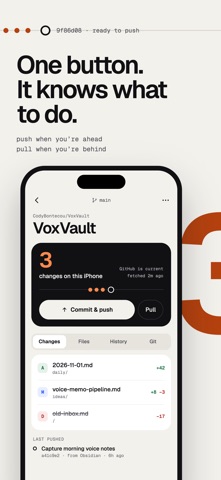
See changed files and text diffs, stage your changes, write a commit message, and push to your remote. Browse commit history, manage branches, stash changes, and use Pull with Rebase. Review and resolve merge conflicts when they occur.
START WITH A REPO OR A LOCAL FOLDER
Clone a repository, open an existing local Git repository, or turn a supported folder on your iPhone or iPad into a Git repository. Publishing a local folder creates a new private GitHub repository as a separate action, so you can review your files before uploading them.
SHORTCUTS FOR YOUR WORKFLOW
Run Pull, Push, or Sync from Apple Shortcuts. Use syncmd:// callback links to trigger repository actions from compatible apps and notes. Optional Background Sync can pull remote changes and, with your consent, automatically commit and push local edits. Enable it in Settings > Background Sync and choose pull and push separately. iOS controls when background work runs; delivery is best effort, not guaranteed or real time. Optional Push Sync connects the GitSync.md GitHub App to request background updates when GitHub changes.
MULTIPLE REPOSITORIES
Keep your notes, documentation, and code projects in separate repositories, each with its own branch, author details, and storage location.
STANDARD GIT, DIRECT CONNECTIONS
GitSync.md uses libgit2 for on-device Git operations. Your repositories have real .git directories, and Git traffic goes directly to your chosen remote. Git credentials are stored in the iOS Keychain.
FREE TO TRY, ONE-TIME UNLOCK
GitSync.md is free to download, and checking a vault is free. Cloning, linking or publishing a vault requires a one-time Full Access in-app purchase. There is no subscription. If you bought GitSync.md before it became free, it is already unlocked.
Terms of Use (EULA): https://gitsyncmd.app/terms
Safety and technology
Found in the app by AppBrain- Price
- Free
- App size
- 29.9 MB
- Content rating
- Everyone
Technologies used by GitSync.md: Git Client
Releases
Updates seen on the App Store- Version
- 3.0.1
- Launched
- February 2026
No changelog data
Alternatives
Similar apps and more from Cody Russell BontecouAlternatives to GitSync.md: Git Client


More from Cody Russell Bontecou


Rankings
App Store top chartsApp Store Rankings for GitSync.md: Git Client
About the app and developer
About GitSync.md: Git Client
GitSync.md: Git Client is an overall app developed by Cody Russell Bontecou.
User Ratings
GitSync.md: Git Client is rated 4.82 out of 5 stars. The rating is based on 17 ratings.
App Information
GitSync.md: Git Client is freely available from the App Store. The app size is 29.87 MB. The latest version available is 3.0.1. The last update was on November 17, 2026.
Technical Requirements
The app has a content rating of Everyone. The app has been available on the App Store since February 2026.
GitSync.md: Git Client is made and published by Cody Russell Bontecou. AppBrain is an independent app data site and isn't affiliated with Cody Russell Bontecou. The app name, icon, screenshots and description belong to Cody Russell Bontecou and are shown as published on the App Store.
Developer information for Cody Russell Bontecou
Address:
Frequently asked questions about GitSync.md: Git Client
Is GitSync.md: Git Client free?
Yes. GitSync.md: Git Client is free on the App Store.
Is GitSync.md: Git Client still available?
Yes. GitSync.md: Git Client is on the App Store, and the last update we saw was on November 17, 2026.
How large is GitSync.md: Git Client?
GitSync.md: Git Client is 29.87 MB.
Is GitSync.md: Git Client suitable for children?
App Store rates the content of GitSync.md: Git Client as suitable for everyone.
How do people rate GitSync.md: Git Client?
GitSync.md: Git Client scores 4.82 out of 5 stars, from 17 ratings on the App Store.
Who made GitSync.md: Git Client?
GitSync.md: Git Client was developed by Cody Russell Bontecou. It is listed in the overall category on the App Store.
What are the best alternatives to GitSync.md: Git Client?
People looking at GitSync.md: Git Client also look at these overall apps: Deviap, DangGIT, IM.codes, Claudette Echo, MOBaiLE.