


AppBrain's verdict
- Rating on App Store
- 3.00
- 4 ratings
- Last updated
- November 16, 2026
- Size
- 106.7 MB
It doesn't have enough ratings yet to judge what users think.
User feedback
Ratings and reviews on the App StoreComments on Vox.md: Quick Capture Notes for iOS
We don't have enough comments to show example comments. Please check back later.
Store listing
By Cody Russell Bontecou, from the App StoreDescription by Cody Russell Bontecou Written by the developer, not by AppBrain. Click to read.
CAPTURE MORE THAN VOICE
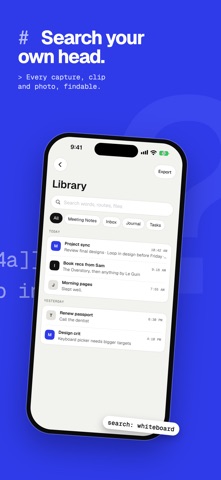
Add typed Markdown, a URL, photos or screenshots, files, a document scanner with on-device OCR, a sketch, or a voice recording. Combine several items in one capture, preview the result, then save it as plain Markdown.
SEND IT WHERE IT BELONGS
Capture Presets remember the destination and formatting for workflows such as your inbox, journal, task list, or meeting notes. Create a note, append or prepend to an existing file, insert beneath a heading, or write to rolling daily, weekly, monthly, quarterly, or yearly notes.
Each preset can keep its own template, metadata, attachment folder, filename rules, placement, and processing preferences. Override a destination or template for one capture without changing the preset.
CAPTURE FROM MORE PLACES
Use Vox.md from the app, Share Sheet, custom keyboard, Home Screen and Lock Screen widgets, Shortcuts, or Apple Watch. Pending and failed deliveries remain available for retry, so a temporary folder permission or sync issue does not lose your work.
PRIVATE VOICE TRANSCRIPTION
Transcribe speech into text on your device with Apple Speech, Whisper, or Parakeet, depending on your settings and device. Audio and transcripts are never sent to Vox.md servers. Use offline dictation and voice typing from the custom keyboard, record on Apple Watch, or export transcripts as TXT, Markdown, JSON, or YAML.
PLAIN FILES, NO LOCK-IN
Vox.md writes standard Markdown to the folders and Obsidian vaults you choose. You do not need an account or a proprietary notes database. Your files remain readable in any Markdown app.
New Capture and transcription require paid access. Choose Individual or Family: weekly, yearly, or lifetime. Eligible subscriptions include a seven-day free trial, then renew automatically at the displayed price until canceled in Apple Account settings. Existing purchases remain valid. Viewing and exporting existing history require no new purchase.
PRIVACY
Capture contents are processed on your device and saved or sent only to destinations you explicitly configure. This version removes custom app usage analytics and advertising attribution. Optional HTTP delivery sends the capture payload to your chosen endpoint; model downloads, quotes, and other connected features are described in the Privacy Policy. Permissions are requested for the capture features you choose. Earlier versions and retained service records are covered separately.
Terms of Use: https://www.apple.com/legal/internet-services/itunes/dev/stdeula/
Privacy: https://vox.isolated.tech/privacy.html
Safety and technology
Found in the app by AppBrain- Price
- Free
- App size
- 106.7 MB
- Content rating
- Everyone
Technologies used by Vox.md: Quick Capture Notes
Releases
Updates seen on the App Store- Version
- 3.0
- Launched
- March 2026
No changelog data
Alternatives
Similar apps and more from Cody Russell BontecouAlternatives to Vox.md: Quick Capture Notes


More from Cody Russell Bontecou


Rankings
App Store top chartsApp Store Rankings for Vox.md: Quick Capture Notes
About the app and developer
About Vox.md: Quick Capture Notes
Vox.md: Quick Capture Notes is a productivity app developed by Cody Russell Bontecou.
What is the rating of Vox.md: Quick Capture Notes?
Vox.md: Quick Capture Notes is rated 3.00 out of 5 stars, based on 4 ratings.
Is Vox.md: Quick Capture Notes free?
Vox.md: Quick Capture Notes is free. The app size is 106.69 MB. The latest version available is 3.0. The last update was on November 16, 2026.
What are the requirements for Vox.md: Quick Capture Notes?
The app has a content rating of Everyone. The app has been available on the App Store since March 2026.
Vox.md: Quick Capture Notes is made and published by Cody Russell Bontecou. AppBrain is an independent app data site and isn't affiliated with Cody Russell Bontecou. The app name, icon, screenshots and description belong to Cody Russell Bontecou and are shown as published on the App Store.
Developer information for Cody Russell Bontecou
Address:
Frequently asked questions about Vox.md: Quick Capture Notes
Is Vox.md: Quick Capture Notes free?
Yes. Vox.md: Quick Capture Notes is free on the App Store.
Is Vox.md: Quick Capture Notes still available?
Yes. Vox.md: Quick Capture Notes is on the App Store, and the last update we saw was on November 16, 2026.
How large is Vox.md: Quick Capture Notes?
Vox.md: Quick Capture Notes is 106.69 MB.
Is Vox.md: Quick Capture Notes suitable for children?
App Store rates the content of Vox.md: Quick Capture Notes as suitable for everyone.
How do people rate Vox.md: Quick Capture Notes?
Vox.md: Quick Capture Notes scores 3.00 out of 5 stars, from 4 ratings on the App Store.
Who made Vox.md: Quick Capture Notes?
Vox.md: Quick Capture Notes was developed by Cody Russell Bontecou. It is listed in the productivity category on the App Store.
What are the best alternatives to Vox.md: Quick Capture Notes?
People looking at Vox.md: Quick Capture Notes also look at these productivity apps: Voicenotes - Noty, Quillo: Voice to Tasks, Whisper Local, Todolog: To-dos to Records, Murmur Keyboard - AI Powered.