

Quillo: Voice to Tasks
Quillo: Voice to Tasks is made and published by Hemanth Kumar Kumaresan. AppBrain is an independent app data site and isn't affiliated with Hemanth Kumar Kumaresan. The app name, icon, screenshots and description belong to Hemanth Kumar Kumaresan and are shown as published on the App Store.
AppBrain's verdict
- Last updated
- October 6, 2026
Rankings
App Store top chartsApp Store Rankings for Quillo: Voice to Tasks
Competitors
Similar apps and more from Hemanth Kumar KumaresanAlternatives to Quillo: Voice to Tasks


More from Hemanth Kumar Kumaresan

Releases
Updates seen on the App Store- Version
- 1.1.5
- Launched
- March 2026
No changelog data
User feedback
Ratings and reviews on the App StoreComments on Quillo: Voice to Tasks for iOS
We don't have enough comments to show example comments. Please check back later.
Technology
Found in the app by AppBrain- Price
- Free
- App size
- 49.7 MB
- Content rating
- Everyone
Technologies used by Quillo: Voice to Tasks
About the app and developer
About Quillo: Voice to Tasks
Quillo: Voice to Tasks is a productivity app developed by Hemanth Kumar Kumaresan.
What is the rating of Quillo: Voice to Tasks?
Quillo: Voice to Tasks has no ratings yet.
Is Quillo: Voice to Tasks free?
Quillo: Voice to Tasks is free. The app size is 49.70 MB. The latest version available is 1.1.5. The last update was on October 6, 2026.
What are the requirements for Quillo: Voice to Tasks?
The app has a content rating of Everyone. The app has been available on the App Store since March 2026.
Developer information for Hemanth Kumar Kumaresan
Address:
Frequently asked questions about Quillo: Voice to Tasks
Is Quillo: Voice to Tasks free?
Yes. Quillo: Voice to Tasks is free on the App Store.
Is Quillo: Voice to Tasks still available?
Yes. Quillo: Voice to Tasks is on the App Store, and the last update we saw was on October 6, 2026.
How large is Quillo: Voice to Tasks?
Quillo: Voice to Tasks is 49.70 MB.
Is Quillo: Voice to Tasks suitable for children?
App Store rates the content of Quillo: Voice to Tasks as suitable for everyone.
Who made Quillo: Voice to Tasks?
Quillo: Voice to Tasks was developed by Hemanth Kumar Kumaresan. It is listed in the productivity category on the App Store.
What are the best alternatives to Quillo: Voice to Tasks?
People looking at Quillo: Voice to Tasks also look at these productivity apps: Todo & Task Manager: Focus one, Orbi: To Do List & Reminders, TellDone, AI Voice Chat for Watch, Voice To Do: TaskTalk.
Store listing
By Hemanth Kumar Kumaresan, from the App Store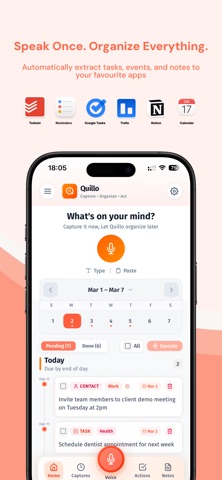



Description by Hemanth Kumar Kumaresan Written by the developer, not by AppBrain. Click to read.
Capture however you think:
- Voice: ramble naturally and let the AI organize
- Text: type freely in your own words
- Paste: drop in meeting notes or messages and extract action items
How it works:
1. Capture your thoughts in seconds
2. Quillo extracts tasks, events, reminders, and lists
3. Review and confirm before sending
AI that understands intent:
- Smart deadline detection when you say a date or time
- Priority recognition for phrases like "urgent" or "when I have time"
- Multi-action extraction from a single recording
- Context hints that help categorize tasks, events, and lists
- Contact hints when you say "email Sarah" or "call Alex"
What Quillo can extract:
- Tasks with due dates and priorities
- Calendar events with times and locations
- Reminders and follow-ups
- Shopping lists and simple lists
Integrations:
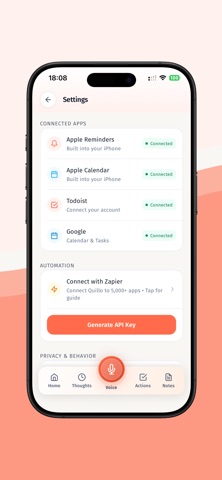
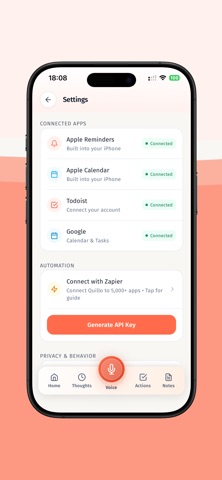
Apple Reminders, Apple Calendar, Apple Notes, Google Calendar, Google Tasks, Todoist, Trello, Notion.
Routing and control:
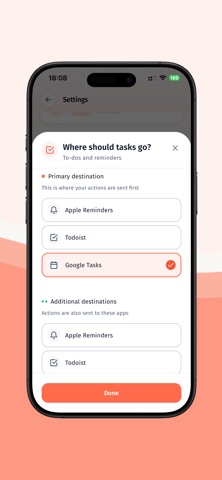
- Review screen lets you edit, delete, or reroute any item
- Send all items at once or pick individually
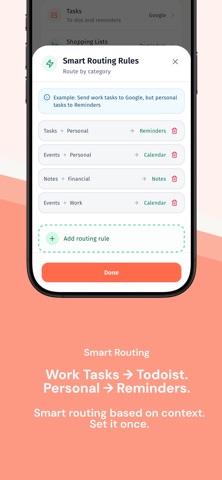
- Smart routing rules in Pro let you map work tasks to one app and personal tasks to another
- Route by keywords, priority, or category
- Multi-destination routing for power users
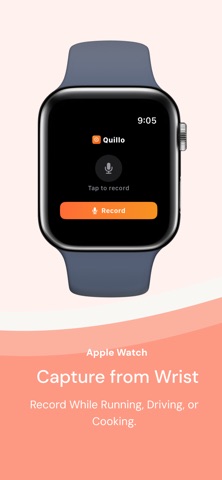
Apple Watch support:
Record from your wrist, sync to iPhone, and process with one tap. Great for walking, driving, or mid-meeting.
Add Quillo to your watch face to see pending actions and start recording instantly.
Widgets and fast capture:
Use widgets or lock screen access to start a capture without opening the app.
Built for people who think faster than they type:
- Busy professionals capturing follow-ups after meetings
- Families coordinating schedules, errands, and shopping
- Freelancers tracking deliverables, deadlines, and invoices
- Neurodivergent users who need frictionless capture
Real examples:
- "Book a flight next month and remind me to renew my passport."
- "Schedule a design review for Friday and add the invoice to my to-do list."
- "Pick up milk, reorder filters, and call the electrician tomorrow."
Why people choose Quillo:
- One recording can become multiple organized actions
- You control where each item goes
- No manual sorting, no app hopping
- Works with the tools you already use
- Capture when you are on the move
- Clear review before anything is executed
Quillo vs. typical voice assistants:
Voice assistants handle one command at a time with specific phrasing. Quillo lets you speak naturally, extract multiple actions from one capture, and review everything before sending.
Setup in minutes:
Quillo works immediately with Apple Reminders and Apple Calendar. Connecting other apps like Todoist or Google Calendar is optional and takes seconds.
Offline capture:
Record offline and Quillo will process when you are back online. AI processing requires an internet connection.
Privacy-first by design:
Audio files and transcripts are encrypted. Audio can be auto-deleted after processing. Data is not sold or shared.
Free and Pro plans:
Start free with 5 captures per month and no credit card. Free includes voice, text, and paste capture, all integrations, and voice notes up to 30 seconds. Pro unlocks unlimited captures, longer recordings up to 10 minutes, auto processing, priority processing, advanced routing rules, smart learning patterns, unlimited destinations, recordings available for 30 days, and priority support.
Use Quillo for meeting followups errands shopping lists travel planning and quick reminders. If you can say it, Quillo can route it.
Get started in seconds and keep your existing system intact-Quillo simply makes it faster.
---
LEGAL & PRIVACY
Terms of Use (EULA): https://tryquillo.com/terms
Privacy Policy: https://tryquillo.com/privacy
Support: support@tryquillo.com