

GPlayer: Local Media Player
GPlayer: Local Media Player is made and published by 金 郭. AppBrain is an independent app data site and isn't affiliated with 金 郭. The app name, icon, screenshots and description belong to 金 郭 and are shown as published on the App Store.
AppBrain's verdict
Established- Rating on App Store
- 5.00
- 14 ratings
- Last updated
- August 21, 2026
It doesn't have enough ratings yet to judge what users think.
Rankings
App Store top chartsApp Store Rankings for GPlayer: Local Media Player
Competitors
Similar apps and more from 金 郭Alternatives to GPlayer: Local Media Player






More from 金 郭


Releases
Updates seen on the App Store- Version
- 5.1.0
- Launched
- August 2013
No changelog data
User feedback
Ratings and reviews on the App StoreComments on GPlayer: Local Media Player for iOS
We don't have enough comments to show example comments. Please check back later.
Technology
Found in the app by AppBrain- Price
- Free
- App size
- 65.8 MB
- Content rating
- Everyone
Technologies used by GPlayer: Local Media Player
About the app and developer
About GPlayer: Local Media Player
GPlayer: Local Media Player is an utilities app developed by 金 郭.
What is the rating of GPlayer: Local Media Player?
GPlayer: Local Media Player is rated 5.00 out of 5 stars, based on 14 ratings.
Is GPlayer: Local Media Player free?
GPlayer: Local Media Player is free. The app size is 65.77 MB. The latest version available is 5.1.0. The last update was on August 21, 2026.
What are the requirements for GPlayer: Local Media Player?
The app has a content rating of Everyone. The app has been available on the App Store since August 2013.
Developer information for 金 郭
Address:
Frequently asked questions about GPlayer: Local Media Player
Is GPlayer: Local Media Player free?
Yes. GPlayer: Local Media Player is free on the App Store.
Is GPlayer: Local Media Player still available?
Yes. GPlayer: Local Media Player is on the App Store, and the last update we saw was on August 21, 2026.
How large is GPlayer: Local Media Player?
GPlayer: Local Media Player is 65.77 MB.
Is GPlayer: Local Media Player suitable for children?
App Store rates the content of GPlayer: Local Media Player as suitable for everyone.
How do people rate GPlayer: Local Media Player?
GPlayer: Local Media Player scores 5.00 out of 5 stars, from 14 ratings on the App Store.
Who made GPlayer: Local Media Player?
GPlayer: Local Media Player was developed by 金 郭. It is listed in the utilities category on the App Store.
What are the best alternatives to GPlayer: Local Media Player?
People looking at GPlayer: Local Media Player also look at these utilities apps: OPlayer Lite - media player, Ulearn – Full-format Player, HD Video Player - media player, APlayer - Alook Player, Player Master - Video Player.
Store listing
By 金 郭, from the App Store



Description by 金 郭 Written by the developer, not by AppBrain. Click to read.
【PLAY VIDEO AND AUDIO FORMATS】
Play popular media formats including MP4, MOV, MKV, RMVB, AVI, FLV, 3GP, MP3, WAV, WMA and OGG. Whether you are watching a movie, studying with a course, listening to music or reviewing a recording, GPlayer keeps playback simple.
【PRACTICAL VIDEO CONTROLS】
Adjust playback speed, manage subtitles, switch between audio tracks and resume from where you left off. Watch courses, foreign-language videos, movies and personal footage at your own pace.
【FOCUSED VIEWING】
A clean playback interface keeps distractions out of the way, so you can focus on your local video.
【EASY FILE IMPORT】
Import media from the Files app, the Share sheet, Open In or your computer. Imported files are automatically organized into video and audio lists for faster access.
【WI-FI TRANSFER】
No cable needed. While your devices are on the same Wi-Fi network, open a browser on your computer to upload media to your iPhone or iPad. You can also browse and download files already stored in the app.
【AUDIO PLAYLISTS】
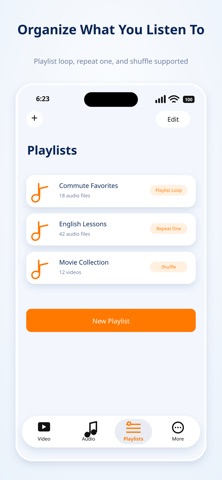
Create and manage playlists for courses, podcasts, recordings and music albums. Choose repeat all, repeat one or shuffle to match the way you listen.
【BACKGROUND AND LOCK SCREEN PLAYBACK】
Keep audio playing in the background and control it from the Lock Screen or Control Center, without keeping the app open on screen.
【PRIVACY PROTECTION】
Enable a passcode when opening the app to add another layer of access protection for your personal media.
【POWER-EFFICIENT PLAYBACK】
Hardware decoding is used by default to balance smooth playback and battery use during longer viewing or listening sessions.
GPlayer helps you import, organize and enjoy local media with less effort.
Privacy Policy:
https://f.n-years.com/docs/gplayer/privacy_statement
Terms of Use:
https://www.apple.com/legal/internet-services/itunes/dev/stdeula/