

GPS Map Camera 360: Geotag
GPS Map Camera 360: Geotag is made and published by GROW APP SOLUTIONS LLP. AppBrain is an independent app data site and isn't affiliated with GROW APP SOLUTIONS LLP. The app name, icon, screenshots and description belong to GROW APP SOLUTIONS LLP and are shown as published on the App Store.
AppBrain's verdict
- Rating on App Store
- 5.00
- 3 ratings
- Last updated
- August 24, 2026
- Size
- 229.0 MB
It doesn't have enough ratings yet to judge what users think.
User feedback
Ratings and reviews on the App StoreComments on GPS Map Camera 360: Geotag for iOS
We don't have enough comments to show example comments. Please check back later.
Store listing
By GROW APP SOLUTIONS LLP, from the App Store





Description by GROW APP SOLUTIONS LLP Written by the developer, not by AppBrain. Click to read.
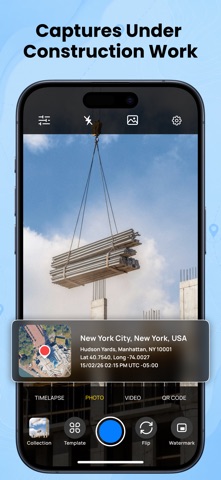
The camera interface is clean and easy to use, with optional overlays that can be enabled or disabled based on user preference. All features function only while the app is actively in use, giving users full control over their experience.
Camera & Capture Experience
GPS Map – Camera & Timestamp provides a straightforward photo and video capture screen. A camera tools panel offers access to features such as grid, timer, ratio, mirror, and recording options. These tools help users frame and capture images comfortably without unnecessary complexity.
Location, Date & Time Information
The app allows users to add visual location information, date, and time details to photos. This information appears as an optional overlay or template and is applied only when the user chooses to enable it. Users can preview how this information looks before saving the image.
Map templates display location-related information in a visual format. Templates are optional and can be selected, changed, or removed according to user preference.
Templates & Preview
GPS Map – Camera & Timestamp includes photo and map templates that can be applied to images. A template selection screen allows users to browse available layouts and preview them before applying. This ensures users always know how their photo will appear.
Template previews do not automatically modify content and require user confirmation before being applied.
Gallery & Photo Viewing
Photos captured within the app can be viewed using an in-app gallery screen. This allows users to review images and see how visual information is displayed.
Privacy & User Control
User privacy is a priority. GPS Map – Camera & Timestamp requests access to the camera, photo library, and location only to support core app functionality. All permissions are requested clearly and are used only with user consent.
The app does not use background location access. Location information is accessed only when the app is open and when the user chooses to apply it to photos.
Designed for Everyday Use.
GPS Map – Camera & Timestamp is suitable for capturing travel moments, personal memories, and everyday photos where visual location or time information is helpful. The app focuses on simplicity, transparency, and user control.
Privacy - https://appspecials.blogspot.com/2026/01/gps-map-privacy-policy.html
Term of use - https://appspecials.blogspot.com/2026/01/gps-map-terms-conditions.html
Safety and technology
Found in the app by AppBrain- Price
- Free
- App size
- 229.0 MB
- Content rating
- Everyone
Technologies used by GPS Map Camera 360: Geotag
Releases
Updates seen on the App Store- Version
- 2.0.3
- Launched
- February 2026
No changelog data
Alternatives
Similar apps and more from GROW APP SOLUTIONS LLPMore from GROW APP SOLUTIONS LLP


Rankings
App Store top chartsApp Store Rankings for GPS Map Camera 360: Geotag
About the app and developer
About GPS Map Camera 360: Geotag
GPS Map Camera 360: Geotag is a photo & video app developed by GROW APP SOLUTIONS LLP.
User Ratings
GPS Map Camera 360: Geotag is rated 5.00 out of 5 stars. The rating is based on 3 ratings.
App Information
GPS Map Camera 360: Geotag is freely available from the App Store. The app size is 228.97 MB. The latest version available is 2.0.3. The last update was on August 24, 2026.
Technical Requirements
The app has a content rating of Everyone. The app has been available on the App Store since February 2026.
Developer information for GROW APP SOLUTIONS LLP
Address: