


AppBrain's verdict
New- Rating on App Store
- 5.00
- 4 ratings
- Last updated
- September 23, 2026
- Size
- 54.3 MB
GPS Maps: Route Planner came out 72 days ago. It doesn't have enough ratings yet to judge what users think. Its best ranking is #25 in Top Free, Navigation in India.
User feedback
Ratings and reviews on the App StoreComments on GPS Maps: Route Planner for iOS
We don't have enough comments to show example comments. Please check back later.
Store listing
By Nguyen Thi Thu Huong, from the App StoreDescription by Nguyen Thi Thu Huong Written by the developer, not by AppBrain. Click to read.
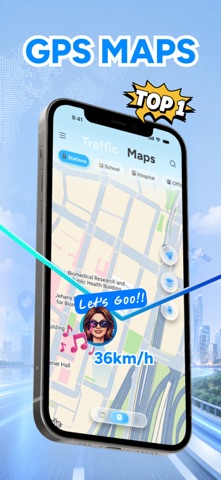
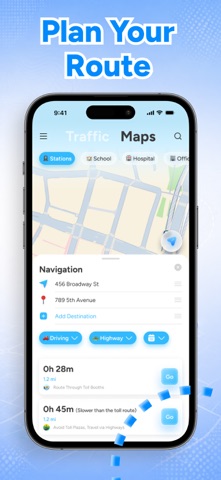
GPS Maps turns a list of places into one efficient trip. Drop in your stops, let the planner reorder them, and follow spoken turn-by-turn directions from one to the next. Each stop checks itself off as you arrive, so you never touch the phone while you're driving.
PLAN A TRIP WITH MULTIPLE STOPS
• Add stops from search, straight off the map, or from your saved places
• Tap Optimize and the app reorders them into the shortest trip
• Drag any stop to override the order yourself
• Distance and time for every leg and for the whole trip
• Stops check off automatically when you arrive
• Finished trips are kept in your history
SEE THE STREET BEFORE YOU GO
• Real ground-level photos taken along your route
• Full 360° panoramas — drag to look around as if you were standing there
• Preview a whole route photo by photo before you commit to it
• Press and hold anywhere on the map to look around that spot
• Coverage is community-contributed, so it is richest in cities and thinner on rural roads
TURN-BY-TURN DIRECTIONS
• Spoken guidance before every turn, twice: early, then right at the turn
• Automatic rerouting when you leave the route
• Car, motorbike and walking modes
• Live trip progress on the Lock Screen and in the Dynamic Island
• Distances in kilometers or miles
FIND PLACES WORTH THE DETOUR
• Nearby landmarks with photos and background, drawn from open encyclopedia data
• One-tap categories: restaurants, cafés, gas, parking, hotels, pharmacies, ATMs, hospitals and more
• Search by voice — in any of the 17 languages the app speaks
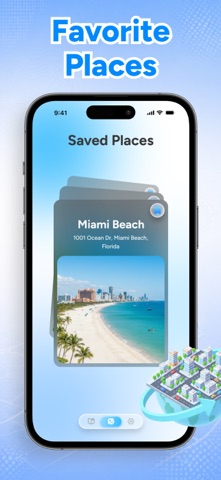
• Save a place now, add it to a trip later
THE MAP ITSELF
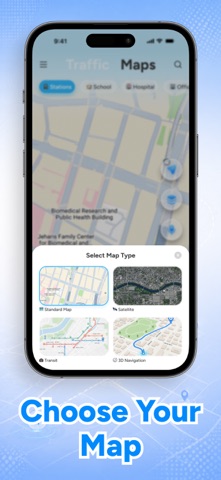
• Standard, satellite, hybrid and 3D views
• Live traffic layer
• 3D buildings
• Map rotates with your heading
SPEAKS YOUR LANGUAGE
English, Chinese (Simplified and Traditional), Hindi, Spanish, Portuguese (Brazil and Portugal), French, Arabic, Bengali, Russian, German, Japanese, Turkish, Korean, Indonesian and Vietnamese — interface, spoken directions and voice search.
GPS MAP PREMIUM
The free version covers 3 stops per trip and 3 street photo sessions a day. Premium lifts both limits.
• Unlimited stops on every trip
• Unlimited 360° street photo views
• Every future Premium feature, included
Plans and prices are shown in the app before you buy.
Terms of Service: https://nguyenthithuhuongg.netlify.app/terms
Privacy Policy: https://nguyenthithuhuongg.netlify.app/policy
Read more about Terms of Use: https://www.apple.com/legal/internet-services/itunes/dev/stdeula/
Add your first stop and see where the day takes you.
Safety and technology
Found in the app by AppBrain- Price
- Free
- App size
- 54.3 MB
- Content rating
- Everyone
Technologies used by GPS Maps: Route Planner
Releases
Updates seen on the App Store- Version
- 1.0.2
- Launched
- September 2026
No changelog data
Alternatives
Similar apps and more from Nguyen Thi Thu HuongAlternatives to GPS Maps: Route Planner


More from Nguyen Thi Thu Huong

Rankings
App Store top charts- Highest rank
- #25
- Chart
- Top Free
- Navigation
- Country
- India
App Store Rankings for GPS Maps: Route Planner
Top rankings
| Rank | Country | Category | List |
|---|---|---|---|
| 58 | United States | Navigation | Top Free |
| 25 | India | Navigation | Top Free |
| 43 | Portugal | Navigation | Top Free |
| 58 | Iran | Navigation | Top Free |
| 72 | Saudi Arabia | Navigation | Top Free |
| 93 | Brazil | Navigation | Top Free |
| 97 | Mexico | Navigation | Top Free |
Ranking history in United States
About the app and developer
About GPS Maps: Route Planner
GPS Maps: Route Planner is a navigation app developed by Nguyen Thi Thu Huong.
User Ratings
GPS Maps: Route Planner is rated 5.00 out of 5 stars. The rating is based on 4 ratings.
App Information
GPS Maps: Route Planner is freely available from the App Store. The app size is 54.33 MB. The latest version available is 1.0.2. The last update was on September 23, 2026.
Technical Requirements
The app has a content rating of Everyone. The app has been available on the App Store since September 2026.
GPS Maps: Route Planner is made and published by Nguyen Thi Thu Huong. AppBrain is an independent app data site and isn't affiliated with Nguyen Thi Thu Huong. The app name, icon, screenshots and description belong to Nguyen Thi Thu Huong and are shown as published on the App Store.
Developer information for Nguyen Thi Thu Huong
Address:
Frequently asked questions about GPS Maps: Route Planner
Is GPS Maps: Route Planner free?
Yes. GPS Maps: Route Planner is free on the App Store.
Is GPS Maps: Route Planner still available?
Yes. GPS Maps: Route Planner is on the App Store, and the last update we saw was on September 23, 2026.
How large is GPS Maps: Route Planner?
GPS Maps: Route Planner is 54.33 MB.
Is GPS Maps: Route Planner suitable for children?
App Store rates the content of GPS Maps: Route Planner as suitable for everyone.
How do people rate GPS Maps: Route Planner?
GPS Maps: Route Planner scores 5.00 out of 5 stars, from 4 ratings on the App Store.
Who made GPS Maps: Route Planner?
GPS Maps: Route Planner was developed by Nguyen Thi Thu Huong. It is listed in the navigation category on the App Store.
What are the best alternatives to GPS Maps: Route Planner?
People looking at GPS Maps: Route Planner also look at these navigation apps: Live Earth Map: Satellite, Floki: AI Travel Planner, MakeRoutes: Route Planner, Globe 3D: Maps, Street & GPS, Newbl Spots.