

GPS Tunes is made and published by Vijayvir Singh. AppBrain is an independent app data site and isn't affiliated with Vijayvir Singh. The app name, icon, screenshots and description belong to Vijayvir Singh and are shown as published on the App Store.
AppBrain's verdict
- Last updated
- September 8, 2026
Rankings
App Store top chartsApp Store Rankings for GPS Tunes
Competitors
Similar apps and more from Vijayvir SinghAlternatives to GPS Tunes


More from Vijayvir Singh


Releases
Updates seen on the App Store- Version
- 1.0.7
- Launched
- July 2026
No changelog data
User feedback
Ratings and reviews on the App StoreComments on GPS Tunes for iOS
We don't have enough comments to show example comments. Please check back later.
Technology
Found in the app by AppBrain- Price
- $2.99
- App size
- 8.01 MB
- Content rating
- Everyone
Technologies used by GPS Tunes
About the app and developer
About GPS Tunes
GPS Tunes is a music app developed by Vijayvir Singh.
What is the rating of GPS Tunes?
GPS Tunes has no ratings yet.
Is GPS Tunes free?
GPS Tunes costs $2.99. The app size is 8.01 MB. The latest version available is 1.0.7. The last update was on September 8, 2026.
What are the requirements for GPS Tunes?
The app has a content rating of Everyone. The app has been available on the App Store since July 2026.
Developer information for Vijayvir Singh
Address:
Frequently asked questions about GPS Tunes
Is GPS Tunes free?
No. GPS Tunes costs $2.99 on the App Store.
Is GPS Tunes still available?
Yes. GPS Tunes is on the App Store, and the last update we saw was on September 8, 2026.
How large is GPS Tunes?
GPS Tunes is 8.01 MB.
Is GPS Tunes suitable for children?
App Store rates the content of GPS Tunes as suitable for everyone.
Who made GPS Tunes?
GPS Tunes was developed by Vijayvir Singh. It is listed in the music category on the App Store.
What are the best alternatives to GPS Tunes?
People looking at GPS Tunes also look at these music apps: PlaylistDig, ClassicalPlayer, Vinyl ID, Mustory - Play Favorite Music, Casette: Offline Audio Player.
Store listing
By Vijayvir Singh, from the App Store

Description by Vijayvir Singh Written by the developer, not by AppBrain. Click to read.
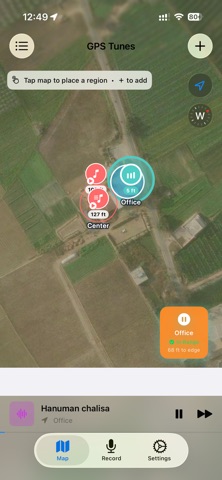
Draw a circle around any place — your home, gym, office, favourite café, commute route, or anywhere that deserves its own soundtrack — and assign Apple Music playlists, songs, or voice recordings to it. Step inside and your music starts playing automatically. Walk out and it pauses. It's that simple.
HOW IT WORKS
1. Open the Map tab and tap anywhere to place a region, or tap + to add one at your current location.
2. Set the size of the circle — from a single room to an entire neighbourhood.
3. Attach any Apple Music playlist, a set of songs, or a voice recording.
4. Walk in. Music plays. Walk out. Music pauses.
KEY FEATURES
LOCATION-TRIGGERED PLAYBACK
Music starts the moment you cross a region boundary — even when your screen is off or the app is closed. Background location keeps it working all day.
APPLE MUSIC INTEGRATION
Attach any playlist or song from your Apple Music library or the full catalogue. GPS Tunes queues and plays everything automatically.
SMART RESUME
Briefly stepped out and came back? GPS Tunes remembers exactly where you were in the queue and picks up right where it left off — no restart, no skipping.
MULTIPLE REGIONS, ONE MAP
Create as many regions as you like. Overlapping regions? No problem — GPS Tunes always plays the region whose centre you're closest to.
VOICE RECORDINGS
Record voice memos directly in the app and attach them to any region. Perfect for reminders, guided tours, or personal messages tied to a place.
REGION ENTRY NOTIFICATIONS
Get a heads-up banner when you enter a music region so you can tap Play Now even if the app is in the background.
BACKGROUND AND KILLED-STATE SUPPORT
GPS Tunes uses iOS CoreLocation region monitoring so it can wake itself up and start playing even if you force-quit the app.
ORDERED MEDIA BLOCKS
Mix playlists, individual songs, and voice recordings in any order within a single region. GPS Tunes plays them sequentially and loops back automatically.
PERFECT FOR
• Morning routines — upbeat playlist triggers the moment you step into the kitchen
• Gym sessions — workout mix starts when you walk through the door
• Commutes — music switches as you leave home and again when you arrive at work
• Home office — focus music plays only at your desk
• Road trips — region-specific soundtracks for different cities or highways
• Guided walks and tours — voice narration plays as you move between landmarks
PRIVACY
Your location is used only on-device to detect region boundaries. GPS Tunes never uploads, shares, or sells your location data.
Requires Apple Music subscription or library access for music playback. Voice recordings are stored locally on your device.
https://www.apple.com/legal/internet-services/itunes/dev/stdeula/
https://www.apple.com/legal/privacy/en-ww/