

Gravity – Minimal Notes
Gravity – Minimal Notes is made and published by Tristan Manchester. AppBrain is an independent app data site and isn't affiliated with Tristan Manchester. The app name, icon, screenshots and description belong to Tristan Manchester and are shown as published on the App Store.
AppBrain's verdict
- Rating on App Store
- 5.00
- 9 ratings
- Last updated
- October 8, 2026
It doesn't have enough ratings yet to judge what users think.
Rankings
App Store top chartsApp Store Rankings for Gravity – Minimal Notes
Competitors
Similar apps and more from Tristan ManchesterMore from Tristan Manchester


Also available on Google Play

Releases
Updates seen on the App Store- Version
- 2.0.6
- Launched
- December 2025
No changelog data
User feedback
Ratings and reviews on the App StoreComments on Gravity – Minimal Notes for iOS
We don't have enough comments to show example comments. Please check back later.
Technology
Found in the app by AppBrain- Price
- $9.99
- App size
- 36.2 MB
- Content rating
- Everyone
Technologies used by Gravity – Minimal Notes
About the app and developer
About Gravity – Minimal Notes
Gravity – Minimal Notes is a productivity app developed by Tristan Manchester.
User Ratings
Gravity – Minimal Notes is rated 5.00 out of 5 stars. The rating is based on 9 ratings.
App Information
Gravity – Minimal Notes costs $9.99. The app size is 36.19 MB. The latest version available is 2.0.6. The last update was on October 8, 2026.
Technical Requirements
The app has a content rating of Everyone. The app has been available on the App Store since December 2025.
Developer information for Tristan Manchester
Address:
Frequently asked questions about Gravity – Minimal Notes
Is Gravity – Minimal Notes free?
No. Gravity – Minimal Notes costs $9.99 on the App Store.
Is Gravity – Minimal Notes still available?
Yes. Gravity – Minimal Notes is on the App Store, and the last update we saw was on October 8, 2026.
How large is Gravity – Minimal Notes?
Gravity – Minimal Notes is 36.19 MB.
Is Gravity – Minimal Notes suitable for children?
App Store rates the content of Gravity – Minimal Notes as suitable for everyone.
How do people rate Gravity – Minimal Notes?
Gravity – Minimal Notes scores 5.00 out of 5 stars, from 9 ratings on the App Store.
Who made Gravity – Minimal Notes?
Gravity – Minimal Notes was developed by Tristan Manchester. It is listed in the productivity category on the App Store.
Store listing
By Tristan Manchester, from the App Store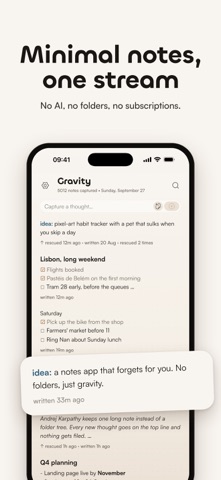




Description by Tristan Manchester Written by the developer, not by AppBrain. Click to read.
The idea comes from Andrej Karpathy's append-and-review note: write everything in one place, read back through it now and then, and move up whatever you still care about. Gravity has no folders, so there's nothing to file.
Writing
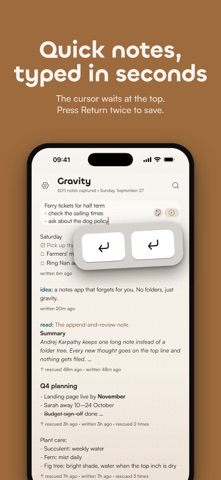
The cursor is waiting at the top when you open the app. Type your note and press Return twice, or tap the add button. A half-written draft stays where you left it.
Rescuing and tidying
Swipe right on a note to rescue it. Swipe left to archive, delete, share or copy. Archived notes have a page of their own, and deleted notes stay in Deleted Notes until you restore them or clear them out.
Markdown and checklists
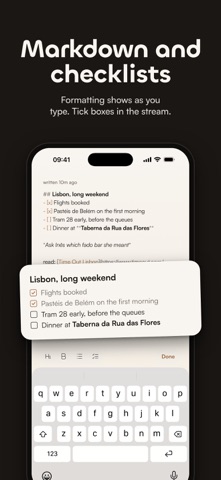
Headings, bold, italics, lists, links and quotes show formatted in the stream. Start a line with "- [ ]" to make a checklist, then tick items off without opening the note. In the editor the formatting appears as you type, and a small bar above the keyboard adds headings, bold, lists and checklists. Everything is saved as plain Markdown text.
Tags
Start a note with todo:, idea:, read: or any word followed by a colon, and it gets a colour of its own. Type todo: into search to see only those notes. There's no tag manager to look after.
Search
Search covers every note on your phone, archived ones too, and works offline. It matches parts of words and ignores accents.
Getting notes in
The Home Screen widget starts a new note or pastes in whatever you last copied. You can also share text or a link from another app, and it becomes a new note at the top of the stream.
Privacy
Your notes are stored on your iPhone. Gravity has no accounts and no analytics, and it doesn't collect any data. If you want your notes on your other Apple devices, turn on iCloud sync; it also works with Gravity for Mac, which is sold separately. You can export everything as JSON or Markdown at any time.
Looks
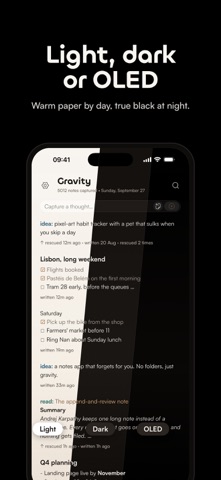
Choose light, dark or OLED black, or follow the system, and pick from three text sizes. There's a stats page too, worked out on your phone, of course.
Price
You pay once. There's no subscription, no in-app purchases and no ads.
Privacy policy: https://www.gravitynotes.app/privacy-policy